
Trending Lyricist I
May 18, 2021
Answered

Sonos Surrounds not Connecting even after multiple restarts of the Beam, Surrounds and the Router

This is honestly occurring to me so often that I’m kind of put off by the sonos “all things wireless” system.

I have two Sonos Surrounds and 1 Sonos Beam, all wireless.

Every so often the system loses the surrounds and they either show in the app as +?+? as surrounds and no sound playing or are showing as if everything is good but no sound playing.

Today they just refuse to connect no matter how many times I reset the system.


Things I tried:

  • Rebooted the Beam and both surrounds
  • Reboot the router
  • Turned off the router, turned off all sonos, turned on the router, waited 5 minutes, turned on the sonos products.
  • Removed the surrounds from the app, factory reset the surrounds, reconnected them to the network.
  • I moved the 2.4Ghz Channel from 6 to 11.

Now the surrounds don’t even show up in the app. Also during the setup, it was taking a long time and it was saying at the end that they are connected but they might not show up in the app and I need to restart the surrounds. I DID, MANY TIMES.

I submitted a diagnostics: 584945453.

Please Sonos, fix your products.

I see tens of threads with this issue. No, there’s no WIFI interference at my house. These surrounds are literally 3 feet away from the router and I don’t have that many devices connected to my router. No neighbors around either.


Here are the surrounds in my router’s device list.
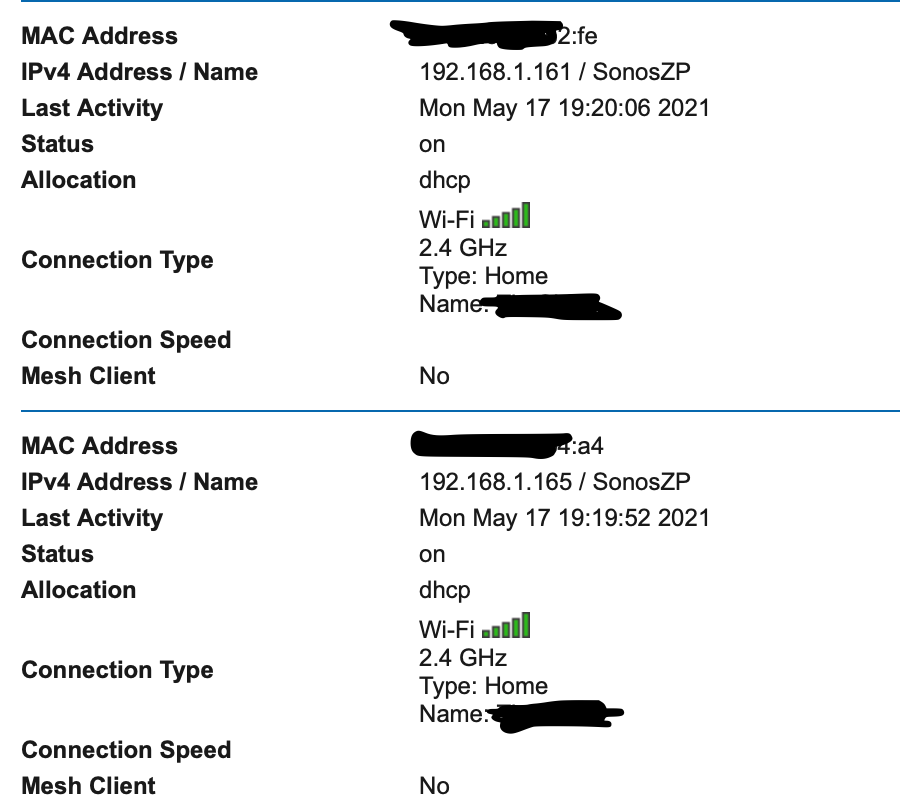
 

This topic has been closed for further comments. You can use the search bar to find a similar topic, or create a new one by clicking Create Topic at the top of the page.
Airgetlam
AirgetlamAnswer
May 18, 2021

It looks like you rebooted your router, then rebooted your speakers afterward. The Sonos devices need to be unplugged while you reboot the router, otherwise you’re not getting all the potential benefits. 

But I’m not convinced that’s the issue you’re experiencing, so doing that step, while not onerous, may not help. However, it wouldn’t hurt, either. 

What kind of wifi system do you use? What router is it? Is the Beam wired directly to the router, or do you have it hanging off your wifi? Have you read through the the wifi interference FAQ?

The surrounds are actually should be connected to the Beam itself, using a dedicated 5Ghz signal. Which means the wifi/radio in the controller has to be “on” for all three devices. The surrounds don’t actually connect to your 2.4Ghz signal, I suspect your router is seeing them as attached to the Beam, which is connecting on a 2.4Ghz signal….but perhaps looking at that diagnostic will help Sonos identify what may be going on. 

Bruce

24 replies

Lyricist III
May 18, 2021
  • When the Beam tries to make this connection, it asks your router for multiple IP addresses - 1 for itself and 1 for each of the surrounds

I noticed yesterday that one of my two “One”s, configured as surround to my own Beam, is proxy-ARP’ing for my other One and the Beam. That is, it answers ARP requests for the other One and the Beam’s IP addresses, with its own MAC and all traffic to the second One and the Beam flows through it.

But they each have their fixed IP addresses, issued to them by my DHCP server, so at some point there was a DHCP request made with their real MAC addresses.

Does the device that takes control (the One in my case) do proxy-DHCP for the others? Ah yes, I realise that’s what that log entry you quote is suggesting, albeit subtly…

James L.
Retired Community Staff
May 18, 2021
  • When the Beam tries to make this connection, it asks your router for multiple IP addresses - 1 for itself and 1 for each of the surrounds

I noticed yesterday that one of my two “One”s, configured as surround to my own Beam, is proxy-ARP’ing for my other One and the Beam. That is, it answers ARP requests for the other One and the Beam’s IP addresses, with its own MAC and all traffic to the second One and the Beam flows through it.

But they each have their fixed IP addresses, issued to them by my DHCP server, so at some point there was a DHCP request made with their real MAC addresses.

Does the device that takes control (the One in my case) do proxy-DHCP for the others? Ah yes, I realise that’s what that log entry you quote is suggesting, albeit subtly…

Yeah, that’s right. Though it’s the home theatre master (Beam in your example) that would perform the proxy-ARP, and not one of the surrounds, since that would be the group coordinator in that setup.

Mark good posts by pressing the like button, and select the best answer on questions you've asked to help others find solutions.
Trending Lyricist I
May 19, 2021

Thanks everyone.

I simply moved the 2.4GHz channel to 1 (it was initially on 6 then 11, then I changed it to 1) which magically fixed the issue. No wires required.

Not sure if this is indeed a wireless interference issue or if I just got lucky and the issue will surface again in the future (as it always does eventually)

It could be my AT&T supplied router that’s misbehaving. Or perhaps I lose power at night and the surrounds don’t reconnect.

  • The Bookshelf speakers are initially added via the app as separate devices during the setup process. They connect individually to my network.
  • After they are added, they show up in the app as separate rooms.(Living Room 1, Living Room 2, etc).
  • The app then gives me the option to add them as surrounds which bonds them into 1 room.
  • They still show up in my router’s active device list as 3 separate devices on the 2.4GHz and each of them have their own IP address assigned. (same IP as previously).
  • I see them in the app as part of the Beam’s room as +LS+RS.
    Often, when this stops working, I see them as +?+? and they don’t play. See below.


For now, the issue is solved. This is how the app shows them:


ratty
May 19, 2021

When the surrounds attempt to renew their IP leases things could well fail again now they’re bonded. The router evidently doesn’t like the proxied DHCP request. Some routers are deficient in this regard.

Trending Lyricist I
June 17, 2021

Issue resurfaced again after a 1 minute electricity outage.

My router and all network devices are protected by an UPS so only the Sonos went offline.


Of course I’ve been trying to get this to reconnect for the past hour. It’s not only that it doesn’t reconnect on it’s own but even after plugging and replugging and doing everything the app is asking you to do it still won’t work.

It’s like I have to attempt 15 times before it actually magically connects back again. 


Such a frustrating product. Will not recommend to anyone.

Trending Lyricist I
June 17, 2021

Restarted my router 5 times by the way which is already unacceptable. This ain’t 1999. A modern product should be able to connect to the router without requiring it to be restarted and replugged a hundred times.

I even connected the product with an ethernet cable and still cannot get it to work again. It’s like the Beam will connect but the the 2 book shelves speakers won’t. 

Or the bookshelf will connect but say that it needs a restart and then never come back again.

And then the dreaded +LS??+RS??? appears in the app.

Hideous user experience. 

Trending Lyricist I
June 17, 2021

I’m going through the setup of the bookshelf speakers with ethernet plugged in , then it stays at “Adding sonos to your system….”  for 3 minutes and after that it says “your sonos has been added, but may not appear in the system tab. if so, unplug the power cord and plug it back in to finish setup from the system tab”. 

Of course nothing appears after I unplug them and replug them.

Trending Lyricist I
June 17, 2021

After turning on each device one at a time. I was able to add the two bookshelf speakers but guess what, now the beam disappeared.

After adding the beam and a few more restarts and unplugs, now I’m back to square one and the bookshelf speakers that I added as surrounds show up as Living Room (+?+?).


Done for the night. 3 hours of troubleshooting now and counting….

ratty
June 17, 2021

Such a frustrating product. Will not recommend to anyone.

You must be referring to your router surely. As has already been pointed out, that isn't responding as it should. 

Trending Lyricist I
June 19, 2021

Such a frustrating product. Will not recommend to anyone.

You must be referring to your router surely. As has already been pointed out, that isn't responding as it should. 

Yes I was :D

I decided to waste a few more hours and ditch the AT&T supplied router. (you can’t really get rid of it).
I disabled the WIFI radios on the AT&T router, took my dusty Archer A7 from the closet and set the AT&T router to pass through everything to the Archer A7 and reconfigured my entire network.

And what do you know, the SONOS is now working perfectly on WIFI.

So for future readers out there, the new AT&T fiber router BGW-320-505 is trash, just like their older routers.

AirPlay now works with almost no delay as well.

Even my home assistant and all the internet of things I have are responding quicker.