
Trending Lyricist I
May 18, 2021
Answered

Sonos Surrounds not Connecting even after multiple restarts of the Beam, Surrounds and the Router

This is honestly occurring to me so often that I’m kind of put off by the sonos “all things wireless” system.

I have two Sonos Surrounds and 1 Sonos Beam, all wireless.

Every so often the system loses the surrounds and they either show in the app as +?+? as surrounds and no sound playing or are showing as if everything is good but no sound playing.

Today they just refuse to connect no matter how many times I reset the system.


Things I tried:

  • Rebooted the Beam and both surrounds
  • Reboot the router
  • Turned off the router, turned off all sonos, turned on the router, waited 5 minutes, turned on the sonos products.
  • Removed the surrounds from the app, factory reset the surrounds, reconnected them to the network.
  • I moved the 2.4Ghz Channel from 6 to 11.

Now the surrounds don’t even show up in the app. Also during the setup, it was taking a long time and it was saying at the end that they are connected but they might not show up in the app and I need to restart the surrounds. I DID, MANY TIMES.

I submitted a diagnostics: 584945453.

Please Sonos, fix your products.

I see tens of threads with this issue. No, there’s no WIFI interference at my house. These surrounds are literally 3 feet away from the router and I don’t have that many devices connected to my router. No neighbors around either.


Here are the surrounds in my router’s device list.
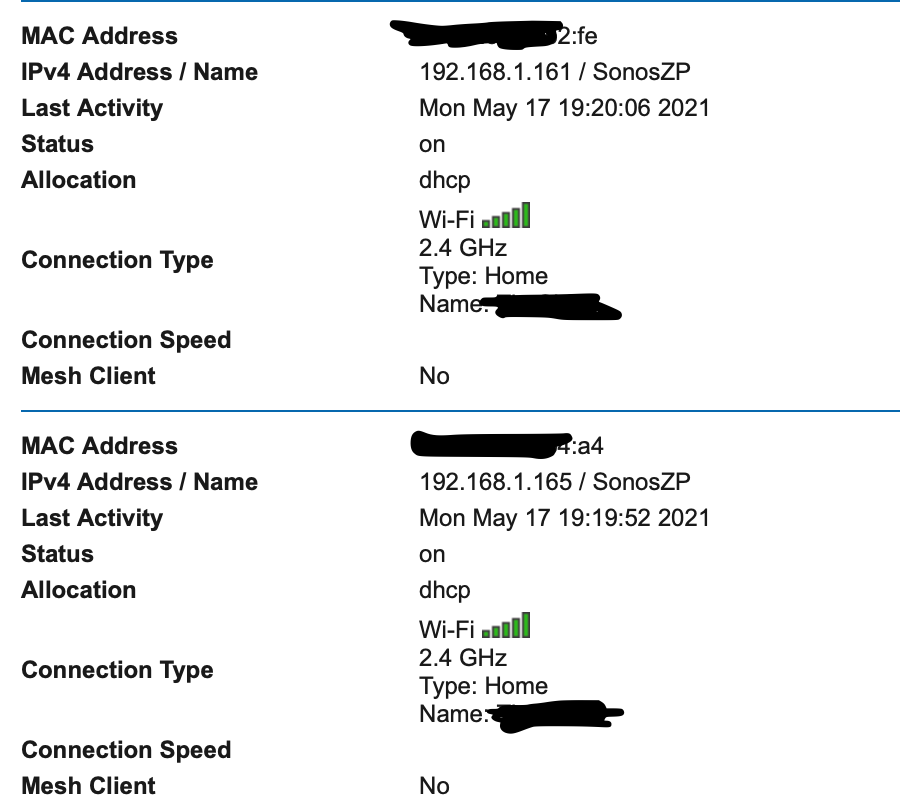
 

This topic has been closed for further comments. You can use the search bar to find a similar topic, or create a new one by clicking Create Topic at the top of the page.
Airgetlam
AirgetlamAnswer
May 18, 2021

It looks like you rebooted your router, then rebooted your speakers afterward. The Sonos devices need to be unplugged while you reboot the router, otherwise you’re not getting all the potential benefits. 

But I’m not convinced that’s the issue you’re experiencing, so doing that step, while not onerous, may not help. However, it wouldn’t hurt, either. 

What kind of wifi system do you use? What router is it? Is the Beam wired directly to the router, or do you have it hanging off your wifi? Have you read through the the wifi interference FAQ?

The surrounds are actually should be connected to the Beam itself, using a dedicated 5Ghz signal. Which means the wifi/radio in the controller has to be “on” for all three devices. The surrounds don’t actually connect to your 2.4Ghz signal, I suspect your router is seeing them as attached to the Beam, which is connecting on a 2.4Ghz signal….but perhaps looking at that diagnostic will help Sonos identify what may be going on. 

Bruce

24 replies

Airgetlam
June 19, 2021

I gave up on the built in ‘router’ on the modem AT&T provided me years ago, and used it just as a source for internet, turning off all DHCP functions and the wireless side, and went with a  bog standard Netgear device. Which I have had full control over. And has worked with Sonos. 

Bruce
Trending Lyricist I
June 19, 2021

I gave up on the built in ‘router’ on the modem AT&T provided me years ago, and used it just as a source for internet, turning off all DHCP functions and the wireless side, and went with a  bog standard Netgear device. Which I have had full control over. And has worked with Sonos. 

Problem with these ATT routers is that you can’t fully get rid of them. ATT does that on purpose with their custom firmware.

There’s no true bridge mode on these routers. So you either set it in passthrough or the retarded DMZ mode solution that some older routers required.

The reason I hesitated doing this is because it’s difficult to get rid of the double NAT but so far I have no issues with any of my services that can be reached from outside my network.

Airgetlam
June 20, 2021

Honestly, I just turned mine in. It was 15 or 20 years old, outdated, and in no longer going to be using it as just a DSL modem. Moving on to something newer, and not forced on me. Although if I could get their fiber, I’d  be tempted to stay. 

Bruce
ratty
June 20, 2021

The reason I hesitated doing this is because it’s difficult to get rid of the double NAT but so far I have no issues with any of my services that can be reached from outside my network.

Double NAT isn’t a problem.

A considerable number of people who install mesh WiFi system end up in double NAT without being aware of it.