investigating the Sub and Surround connection

  • February 14, 2026
  • 23 replies
  • 199 views

Stanley_4

I'm going to try to figure out the Sonos connections to surrounds. 

I'm starting with my main Rooms powered up and updated. I also have a Home Theater Room that has been powered down for a month or so which is what I'll be working with first. It has a Beam gen 1, Sub gen 2 and two One SLs.

Initially the Room and speakers aren't visible in the Android app, main Room lists or the About page, they have been powered down long enough to be removed.

Powering up just the surrounds, they are still not visible in any app lists, but if I do an update check I am told one is needed. I do not have the 2.4 gHz Sonosnet enabled here and the Beam is powered down so they must be connecting to my home Wi-Fi on my 5 gHz band in order for the app to see the update status. The AP access log confirms this connection and shows it became active soon after I powered the surrounds up. The log also shows they are communicating using the link.

Running the update, both One SLs go through the update/reboot LED patterns. At the end of the process the AP logs show the names are no longer the DHCP assigned/reserved ones, instead both show as "Sonos ZP" but still using the DHCP reserved addresses. The MAC addresses appear to be correct in both DHCP and AP logs.

The One SLs still do not appear anywhere in the app.

Power cycling the One SLs causes the AP logs to return the DHCP assigned names. They still do not appear in the app.

Rechecking the update status shows all are updated.

Next, powering up the Beam and Sub. The AP logs show the surrounds disappearing soon after the Beam appeared. The Sub briefly appeared in the AP logs but did not pass any data, I did not see if it used the default name originally but I do show two sessions, one before and the other after the update.


So two interesting things here, the non-HT connection for updates and the DHCP/DNS oddness on update.



23 replies

AjTrek1
  • February 15, 2026

It would have been even more interesting if you could have checked the WiFi signal strength for the surrounds which by all accounts you shouldn’t have been able to do so.

My speculation is that the One SL’s being down for so long were released back to your home WiFi as you indicated. However, as far the App was concerned they were still surround speakers and only visible when the Beam’s (upon power-up) hidden 5Ghz channel is active.


Airgetlam
  • February 15, 2026

To my knowledge, surrounds always connect on 5 GHz, one of the reasons Sonos had to release the ‘workaround’ for using the version 1 CONNECT:AMP, which never had a 5Ghz system in it. 


AjTrek1
  • February 15, 2026

To my knowledge, surrounds always connect on 5 GHz, one of the reasons Sonos had to release the ‘workaround’ for using the version 1 CONNECT:AMP, which never had a 5Ghz system in it. 

I think ​@Stanley_4 was commenting that the update for the speakers used as surrounds even though they were not shown in the app was still applied. Assuming I’m understanding the post correctly.


buzz
  • February 15, 2026

Is the surround system, with SUB, now working?


Stanley_4
  • Author
  • Grand Maestro
  • February 15, 2026

In reverse order…

The Room has never had any issues working.

Yes, the App saw that the surrounds needed an update and performed it, even though the Beam and Sub were powered down.

As the App did not show the surrounds in the Room or About lists I couldn't check the signal there, from the AP logs it was good, don't recall the exact number. They are two sheetrock walls and 15 feet from my AP. I do not believe the time that they were powered down had any impact on the network, only on the app listing them as present. 

The Room devices are all powered down now and showing as "not connected" on the About list and not shown on the Room lists. I'm going to power the surrounds back up to see how the app reacts while they are still listed, and as soon as they booted the App removed them from the Room lists, the Beam and Sub appear to still be listed.

At this point all I am sure of is that there is some surround speaker communication with the App and update server with the main device (Beam) powered down.


buzz
  • February 15, 2026

But aren’t the surrounds and SUB waiting for their BEAM?


Stanley_4
  • Author
  • Grand Maestro
  • February 15, 2026

The surrounds don't seem to be waiting for anything, they appear to be fully booted and operational, otherwise how would they first tell the app they need an update when queried and then when told to, download the update?

Once the App sees the Beam the lists return to normal.

I think most of the oddness is in the app, not the firmware.


buzz
  • February 15, 2026

Unless you un-bond the surrounds. I expect that the Controller, BEAM, Surrounds, and SUB are waiting for all to power up.


Stanley_4
  • Author
  • Grand Maestro
  • February 15, 2026

As I said above the surrounds are able to communicate with the app to request and apply an update so they are communicating with the app and Internet without waiting for the Beam to become available.

The Beam powers up and is fully operational with the surrounds and Sub powered down so it isn't waiting on them.

Once Sub and surrounds are powered up the Beam adds them to the Room, but that isn’t related to my original discovery of them communicating with the Wi-Fi directly and not through the 5 gHz Sonosnet from the Beam when it isn't avaliable.


Note that I didn't test the Sub in this trial, it is on the same switch the Beam is on and I'm not able to get to the power connections to change that.


  • Contributor I
  • February 16, 2026

@Stanley_4 - you might have a guest SSID too if its not connecting properly like my post Product not connected…

I just think something in the updates crapped up something which was working perfectly before the recent updates 🤷‍♀️


Stanley_4
  • Author
  • Grand Maestro
  • February 16, 2026

No guest SSID.

No problem connecting.

This is not anything recent, I originally noticed the connection being shown many months ago but didn't investigate until another topic nudged me to look into it.


Forum|alt.badge.img+17
  • Local Superstar
  • February 17, 2026

The surrounds don't seem to be waiting for anything, they appear to be fully booted and operational, otherwise how would they first tell the app they need an update when queried and then when told to, download the update?

Once the App sees the Beam the lists return to normal.

I think most of the oddness is in the app, not the firmware.

I think this is normal, ‘by design’. The Sonos App is showing ‘Rooms’ your UniFi? is showing ‘Devices’.

It is not possible to interact with a bonded Sub/Surround using the Sonos App if the Sounbar is not available, ie you can’t stream to a Surround or Sub, or change volume etc. Therefore why would it show up in App?

I recall when a speaker boots, it will obtain a DHCP IP address from the Local Wi-Fi (or Ethernet) adapter, before it bonds. Once its bonds (bridge) to the Soundbar, Unifi will not show the original device, as its no longer active. It will show probably if you enable ‘offline’ devices in the devices view on your UniFi Network App.


MoPac
Forum|alt.badge.img+18
  • Headliner III
  • February 17, 2026

 Would be nice if the app could somehow indicate this condition.  It should list the surrounds as available for update and waiting for the soundbar 5GHz.


Forum|alt.badge.img+17
  • Local Superstar
  • February 17, 2026

The condition is the Soundbar is powered down, that would be obvious when the TV is turned on, and no sound comes from the Soundbar?


Stanley_4
  • Author
  • Grand Maestro
  • February 17, 2026

The surrounds don't seem to be waiting for anything, they appear to be fully booted and operational, otherwise how would they first tell the app they need an update when queried and then when told to, download the update?

Once the App sees the Beam the lists return to normal.

I think most of the oddness is in the app, not the firmware.

I think this is normal, ‘by design’. The Sonos App is showing ‘Rooms’ your UniFi? is showing ‘Devices’.

That is not what I am trying to discuss, it is that the surrounds are communicating directly with my wifi when the Beam is unavailable. The Update function does not show Rooms or devices, just that it sees a speaker that needs an update.

It is not possible to interact with a bonded Sub/Surround using the Sonos App if the Sounbar is not available, ie you can’t stream to a Surround or Sub, or change volume etc. Therefore why would it show up in App?

Again this is not about showing in tne App or not, it is about the link to my wifi when the Beam is not available.

I recall when a speaker boots, it will obtain a DHCP IP address from the Local Wi-Fi (or Ethernet) adapter, before it bonds. Once its bonds (bridge) to the Soundbar, Unifi will not show the original device, as its no longer active. It will show probably if you enable ‘offline’ devices in the devices view on your UniFi Network App.

As I discussed the DHCP is working as expected, but the related DNS registration is failing in some circumstances. Could be router related as that is where the DNS registration happens, more likely it is a combination Sonos/router issue as only some systems have DHCP issues at reboot time and need the reserved IPs.


Forum|alt.badge.img+17
  • Local Superstar
  • February 17, 2026

@Stanley_4 I think we are saying the same thing. The Surrounds/Sub will obtain an IP address from their own MAC address when they boot, and IIRC when they are updating, and show up in your UniFi Network App.

When they bond (bridge) they will use the MAC address of the device they are bonded to, and the original device will show offline. I expect that devices are unique by MAC address in your UniFi App, not IP address.

If DNS registration is failing, that would be a router/firewall config issue. There is no requirement for IP reservation for an Sonos HT system, or a local DNS suffix.

I seem to recall that DHCP request can timeout, if the DNS registration fails for whatever reason. Maybe reserving the IP address in DHCP scope with an associated fixed DNS name solves the issue for you, if Sonos devices are all trying to register same DNS names in your specific firewall config without reserved IP addresses?


buzz
  • February 17, 2026

While using the private connection to a soundbar, regular WiFi is ignored. If the soundbar is absent, regular WiFi is used, but function is very basic while the unit waits for the soundbar to connect. I think that regular WiFi is used during updates because the private connection goes down at some point during an update.


melvimbe
  • February 17, 2026

I know that we think of the surrounds being locked into the soundbar for wireless communication, but I am pretty sure that’s only been for audio communication.  Besides this example of receiving upgrades while the soundbar is powered off, I would assume that voice commands (that are not requesting music playback) would also work when the soundbar is powered off. 

I would also assume (have not tested) that speakers that were previously surround speakers can be reassigned to another room without requiring a factory reset.  This obviously wouldn’t be possible if they could not communicate to the router directly.


buzz
  • February 17, 2026

Maybe the surrounds will respond to a “Remove Surrounds” command while the soundbar is down, but I don’t know what the soundbar’s response might be when it comes back up. I would think that it will wait for the surrounds. Then there is the question as to being able to remove non existent surrounds that will be visible in the system, but not as bonded surrounds.


AjTrek1
  • February 17, 2026

I would assume that voice commands (that are not requesting music playback) would also work when the soundbar is powered off. 


If true that would most likely only apply to Era series because as far I know they are the only speakers when used as surrounds that can also be setup with a voice assistant.  


melvimbe
  • February 17, 2026

Maybe the surrounds will respond to a “Remove Surrounds” command while the soundbar is down, but I don’t know what the soundbar’s response might be when it comes back up. I would think that it will wait for the surrounds. Then there is the question as to being able to remove non existent surrounds that will be visible in the system, but not as bonded surrounds.

Perhaps there’s the technical equivalent of a ‘Dear John’  letter.


Dear Soundbar,

  While you were away, I found somebody new.


I am mostly joking with this, but it does seem like that soundbar could be informed that the surround(s) are no longer bonded as they should be able to see that mac address is being used elsewhere on the network. She’s not coming back.


melvimbe
  • February 17, 2026

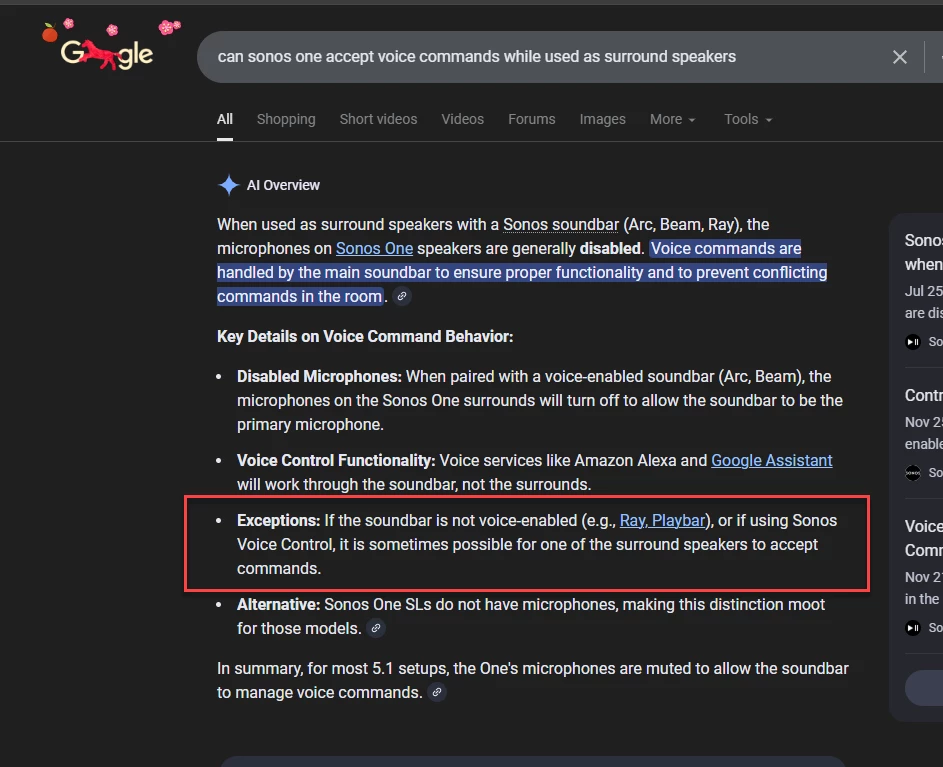
I would assume that voice commands (that are not requesting music playback) would also work when the soundbar is powered off. 


If true that would most likely only apply to Era series because as far I know they are the only speakers when used as surrounds that can also be setup with a voice assistant.  

 I didn’t see a Sonos support article on this, and don’t fully trust my memory, but I thought Sonos Ones worked for voice with the playbar.

 edit: the the ‘Ray, Playbar’ link  is here


AjTrek1
  • February 17, 2026

I would assume that voice commands (that are not requesting music playback) would also work when the soundbar is powered off. 


If true that would most likely only apply to Era series because as far I know they are the only speakers when used as surrounds that can also be setup with a voice assistant.  

 I didn’t see a Sonos support article on this, and don’t fully trust my memory, but I thought Sonos Ones worked for voice with the playbar.

 edit: the the ‘Ray, Playbar’ link  is here

Okkkk…hadn’t seen that one 😊