
Contributor I
August 26, 2022
Answered

Beam (Gen 2) on 5GHz wifi doesn't seem to work

I can’t seem to get my Beam (Gen 2) to connect to my wifi using 5GHz. Although the specs say it supports 5GHz that doesn’t seem to be the case (at least not for me).

If I disable the 2.4GHz band on my SSID the Beam won’t connect at all. Using both 2.4GHz and 5GHz will allow it to connect. But as can be seen from the network controller (below)… only using 2.4GHz.
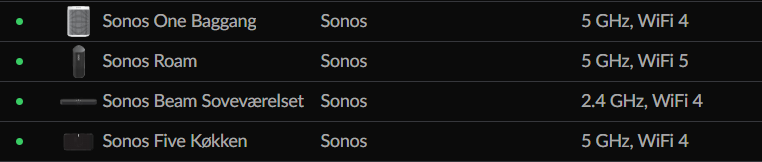
But why?

What is the trick here?

As you can see my other Sonos speakers have no problem using 5GHz and the Beam is the newest of them all??!

The reason this annoys me is because the Beam is the ONLY device on my network that requires 2.4GHz. So if it worked as I was expecting I could disable the 2.4GHz all together.


Any good ideas as to how I can fix this? Or is it simply “not fixable”?


Thanks :-)

This topic has been closed for further comments. You can use the search bar to find a similar topic, or create a new one by clicking Create Topic at the top of the page.
ratty
rattyAnswer
August 26, 2022

Like other Home Theatre players, Beam can’t connect to 5GHz WiFi. Its 5GHz radio is reserved, to connect its surrounds/Subs.

WiFi compatibility is all set out in https://support.sonos.com/s/article/126

23 replies

Contributor I
January 4, 2023

I switched to T-Mobile home internet, and it is supposed to differentiate between 2.4 and 5.0 bands. I spent hours trying to get my Sonos beam gen 2 and my Sonos sub mini working. When I finally got the beam to work it was not recognized in the app. Same thing with the sub mini. My 2 Sonos ones connected but did not put out any sounds. I finally got the beam and sub working by connecting the ethernet cable but the sonos ones would not play any sound. I was literally pulling my hair out. Got on the phone with the sonos support guy and we were on the phone for an hour and 15 minutes. He took over my phone and it took forever to finally get the sonos ones to work. The ones finally worked surround with my fire tv cube but would not work with my Roku 4k stick. This is ridiculous for a system as expensive as this to be this difficult to set up!!!

Translate
Ken_Griffiths
January 4, 2023

I switched to T-Mobile home internet, and it is supposed to differentiate between 2.4 and 5.0 bands. I spent hours trying to get my Sonos beam gen 2 and my Sonos sub mini working. When I finally got the beam to work it was not recognized in the app. Same thing with the sub mini. My 2 Sonos ones connected but did not put out any sounds. I finally got the beam and sub working by connecting the ethernet cable but the sonos ones would not play any sound. I was literally pulling my hair out. Got on the phone with the sonos support guy and we were on the phone for an hour and 15 minutes. He took over my phone and it took forever to finally get the sonos ones to work. The ones finally worked surround with my fire tv cube but would not work with my Roku 4k stick. This is ridiculous for a system as expensive as this to be this difficult to set up!!!

So what was the cause of your issue? - in my own case my two Sonos Beams and their surrounds (Sonos Ones) were each setup without any issue.. it was a simple process. Was it something connected to your router/network? How were things fixed in your case🤔?

Translate
Lyricist I
February 19, 2023

I too was working like a champ on 5ghz network and now going to have to change up network settings.  The problem is most people live on the 5g networks so having to switch to 2g is just plain dumb.  Especially for a high end system.  I also realize it’s a small inconvenience, but still annoying

Translate
Ken_Griffiths
February 19, 2023

I too was working like a champ on 5ghz network and now going to have to change up network settings.  The problem is most people live on the 5g networks so having to switch to 2g is just plain dumb.  Especially for a high end system.  I also realize it’s a small inconvenience, but still annoying

But maybe not when grouping speakers across different rooms and through walls, as the 2.4Ghz band is much further reaching and far more penetrating than a 5Ghz signal. Ideal for grouping when playing music, in sync, across many rooms/speakers.

Translate
February 19, 2023

The suggestion that "most people live on 5GHz" and the implication that 5GHz is intrinsically better than 2.4GHz are the only dumb things around here. 

Translate
106rallye
February 19, 2023

It’s not 2G and 5G, those are cell phone networks, where “G” stands for “generation”. Wifi uses 2.4Ghz an 5Ghz radio frequency bands.

Translate
Lyricist I
February 20, 2023

lol yes I know the difference between 2.4 and 2g.  Also, my point was why does Sonos require me to separate 2.4 and 5ghz bands if my situation doesn’t require.  In my case it doesn’t.  That said it could still allow for those with larger homes or other situations that might necessitate to use 2.4 GHZ.  And yes 5ghz is superior in close range, duh!   More importantly my footprint is not that big so I do not need 2 separate bands or networks broadcasting 

Translate
106rallye
February 20, 2023

Why would you complicate discussions by using the wrong terms? I do not think most people “live on” 5Ghz networks. Most people let their router and devices decide what network to use, so for most people this would not be a problem.

I’m not sure it is technically possible for Sonos to program a switch to 2,4Ghz only in case 5Ghz needs to be used for the dedicated link Sonos uses for the surround and the Sub. You seem to word it as if Sonos is willingly crossing you. I do not think this is the case.

Translate
Ken_Griffiths
February 20, 2023

lol yes I know the difference between 2.4 and 2g.  Also, my point was why does Sonos require me to separate 2.4 and 5ghz bands if my situation doesn’t require.  In my case it doesn’t.  That said it could still allow for those with larger homes or other situations that might necessitate to use 2.4 GHZ.  And yes 5ghz is superior in close range, duh!   More importantly my footprint is not that big so I do not need 2 separate bands or networks broadcasting 

My router uses combined bands and that works okay for my setup - maybe the band steering on your router is nit doing too good a job, in which case separating them might be the way to go.. or just use SonosNet perhaps. There are many options that Sonis make available for you to explore and to try and see what perhaps works best for your setup, but a HT master device needs either a wired or 2.4Ghz connection to the LAN as it’s 5Ghz adapter is used for the much needed faster ‘direct’ connection with its bonded surrounds and Sub(s).

Translate
Lyricist I
April 19, 2023

In my situation, I just received a new router from my provider. It turns out I went from 2.4 GHz to 5 GHz and now I cannot connect to my Sonos beam. Rather than getting a second router or trying to figure out how to get 2.4 out of my current router, can I use a cat five cable from the router to the beam and then progress as usual? I would love to hear thoughts on this.

Translate