
Contributor I
August 26, 2022
Answered

Beam (Gen 2) on 5GHz wifi doesn't seem to work

I can’t seem to get my Beam (Gen 2) to connect to my wifi using 5GHz. Although the specs say it supports 5GHz that doesn’t seem to be the case (at least not for me).

If I disable the 2.4GHz band on my SSID the Beam won’t connect at all. Using both 2.4GHz and 5GHz will allow it to connect. But as can be seen from the network controller (below)… only using 2.4GHz.
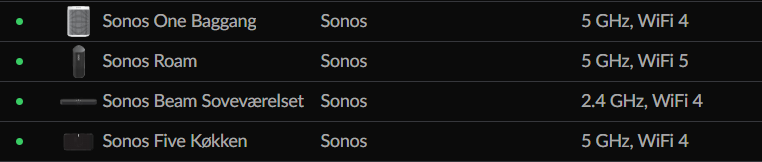
But why?

What is the trick here?

As you can see my other Sonos speakers have no problem using 5GHz and the Beam is the newest of them all??!

The reason this annoys me is because the Beam is the ONLY device on my network that requires 2.4GHz. So if it worked as I was expecting I could disable the 2.4GHz all together.


Any good ideas as to how I can fix this? Or is it simply “not fixable”?


Thanks :-)

This topic has been closed for further comments. You can use the search bar to find a similar topic, or create a new one by clicking Create Topic at the top of the page.
ratty
rattyAnswer
August 26, 2022

Like other Home Theatre players, Beam can’t connect to 5GHz WiFi. Its 5GHz radio is reserved, to connect its surrounds/Subs.

WiFi compatibility is all set out in https://support.sonos.com/s/article/126

23 replies

Ken_Griffiths
April 19, 2023

In my situation, I just received a new router from my provider. It turns out I went from 2.4 GHz to 5 GHz and now I cannot connect to my Sonos beam. Rather than getting a second router or trying to figure out how to get 2.4 out of my current router, can I use a cat five cable from the router to the beam and then progress as usual? I would love to hear thoughts on this.

I’ve not seen a router with just a 5Ghz band, might it still be a dual Wifi band router with band-steering? Each band is likely using the same SSID?

What is the make/model of the router?

Have you added the new WiFi credentials to your Sonos device?

Note, the Beam will require a 2.4Ghz WiFi to operate over your LAN, as it’s 5Ghz adapter is reserved for use with any Surrounds and/or Sub.

What do your new router configuration pages show in relation to your WiFi network?


Translate
Airgetlam
April 19, 2023

And yes, you can connect the Beam with a CAT-5 cable, and continue as normal. 

Translate
Bruce
Lyricist I
May 1, 2023

I finally got hold of a cat5 cable and connect that to the beam. My Sonos ones are now connected to the beam. The hardest part was hiding the cat5 cable

Translate