
Contributor I
August 26, 2022
Answered

Beam (Gen 2) on 5GHz wifi doesn't seem to work

I can’t seem to get my Beam (Gen 2) to connect to my wifi using 5GHz. Although the specs say it supports 5GHz that doesn’t seem to be the case (at least not for me).

If I disable the 2.4GHz band on my SSID the Beam won’t connect at all. Using both 2.4GHz and 5GHz will allow it to connect. But as can be seen from the network controller (below)… only using 2.4GHz.
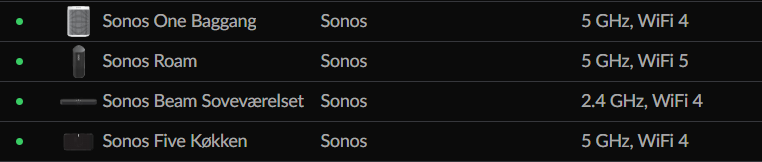
But why?

What is the trick here?

As you can see my other Sonos speakers have no problem using 5GHz and the Beam is the newest of them all??!

The reason this annoys me is because the Beam is the ONLY device on my network that requires 2.4GHz. So if it worked as I was expecting I could disable the 2.4GHz all together.


Any good ideas as to how I can fix this? Or is it simply “not fixable”?


Thanks :-)

This topic has been closed for further comments. You can use the search bar to find a similar topic, or create a new one by clicking Create Topic at the top of the page.
ratty
rattyAnswer
August 26, 2022

Like other Home Theatre players, Beam can’t connect to 5GHz WiFi. Its 5GHz radio is reserved, to connect its surrounds/Subs.

WiFi compatibility is all set out in https://support.sonos.com/s/article/126

23 replies

ratty
rattyAnswer
August 26, 2022

Like other Home Theatre players, Beam can’t connect to 5GHz WiFi. Its 5GHz radio is reserved, to connect its surrounds/Subs.

WiFi compatibility is all set out in https://support.sonos.com/s/article/126

Translate
Contributor I
August 26, 2022

Thanks for that link… I have not come across that before.

Let’s just say that is not what is advertised from various resellers but it does explain what I am seeing in my network. Unfortunately ☹️

Translate
ratty
August 27, 2022

It wouldn't be the first time that a reseller hasn't quite got the story straight. 

Translate
Lyricist I
November 6, 2022

I believe some time beam can connect to 5ghz, its some update that made it not to be able anymore, I dunno? because the Sonos Boost sale is not doing enough? So if you have a Beam and Sonos One SL pair as surround, and recently update your router. Good luck! better throw your Sonos out the window on trying to re establish that connection, cause your Beam and Sonos One SL, will never see each other not until you buy your boost. If you reach out to support, they will advice you to connect one of the sonos to Ethernet, hence creating its own Sonosnet, then will advise you that one should be connected. It was marketed as a wireless setup, and not all house or rooms are capable of having one ethernet connection.
For the readers considering to buy Sonos, save yourself. buy other stuff

Translate
106rallye
November 6, 2022

@michael022502 Great combination of misinformation and paranoia!

The Sonos soundbars have always had their 5GHz antenna reserved for the dedicated connection to the Sub(s) or surrounds, because of the technical reason explained above. No change that I know of.

The 5Ghz connection is made for the Beam and One SL to “see” each other when the Ones SL’s are used as surrounds. To group them you need the Beam to be on 2,4GHz.  You do not mention why you do not use 2,4Ghz, but that is still an option. So is cabling the Beam or indeed buying a (not to expensive) Boost.

Translate
Lyricist I
November 7, 2022

So if you have a Beam and Sonos One SL pair as surround, and recently update your router. Good luck! 

The below relates to the problem you've brought up because the apps network wizard isn't very smart. A change on the router may require a full remake of your network in the app.

One significant problem I've experienced is when someone doesn't understand the 5ghz vs 2.4ghz connections. If they try to force a 5ghz connection by deleting the 2.4ghz connection from the app's network, this causes a catch 22 problem between the speaker and the app. The speaker will fail to connect to the 5ghz and cause the "manage network" wizard to error out, and the manager network wizard will continue to error because it sees the 5ghz network still on its list and thinks it's setup correctly.

The only way to fix this problem is to clear all the related networks on the list and start from scratch. That way the app thinks it's a new network.

Translate
Ken_Griffiths
November 8, 2022

So if you have a Beam and Sonos One SL pair as surround, and recently update your router. Good luck! 

The below relates to the problem you've brought up because the apps network wizard isn't very smart. A change on the router may require a full remake of your network in the app.

One significant problem I've experienced is when someone doesn't understand the 5ghz vs 2.4ghz connections. If they try to force a 5ghz connection by deleting the 2.4ghz connection from the app's network, this causes a catch 22 problem between the speaker and the app. The speaker will fail to connect to the 5ghz and cause the "manage network" wizard to error out, and the manager network wizard will continue to error because it sees the 5ghz network still on its list and thinks it's setup correctly.

The only way to fix this problem is to clear all the related networks on the list and start from scratch. That way the app thinks it's a new network.

Or just simply wire a Sonos product to the network. Those with non-portable Sonos products, operating on SonosNet, quite often run their setup with no WiFi network credentials stored at all in their Sonos setup (not showing in the Network Settings area of the Sonos App).

Although some other users, who have portable devices - Roam/Move, will quite often just add the 5Ghz SSID/credentials to that area of the App and have their portable products operating on just that band only.

Translate
Contributor I
November 30, 2022

They removed support. It definitely worked just fine on 5ghz when it first came out (the gen 2).

Translate
106rallye
December 1, 2022

So when and why? Since the technical explanation for the soundbars not using 5Ghz seems valid I would expect some proof for your statement.

Translate
Lyricist I
December 1, 2022

i was able to use it before and all connected in 5ghz and and was able to play spotify via sonos app on my phone thats on the same network. but after some device update. they cant connect anymore. what proof do you need? tech support mentioned now need to be wired. so how come im able to setup and use before without connecting to ethernet?

you can come to my place if you know better than giving response that has no value.

its unusable for 3 months already

 beam gen 2 and 2 sl1 surround.


Translate