Question

ARC or optical to Beam to Era 100 -- will not work, audio drops

  • January 13, 2026
  • 8 replies
  • 23 views

I’ve talked to support several times about this issue but I cannot get my Eras to work properly with the Beam. I cannot get 5 seconds without a drop. They hung up on me with it not resolved.


Moderator Note: Modified in accordance with the Community Code of Conduct.

8 replies

Airgetlam
  • January 13, 2026

Are these Era 100s set up as grouped stereo or mono speakers, or are they set up as surrounds? They’d receive their WiFi signal from different places, depending, but I’m going to hazard a guess, given the lack of information, that you might have some sort of wifi interference going on. Might be worth reading the linked FAQ, keeping in mind that all interference doesn’t have to come either from inside your network, or even within your home. 

But neither of us have access to the diagnostic reports. I would recommend that you submit a system diagnostic within 10 minutes of experiencing this problem, and call Sonos Support to discuss it. Don’t post the resulting diagnostic number here, Sonos’ lawyers get sensitive about GDPR, I suspect.

There may be information included in the diagnostic that will help Sonos pinpoint the issue and help you find a solution.

When you speak directly to the Support staff, they have tools at their disposal that will allow them to give you advice specific to your network and Sonos system.

Stay away from anecdotal complaints, they’re hard to understand and act on, as there really are so many potential issues that could need to be addressed. Hard data is hard to argue with, and much easier to respond to. 

Moderator edit: removed reference to removed text in original post.


  • Author
  • Contributor I
  • January 13, 2026

Appreciate the response. They’re setup as mono speakers, for the purpose of having sound travel from my TV throughout the house. I feel mistaken that I should be able to do this.

I’ve sent them diagnostic reports several times. The last time I called, they acted like they had done their job and just hung up, without any conformation from me that it was indeed working or not. 

I’m getting REALLY tired of resetting my TV, my network, my devices… knowing not of that is going to help. I even factory reset my modem and at this point have spent days trying to get them to work. I’m getting so fed up with this.


Stanley_4
  • Lead Maestro
  • January 13, 2026

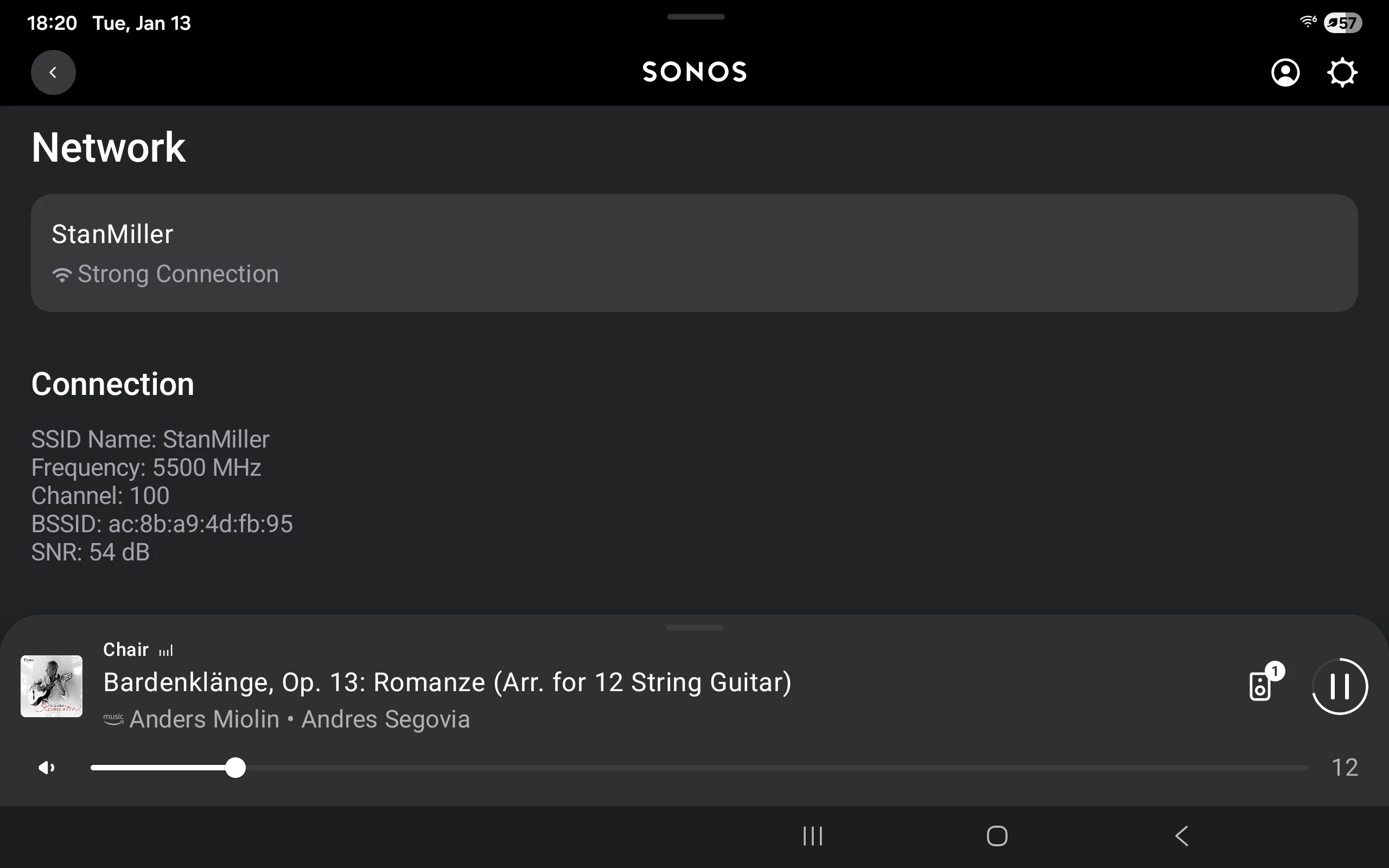
As they are set up as individual speakers you can see information on the Wi-Fi connection under the speaker's Network section. If it isn't Good or better the wifi interference suggestion is good.

If you think it might be a network issue you can try a fix that is easy and has worked for others. From the router's DHCP Settings page you can assign a static/reserved address to every Sonos. Once done power down the Sonos, reboot the router and once it is ready power up the Sonos. 

Once you are ready to try again, open the TV Room in the app and add the Era Rooms to the TV Room. 


Do you see issues when streaming audio? If so, what happens if you pick Different Rooms to start streaming and then add in other Rooms.


Airgetlam
  • January 14, 2026

It is also important to know that when streaming the TV’s input to the Beam, there will always be a 75 ms delay with any ‘grouped’ rooms. Meaning those Era 100s. It’s due to the way that Sonos works. 

I’d be tempted to call back in, to see if you can get someone who can help. 


  • Author
  • Contributor I
  • January 14, 2026

I see network, but I don’t see any info like you refer to there. It’s set to channel 1 via the app preference. I see update networks, and I just updated all 3 devices, however none of them were blinking during the process like it said they should be. I still hit the same buttons.

I’ve been digging quite a bit, unfortunately my router software doesn’t allow me to change banding between 2.4Ghz and 5Ghz.. I may be able to set it to 6ghz though I’m not sure that’s even possible with Sonos

I’ve also been concerned there’s an impedence issue with my home wiring(I rent), landlord has refused to do anything about the issue. I’ve had both Xfinity and Comcast here extensively, I paid for many home visits, but the problem exists regardless. Random .08mbps. Almost everything works -- downloading no problem.. However the upload rate often drops to .08mpbs, it seems. Some certain types of livestreams or first person shooter games are unuseable.

When it comes to the Beam, what I am trying to play works without internet disruption, from my PC or laptop. Problem is it plays fine on the Beam but can’t seem to be very consistent with these Eras. I sat by one Era after hard resetting my router, and I thought things were fixed until the next day. Was able to play for almost an hour with only a few extremely brief drops, mainly in the later half hour. But for the most part it’s been real bad. Honestly I’m a bit of a loss. I had to give up earlier because I was beginning to lose my mind.


  • Author
  • Contributor I
  • January 14, 2026

It is also important to know that when streaming the TV’s input to the Beam, there will always be a 75 ms delay with any ‘grouped’ rooms. Meaning those Era 100s. It’s due to the way that Sonos works. 

I’d be tempted to call back in, to see if you can get someone who can help. 

understood, and during the time they work together momentarily, it’s been acceptable for me. Once I’m in one room, the effect isn’t overkill to the point I couldn’t work with them. 

Appreciate the comments. 


Stanley_4
  • Lead Maestro
  • January 14, 2026

Settings -  Room - Product - Network. The. Scroll down.


Stanley_4
  • Lead Maestro
  • January 14, 2026

Trimmed a good bit:

none of them were blinking during the process like it said they should be. I still hit the same buttons.

my router software doesn’t allow me to change banding between 2.4Ghz and 5Ghz..

I may be able to set it to 6ghz though I’m not sure that’s even possible with Sonos

I’ve also been concerned there’s an impedence issue with my home wiring(I .08mbps. Almost everything works -- downloading no problem.. However the upload rate often drops to .08mpbs, it seems.

When it comes to the Beam, what I am trying to play works without internet disruption, from my PC or laptop. Problem is it plays fine on the Beam but can’t seem to be very consistent with these Eras. I sat by one Era after hard resetting my router, and I thought things were fixed until the next day. Was able to play for almost an hour with only a few extremely brief drops, mainly in the later half hour. But for the most part it’s been real bad. Honestly I’m a bit of a loss. I had to give up earlier because I was beginning to lose my mind.

Blinking only happens if the speaker needs the update.

You shouldn't be hitting any buttons on tne speakers while an update is in progress.

Not sure which router you have, must be really old it doesn't support 2.4 and 5 gHz connections. Brand and model?

Sonos doesn't use 6 gHz

https://support.sonos.com/en-us/article/supported-wifi-modes-and-security-standards-for-sonos-products

Impedance of your home wiring? That would impact every powered thing you own. It would also usually be a major fire risk. To confirm this pick any unswitched duplex outlet, plug in a lamp (incandescent if possible, otherwise dimmable) and somthing like a toaster. Turn the lamp on and observe the brightness, turn on the toaster, if there is more than a momentary flicker in the lamp then you might have a wiring problem. Either way that isn't going to impact your Sonos unless it is bad enough to cause a power-loss reboot.

If playing from your PC or laptop using the music library function the Internet isn't involved just your local network.


Don't keep resetting things until you have identified the problem as that usually just makes things worse.


Try these options and let us know how they work.

Turn on the TV and start watching something. Does it work right?

Use the Group icon to add one of the Era Rooms to the TV,  do not do it the other way around. Does it work right?

Turn off the TV and select a streaming source, still Grouped. Does it work right?

Ungroup all Sonos, select one of the Era Rooms, then a streaming source. Does it work right?