
Answered

arc home theater setup stopped working. surrounds and sub disconnected

  • December 4, 2025
  • 11 replies
  • 104 views

Forum|alt.badge.img

Setup

Speakers - Arc with Sub and two play1 surround.
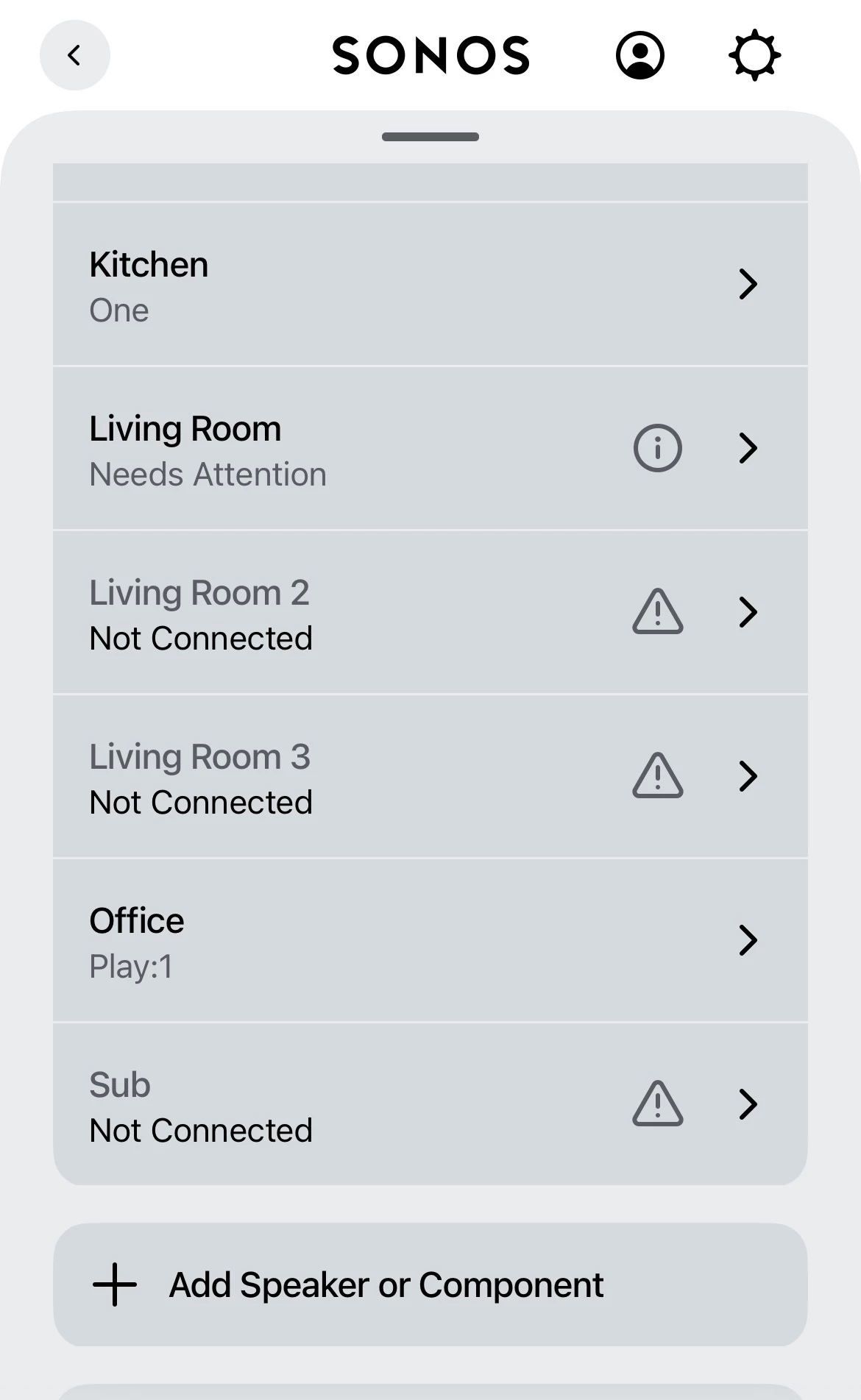
latest iOS app the surrounds and sub are disconnected.


I cannot remove them in app, When I removed the sub it crashed app (twice).

I have now factory reset arc and sub then:

1. have added arc (working)

2. have added the sub (working)

3. two play 1 speakers on system(working)

Then

Prompted in app to Add sub to arc… All ok. Connected and success sound.

Prompted in app to Add surround, select both speakers, test sounds, select the position…. All ok. Connected and then plays success sounds.


Go back into the app… All home theater broken again.  Help?
 

Best answer by Stanley_4

Close is not bad, but too close, under 3 feet is often a problem. Not just Sonos to router or Sonos to Sonos, but often between any wifi devices as they tend to block each other.

11 replies

Forum|alt.badge.img+13
  • Headliner I
  • December 4, 2025

I have a similar problem with a Beam, 2 x ERA 100 and a Sub Mini and found that powering off/on the Beam is the quickest way to get things working again. In your situation a power off/on of the Arc might be all that is required to get you up and running.

If the problem persists then collecting diagnostics and calling support would be the logical next step.

Similar problems have been raised so a quick search of this forum might get you a few more suggestions.


Forum|alt.badge.img
  • Author
  • Contributor I
  • December 4, 2025


Forum|alt.badge.img+13
  • Headliner I
  • December 4, 2025

@alexlong26 did you also get the update to the speaker firmware that was released a few days ago?


AjTrek1
  • December 4, 2025

.


Smilja
  • December 4, 2025

@AjTrek1, Sorry but no. In this case just re-enable the WiFi radio. No need for removing the ethernet cable, much less performing a factory reset on the soundbar.

https://support.sonos.com/en-us/article/disable-or-enable-wi-fi-on-your-sonos-products


Forum|alt.badge.img
  • Author
  • Contributor I
  • December 7, 2025

No idea what 2 posts above are on this qu.


Thanks for reply Graham-

Updated all speakers and system. Left off for a day and powered up, removed from system I think twice now, and added back. The system still doesn't even show the sub or surrounds in my settings and gives error as shown in screen shot.

Arc works.

I'll double check the known speakers firmware, and factory reset three erroring ones again. And add them.


If not then yeah I'll have to call support as my home theater is just arc right now 😭


Pools-3015
Forum|alt.badge.img+17
  • Prodigy I
  • December 7, 2025

No idea what 2 posts above are on this qu.


Thanks for reply Graham-

Updated all speakers and system. Left off for a day and powered up, removed from system I think twice now, and added back. The system still doesn't even show the sub or surrounds in my settings and gives error as shown in screen shot.

Arc works.

I'll double check the known speakers firmware, and factory reset three erroring ones again. And add them.


If not then yeah I'll have to call support as my home theater is just arc right now 😭

Are you able to hardwire the Arc to your router/network to see if that solves the issue?

Have you added any new devices to your home recently?

Sometimes the issue you are having is a result of WIFI interference and hardwiring can help. 


Forum|alt.badge.img
  • Author
  • Contributor I
  • December 8, 2025

Hi.  Nothing added to setup. Home theater setup in the same room as the hub (Virgin media). All within 2-3 m off each other and nothing between. No new tech in that room or changes.

I can network in, as it's next to the hub, need to do the above check/tests again first.


Stanley_4
  • Lead Maestro
  • Answer
  • December 8, 2025

Close is not bad, but too close, under 3 feet is often a problem. Not just Sonos to router or Sonos to Sonos, but often between any wifi devices as they tend to block each other.


Forum|alt.badge.img
  • Author
  • Contributor I
  • December 15, 2025

Whilst I dont disagree with the tech points, its been working fine like that in my old house, and working well (no problems) like this for the last 6+ months since moving house.

So physically, whilst location has changed, it has been working fine, so my conclusion is updates to apps/speakers.   Currently still broken after rebooting, I have not had time to do the above yet in a testing/consider way but will do a factory reset, and cable the arc this week to see if I can get working.


Airgetlam
  • December 15, 2025

The challenge is that networking is constantly changing, and adapting to both outside and inside circumstances, when it can, unbeknownst to most of us. So what it was doing yesterday may not be what it’s doing today, even though you’ve not explicitly ‘changed’ anything. I suspect the advice above may be helpful, if you find it isn’t, I would recommend that you submit a system diagnostic within 10 minutes of experiencing this problem, and call Sonos Support to discuss it. Don’t post the resulting diagnostic number here, their lawyers get sensitive about GDPR.

There may be information included in the diagnostic that will help Sonos pinpoint the issue and help you find a solution.

When you speak directly to the Support staff, they have tools at their disposal that will allow them to give you advice specific to your network and Sonos system.