Question

Two separate home theater rooms

  • December 27, 2025
  • 12 replies
  • 83 views

Forum|alt.badge.img

I set up a small system for my living room that I intend to grow. I loved it so much that bought a second system, this time with the arc ultra with the intention of passing the Beam set-up to my husband for his TV room upstairs. This is what I have:

Living Room 

-1 Arc Ultra 

-2 Era 100s

-1 Mini Sub

LG C5 TV

Upstairs TV Room

-1 Beam 2 

-2 Era 100s

-1 Mini Sub

LG C4

My router is in the living room And it’s the standard router supplied by my cable company and everything is wireless.

The controller is on my phone and that’s where I’d like to keep it. The sound bar was originally intended Improve voice clarity for my husband so I could keep buying him at a tolerable range for me when we watch TV together. and also like the option for us to be able to watch TV separately. My first challenge is that audio from his system was playing downstairs in the living room. That tells me something’s wrong and before I bang my head against the wall I wanted to ask for help. I also read that there’s an issue between the arc and my LG C4 TV so I’d appreciate any guidance on suggestions for a fix with that because that will be my next challenge.




12 replies

Airgetlam
  • December 27, 2025

The upstairs audio playing in the downstairs suggests some sort of grouping issue. Make certain you have the option set to ungroup on Autoplay.

As far as I’m aware, there is no issue with connecting any Sonos device to an updated LG C4 TV. Can you supply specifics as to what issue is being experienced?


Forum|alt.badge.img+19
  • Senior Virtuoso
  • December 27, 2025

By default, a home theatre room should be playing the tv audio via the HDMI cable. Make sure you have TV Autoplay set to On for both rooms, as well as Ungroup on Autoplay as Bruce suggests above. You’ll find them in Settings (the cog icon in top right), then choose a room and scroll down. Toggle the switches to the right. 


Stanley_4
  • Lead Maestro
  • December 27, 2025

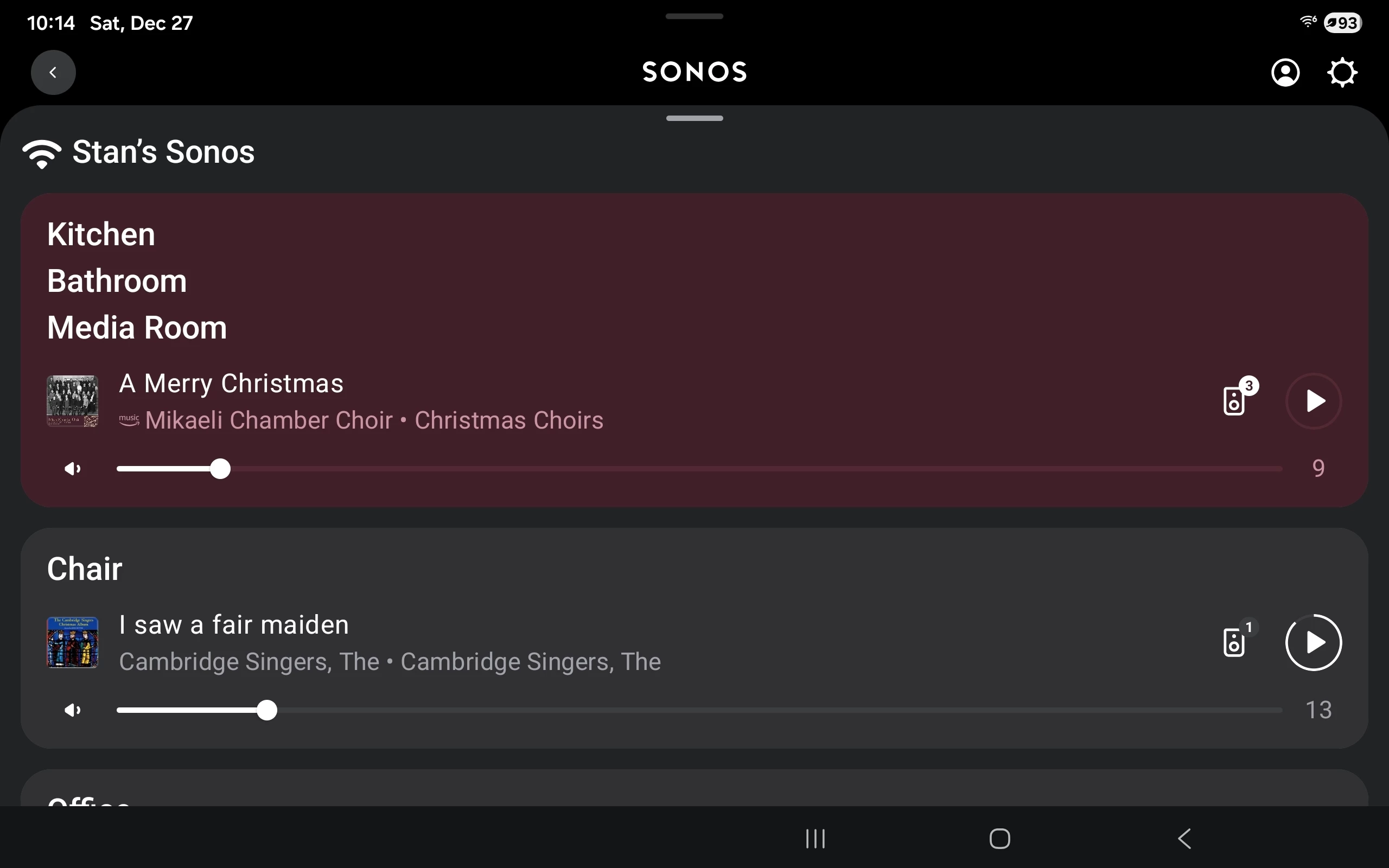
You can see examples of Grouped and single in the screenshot below. Both the multiple room names when grouped and the number (being greater than 1) by the speaker icon are indicators.


Forum|alt.badge.img
  • Author
  • Contributor I
  • December 27, 2025

The upstairs audio playing in the downstairs suggests some sort of grouping issue. Make certain you have the option set to ungroup on Autoplay.

As far as I’m aware, there is no issue with connecting any Sonos device to an updated LG C4 TV. Can you supply specifics as to what issue is being experienced?

Thank you. I’m glad to hear that I haven’t committed some terrible Sonos set-up transgression. I’ll check for grouping when I’m home.

The issue with the LG C5 (NOT the LG C4) was intermittent, and related to using the remote to control TV volume. It worked perfectly with the Beam but it was hit or miss with the Arc. I read something about a known issue between the C5 and Arc Ultra, something to do with LG “CEC” setting?? At some point the Sonos software asked me of I  wanted to pair the remote, but wouldn’t recognize the remote. That being said, I had been able to adjust the volume a couple times using the same remote which is compatible with Sonos. It’s beginning to sound like there’s some random setting cleanup that needs to occur. 


Airgetlam
  • December 27, 2025

As far as I’m aware, Sonos implemented their soundbars to recognize the CEC standard, so if the TV has implemented something ‘different’, perhaps ‘extending’ the CEC standards, there could potentially be issues. That being said, I’ve not seen any issues about either the C4 or C5 in these forums, that potentially may have been Sonos based. Certainly lots (relatively) of people with issues trying to connect via optical, since that relies on the remote sending IR signals, rather that CEC data being sent by the TV. 


Forum|alt.badge.img
  • Author
  • Contributor I
  • December 28, 2025

By default, a home theatre room should be playing the tv audio via the HDMI cable. Make sure you have TV Autoplay set to On for both rooms, as well as Ungroup on Autoplay as Bruce suggests above. You’ll find them in Settings (the cog icon in top right), then choose a room and scroll down. Toggle the switches to the right. 

Thanks. The Arc is connected via HDMI and Autoplay and Ungroup and Autoplay are toggled to the right currently.


Forum|alt.badge.img
  • Author
  • Contributor I
  • December 28, 2025

As far as I’m aware, Sonos implemented their soundbars to recognize the CEC standard, so if the TV has implemented something ‘different’, perhaps ‘extending’ the CEC standards, there could potentially be issues. That being said, I’ve not seen any issues about either the C4 or C5 in these forums, that potentially may have been Sonos based. Certainly lots (relatively) of people with issues trying to connect via optical, since that relies on the remote sending IR signals, rather that CEC data being sent by the TV. 

I understand. I’ll look for the post I referenced. I believe it said LG TVs use CEC standard but there was a problem with the arc ultra and the LG C5 specifically.  Setting the beam, mini sub and era 100a up with the LG C4 was a breeze so I really wanted to make sure that setting two  separate systems up wasn’t my problem before spinning my wheels looking elsewhere. Thank you.


Forum|alt.badge.img
  • Author
  • Contributor I
  • December 28, 2025

You can see examples of Grouped and single in the screenshot below. Both the multiple room names when grouped and the number (being greater than 1) by the speaker icon are indicators.


Thank you. Both of my rooms are set up with four components, Grouping is not turned on and the speaker indicator number for both is “1”. 


Forum|alt.badge.img+19
  • Senior Virtuoso
  • December 28, 2025

Have you simply got the physical and virtual rooms mixed up, labelling them the wrong way around?
Go to Settings, choose a room, and the Products section will tell you what hardware is configured in that room.

If so, it’s easy to rename them. 


Stanley_4
  • Lead Maestro
  • December 28, 2025

When setting up I initially use helpful Sonos Room names. 

Media room Arc, media room Sub, media room left 100, media room right 100.

Once all are Bonded into a home theater Group I rename that Sonos Room to Media Room.

I do the same for stereo Pairs and if there is one the Sub.


Forum|alt.badge.img
  • Author
  • Contributor I
  • December 28, 2025

I went through all settings on the TV and Tivo remote, removed the sub and surrounds from the room, then unplugged all devices, including the TV. When I powered it back up, I rebonded the arc, mini sub and era 100s and now the living room system works perfectly. The issue with the TIVO remote was that IR was not checked in the remote settings. It worked with the beam set up before I swapped the beam for the arc so not sure what happened there.
As a newer Sonos user, I was second guessing everything. Your input helped me take a step back, reassess and try again. Next step is going through the same process upstairs with the beam, mini and era 100. I appreciate all of your  support.


Airgetlam
  • December 28, 2025

For what it’s worth (nothing at all), I’m running two ‘home theater’ rooms in my home, I have no issues whatsoever. Sounds like you’re on the road to a good setup.