

Will the new Sonos Ace Ultra headphone be just another room in the S2 app? Or does it require one of the compatible Sonos products?
- Community
- Get help and assistance with your Sonos system
- Headphones
- Sonos Ace Ultra as a room in the S2 app
Question
Sonos Ace Ultra as a room in the S2 app
- September 2, 2026
- 49 replies
- 521 views
49 replies
- Author
- Local Superstar
- September 2, 2026
Think about it this way.
The music services are stored on the speaker. In order to play music on Ace Ultra from the Sonos app, you need a compatible player. If the compatible player is powered off, then the audio will stop. At least that’s my understanding from the support articles available.
If you're right (maybe a Sonos rep could shed some light on this) I will not purchase a Sonos Ace Ultra. I just want to add the Ace Ultra to my system and stream music to it (like I do to any Sonos item in my household). I dont want to have to link anything and swap music from A to B before I can listen to it.

- September 2, 2026
Think about it this way.
The music services are stored on the speaker. In order to play music on Ace Ultra from the Sonos app, you need a compatible player. If the compatible player is powered off, then the audio will stop. At least that’s my understanding from the support articles available.
If you're right (maybe a Sonos rep could shed some light on this) I will not purchase a Sonos Ace Ultra. I just want to add the Ace Ultra to my system and stream music to it (like I do to any Sonos item in my household). I dont want to have to link anything and swap music from A to B before I can listen to it.
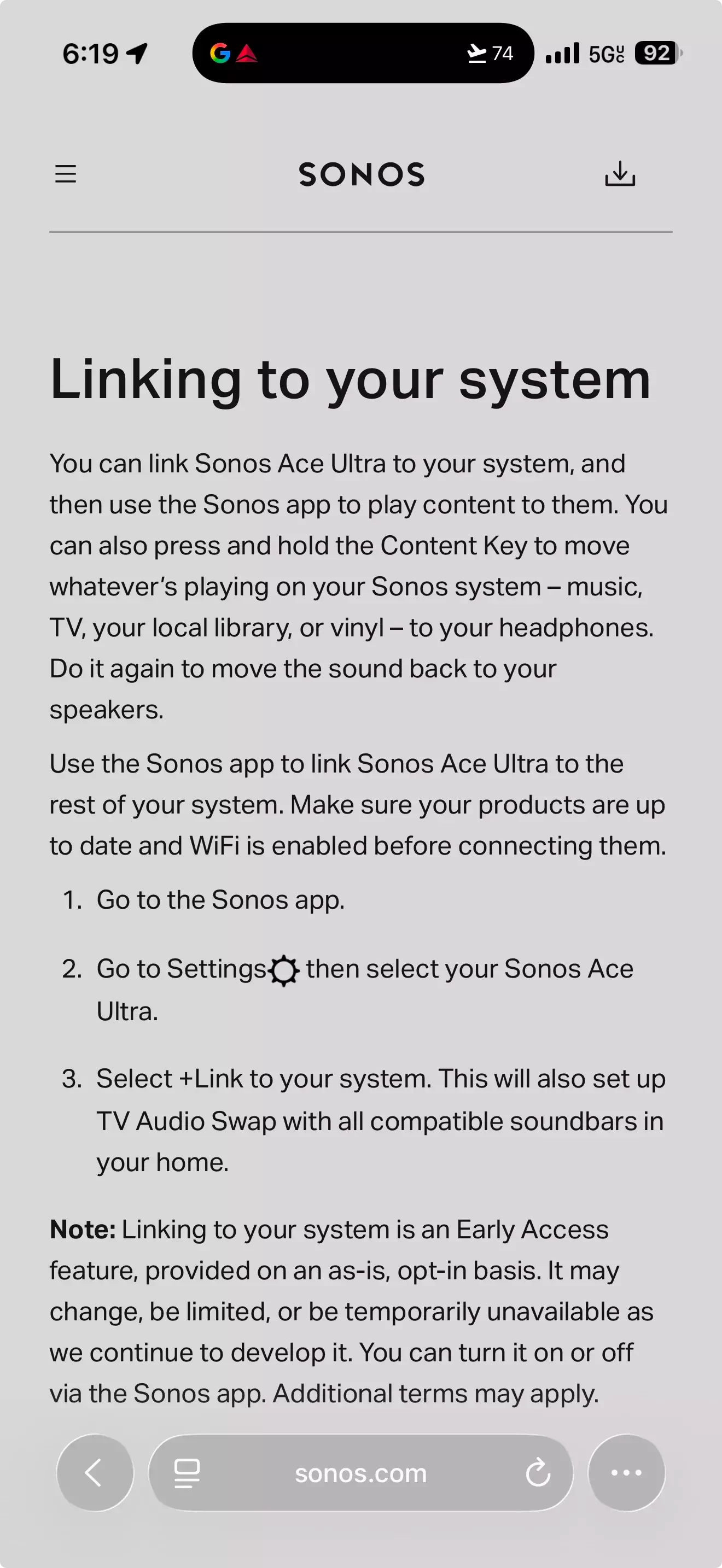
In order to add Ace Ultra to your system, you have to link it. This appears to be a one off process, like setting up TV Audio Swap is currently on Ace. You can then select Ace Ultra in the System tab to play directly to them from the support page you have previously quoted.
- You can select content to play directly to your headphones by navigating to the System tab and selecting your Sonos Ace Ultra.
- Once selected, navigate to the Home or Search tabs to select content.

- September 2, 2026
So guessing it would not link to a turntable hooked up to 2 Sonos Fives? I guess not sadly even if a speaker from the above list was also owned.
Uhhh, the Sonos Five is in the list of players. Also, the Line-In used by the turntable is a Sonos source and can be played on any Sonos player. So you would choose the Line-In source on any player from that list (including the Fives), link the Ace Ultra to that player, and drop the needle.

 +14
+14- Headliner I
- September 2, 2026
So guessing it would not link to a turntable hooked up to 2 Sonos Fives? I guess not sadly even if a speaker from the above list was also owned.
Uhhh, the Sonos Five is in the list of players. Also, the Line-In used by the turntable is a Sonos source and can be played on any Sonos player. So you would choose the Line-In source on any player from that list (including the Fives), link the Ace Ultra to that player, and drop the needle.
Lol - see my other replies and you will see there is a discrepancy between the list of players on the Shop site compared to the list of players on the info page from Mr T’s link. The Five appears in one list but not the other. I was only looking at the info page link where it is not listed. Sonos just need to update the lists so that they match!
support page: https://support.sonos.com/en-gb/article/set-up-headphone-linking
- September 2, 2026
Lol - see my other replies and you will see there is a discrepancy between the list of players on the Shop site compared to the list of players on the info page from Mr T’s link. The Five appears in one list but not the other. I was only looking at the info page link where it is not listed. Sonos just need to update the lists so that they match!
support page: https://support.sonos.com/en-gb/article/set-up-headphone-linking
I see that. Even if the Five is not supposed to be on the list, you can still use the Line-In on the Fives as a source in any other Ace Ultra compatible unit.
- Author
- Local Superstar
- September 2, 2026
In order to add Ace Ultra to your system, you have to link it. This appears to be a one off process,
If you're right about this, it wouldn't be a problem for me. Linking & swapping every time I want to use the Ace Ultra would be a no go for me. I hope you're right. Can anybody confirm this?

- September 2, 2026
In order to add Ace Ultra to your system, you have to link it. This appears to be a one off process,
If you're right about this, it wouldn't be a problem for me. Linking & swapping every time I want to use the Ace Ultra would be a no go for me. I hope you're right. Can anybody confirm this?
I think you need to link to a speaker everytime you want to initiate playback over wifi. And it seems like all that entails is just pressing a button on your headphones, not anymore complicated than a Bluetooth connection.
Danny
- September 2, 2026
In order to add Ace Ultra to your system, you have to link it. This appears to be a one off process,
If you're right about this, it wouldn't be a problem for me. Linking & swapping every time I want to use the Ace Ultra would be a no go for me. I hope you're right. Can anybody confirm this?
I think you need to link to a speaker everytime you want to initiate playback over wifi. And it seems like all that entails is just pressing a button on your headphones, not anymore complicated than a Bluetooth connection.
That is not what the support pages imply.
+14- Headliner I
- September 2, 2026
Given the linking thing will be in a testing environment and could be subject to change, I will hold off ordering the Ace Ultra until it is fully available and tested. That way, I will know for sure how it will work and will have other people’s experiences to go by on what it’s like 😁That bit of wording saying ‘it may change, be limited, or be temp unavailable’ just makes me think watching and waiting is the best plan.
- Author
- Local Superstar
- September 2, 2026

 +1
+1- Sonos Staff
- September 2, 2026
Just a one off. You won't have to do it every time.
- September 2, 2026
Just a one off. You won't have to do it every time.

- Author
- Local Superstar
- September 2, 2026
Just a one off. You won't have to do it every time.
Perfect, thanks for your answer.

- September 2, 2026
Given the linking thing will be in a testing environment and could be subject to change, I will hold off ordering the Ace Ultra until it is fully available and tested. That way, I will know for sure how it will work and will have other people’s experiences to go by on what it’s like 😁That bit of wording saying ‘it may change, be limited, or be temp unavailable’ just makes me think watching and waiting is the best plan.
IMHO I don’t think Sonos is going to go all-in on a marketing campaign that specifies a unique feature such as Ace Ultra Linking and later bail-out. Doing so would seemingly sound the death-nell for Sonos or a close approximation there of.
My thinking is that during further develpment the software linking feature via the app may go silent as a matter of code adjustment. While the hardware button linking on the Ace Ultra will continue to function.
For example you can start an audio stream via the app to a speaker, delete the app and the stream will continue. At that point it becomes a hardware only control for play/pause (stop).
I may be wrong; but that’s nothing new 😂
+14- Headliner I
- September 3, 2026
Given all the great comments above, I think I may go ahead and pre order a Sand colour Sonos Ace Ultra 😁. I would then sell my current Ace on eBay. I have 1 x 15% credit left on my account so that would take approx. £59 pound off too.
- Lyricist II
- September 3, 2026
Having Sonos Ace Ultra appear as a room in the S2 app could be useful for managing it alongside the rest of a Sonos setup. It would be especially helpful if the app clearly showed when the headphones are connected and what audio source they’re currently using.

- Sonos Staff
- September 3, 2026
Hey all,
Just wanted to pop in and let you know that I’ve reached out to our Web team about the confusion around Sonos Ace Ultra compatibility. I’ll drop an update here once I’ve heard back and things have been sorted.
- September 3, 2026
I posted this in the other thread, but it’s probably more appropriate here. I think this is big and really should be in the product details. Especially since the product specs explicitly mention Lossless Audio as a feature of the headphones.
Known limitations with headphone linking
No lossless audio
Headphone link sessions utilize an SBC codec to transmit audio information to the Sonos headphones. This means that lossless or spatial audio quality is not supported via headphone linking.
+14- Headliner I
- September 3, 2026
Hey all,
Just wanted to pop in and let you know that I’ve reached out to our Web team about the confusion around Sonos Ace Ultra compatibility. I’ll drop an update here once I’ve heard back and things have been sorted.
Thanks Keith - that will be super helpful to know which list is the correct one 😄
- Sonos Staff
- September 3, 2026
I posted this in the other thread, but it’s probably more appropriate here. I think this is big and really should be in the product details. Especially since the product specs explicitly mention Lossless Audio as a feature of the headphones.
Known limitations with headphone linking
No lossless audio
Headphone link sessions utilize an SBC codec to transmit audio information to the Sonos headphones. This means that lossless or spatial audio quality is not supported via headphone linking.
I get the confusion here, however that is a limitation of headphone linking and not of the Sonos Ace Ultra itself. This is why that limitation specifically in the Headphone Linking article and not on the product page. The product can produce lossless audio, Headphone Linking cannot.
- Lyricist I
- September 3, 2026
Great to hear that setup is just a one-time process! Still, relying on SBC for Wi-Fi headphone linking feels like a missed opportunity for a premium Sonos product. Looking forward to @Keith N’s update on the compatibility list before making a final decision!
- Sonos Staff
- September 3, 2026
Great to hear that setup is just a one-time process! Still, relying on SBC for Wi-Fi headphone linking feels like a missed opportunity for a premium Sonos product. Looking forward to @Keith N’s update on the compatibility list before making a final decision!
The greatest thing about technology is that its constantly evolving and getting better with time. Here’s hoping we can bring lossless to Headphone Linking someday. 🤞🏼
+14- Headliner I
- September 3, 2026
Great to hear that setup is just a one-time process! Still, relying on SBC for Wi-Fi headphone linking feels like a missed opportunity for a premium Sonos product. Looking forward to @Keith N’s update on the compatibility list before making a final decision!
The greatest thing about technology is that its constantly evolving and getting better with time. Here’s hoping we can bring lossless to Headphone Linking someday. 🤞🏼
So long as that will be on the soon to be available ACE Ultra and not yet another new version 🤣
- September 3, 2026
I posted this in the other thread, but it’s probably more appropriate here. I think this is big and really should be in the product details. Especially since the product specs explicitly mention Lossless Audio as a feature of the headphones.
Known limitations with headphone linking
No lossless audio
Headphone link sessions utilize an SBC codec to transmit audio information to the Sonos headphones. This means that lossless or spatial audio quality is not supported via headphone linking.
I get the confusion here, however that is a limitation of headphone linking and not of the Sonos Ace Ultra itself. This is why that limitation specifically in the Headphone Linking article and not on the product page. The product can produce lossless audio, Headphone Linking cannot.
No confusion on my part. Just disappointment. I didn’t realize linking would not be lossless and the limitations page wasn’t up yet when I ordered. I’ll continue to use a Bluetooth v5.4 aptX lossless transmitter on my Port output to get lossless, like I do with the Ace. I hope it does come to Ace Ultra though. I was going to repurpose that setup.
Enter your E-mail address. We'll send you an e-mail with instructions to reset your password.