
Contributor I
November 24, 2024
Answered

Sonos UNREACHABLE from Google HOME

  • November 24, 2024
  • 157 replies
  • 8492 views

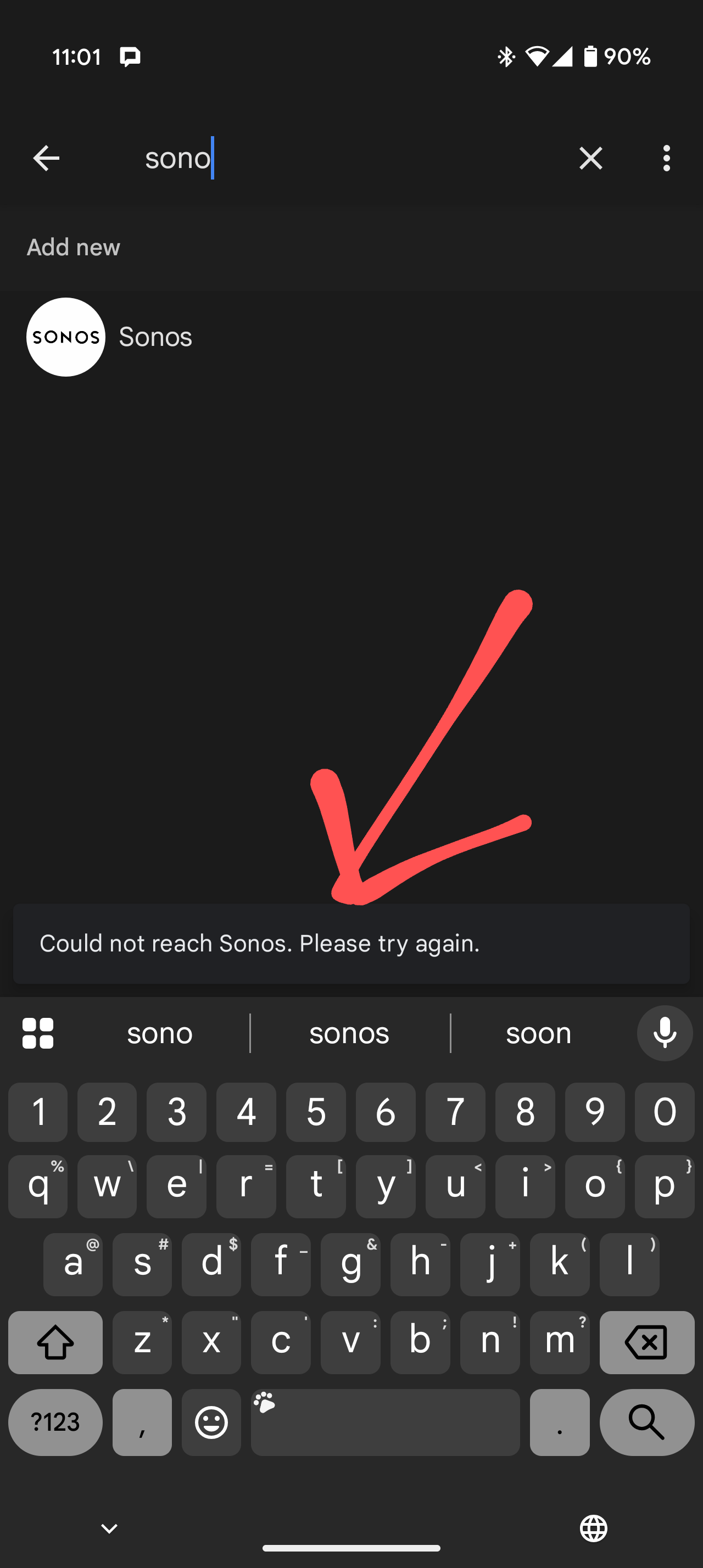
Whenever I try to link google to Sonos I get that SONOS IS UNREACHABLE error.

This has been ongoing for the past 4 days since I got my new device. At this point I am better off returning it and sticking to another brand of speakers.
 

This topic has been closed for further comments. You can use the search bar to find a similar topic, or create a new one by clicking Create Topic at the top of the page.
Best answer by Corry P

Hi ​@Kazamaza et al

We now consider this issue to have been resolved with yesterday’s update. If you still encounter issues, please ensure your Sonos system and app are up-to-date, and if the issues persists, I recommend you get in touch with our technical support team who have tools at their disposal that will allow them to give you advice specific to your Sonos system and what it reports.

I hope this helps.

157 replies

Lyricist I
December 1, 2024

This starts to get very annoying and has been going on for several weeks now. I ll start looking for a system that WILL work with goigle home instead... Its on my christmass wishlist now :)

Ok, not joking, this needs to be solved quickly!

Lyricist I
December 1, 2024

Here in Netherlands also same issue ​@SONOS please share a resolution.

Lyricist I
December 1, 2024

Having the same issue while trying to connect to Sonos in the Google Home app on iOS. Getting the same result as ​@Hurta. It momentarily says “Sonos linked” then shows “Something went wrong. Try again”.

Same. Been like this since Saturday….

Im in Canada. Sonos are you going to address this or fix it???

Agree also here in Netherlands ​@SONOS fix it 

Lyricist I
December 1, 2024

Same problem here in Sweden. Extremely frustrating 

Lyricist I
December 1, 2024

Sadly this has been a problem for months, just tried again. Sonos please wake up and help your costumers 😔.

Im in Denmark, and is a part of countries were this should be available. 
 

And then


Trending Lyricist I
December 1, 2024

If this is central problem and it have been a problem for pretty long time according to posts in this forum. How do we get in touch with Sonos outside of this forum. I have mailed to ceo mail, but it's 0% chance he will read the mail.

Lyricist I
December 1, 2024

Same problem here in Belgium.


Tried, in this order:

Removing my home in the Home app and adding every single smart home device again, all were added fine except Sonos.

I also use Google Nest Pro Wifi 6E, and by resetting my Home app the internet was gone, so set that up again as well. Used same network name and password and all devices reconnected without an issue, even Sonos.

Disconnecting all Sonos speakers from power supply for 30 sec.

Using a different Android phone to do the Home to Sonos setup.

All to no avail...

Ken_Griffiths
December 1, 2024

The Sonos Staff appear to acknowledge the issue here (see link) - posted just before the weekend period, but it appears the investigation was ongoing at the time…

https://en.community.sonos.com/google%2Dassistant%2Dand%2Dsonos%2D229109/google%2Dassistant%2Dvanished%2Dand%2Dcannot%2Dbe%2Dadded%2Dback%2Don%2Dbeam%2Dgen%2D1%2D6923034/index2.html?postid=16826075#post16826075#post16826075

I see the issue too. Hopefully the matter will get resolved at some stage in the not too distant future.

Lyricist I
December 1, 2024

Same here, just moved house and trying to add my Sonos account to my new Google Home. On Android I’ve been getting “Could not reach Sonos” for the past week, on an iOS device it’s just saying “Something went wrong” at the same point in the process.

Can anybody from Sonos at least acknowledge this problem and confirm that it’s being looked in to please?

Thanks

Lyricist III
December 1, 2024

Same issue here in Belgium. Cannot add my Sonos system in Google home. Tried rebooting my internet router, resetting Sonos devices, changing wifi, no luck. I get the error 'Cannot reach Sonos. Please try again'. Any update on this issue?