Why Isn't the Sub on/off switch on the speaker output selector pop up window?

  • April 6, 2026
  • 23 replies
  • 147 views

Forum|alt.badge.img+1

I have a mini sub and I typically have it turned off out of respect for my neighbors.  When I decide to turn the sub on or off there are about 7 or 8 taps/steps I need to go through to achieve that.  It’s not so much the taps but more about remembering the mapping to get there each and every time.

So here is my suggestion….. and Its crystal clear in the image below that I created for you.  Include the sub at the bottom of the output selector page and even though it doesn’t have a volume you could use the slider to adjust the amount of bass.  Plus I can turn it on or off RIGHT THERE!!!!  No more 8 steps to turn on and then another 8 steps to turn it off.  I just saved your customer 16 steps.
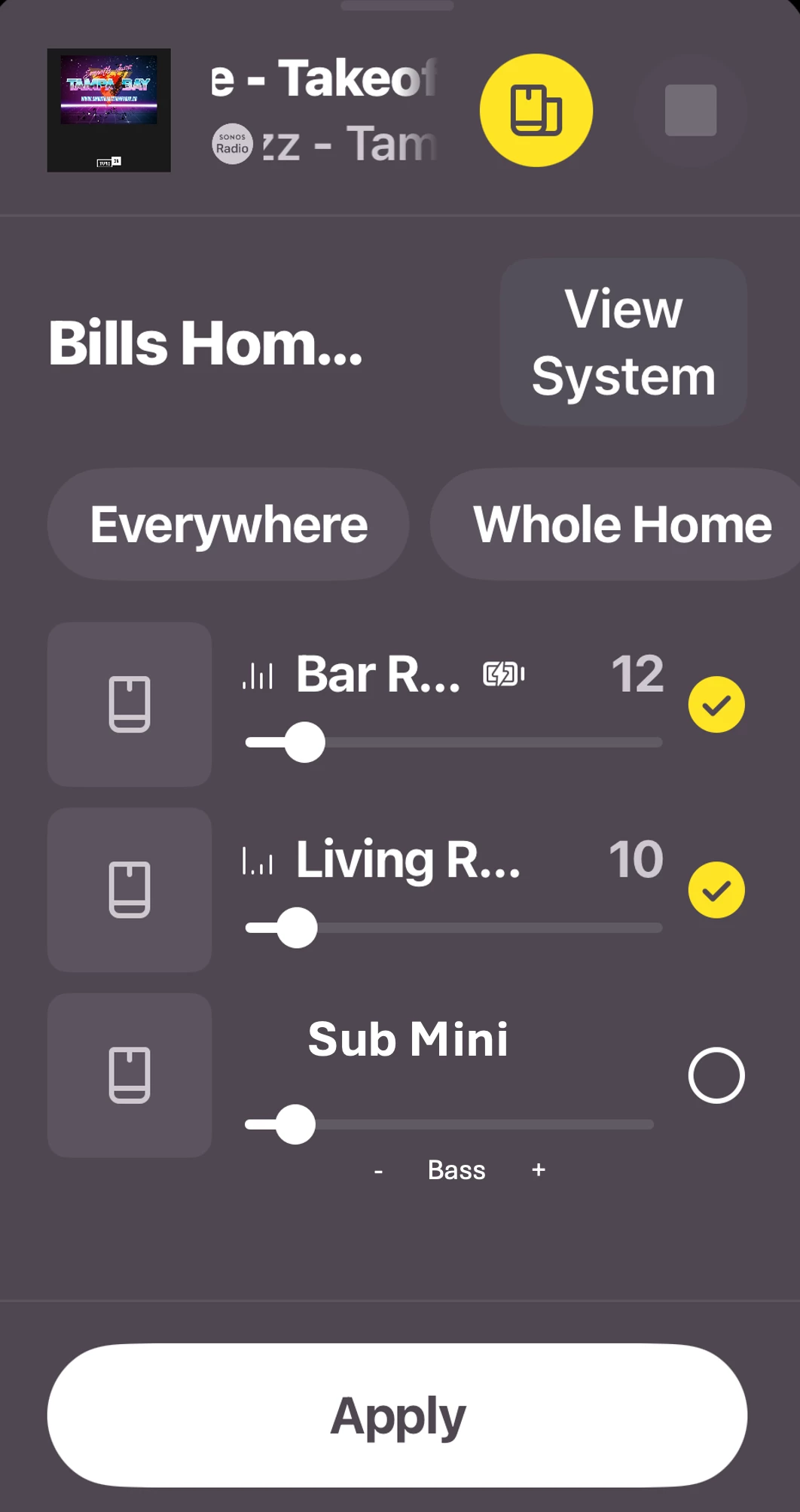
You can’t make it any easier than THAT!  😊   Plus I know engineers love to complicate things so they could add a toggle under the Sub Mini options to “SHOW/HIDE” the sub control in the Output Selector page if so desired.  That way the Output Selector won’t get too full if the user doesn’t find this helpful.

 

23 replies

MoPac
Forum|alt.badge.img+19
  • Headliner III
  • April 6, 2026

 That would be cool.  At this point though the Sub is not a separate “Room”.  Don’t know if it would help to just drop the bass level by the max allowed.


jgatie
  • April 6, 2026

That’s not the “Output Selector page”, it’s the Room Grouping screen.  It’s purpose is to group a room or rooms to other rooms.  I’d find it extremely confusing if one check box caused a room to group or ungroup, and another turned a single unit within a room on/off.  Also listing a Sub, which is part of a room, separately from the room itself, plus other rooms, is not logical at all. 

Personally, I have neighbors on both sides and on my ceiling, and I’ve never found the need to turn off my sub(s).  Also, I count 4 steps to turn one off - Tap Settings, Room Name, Sub Audio, switch to Off.  


Stanley_4
  • Grand Maestro
  • April 6, 2026

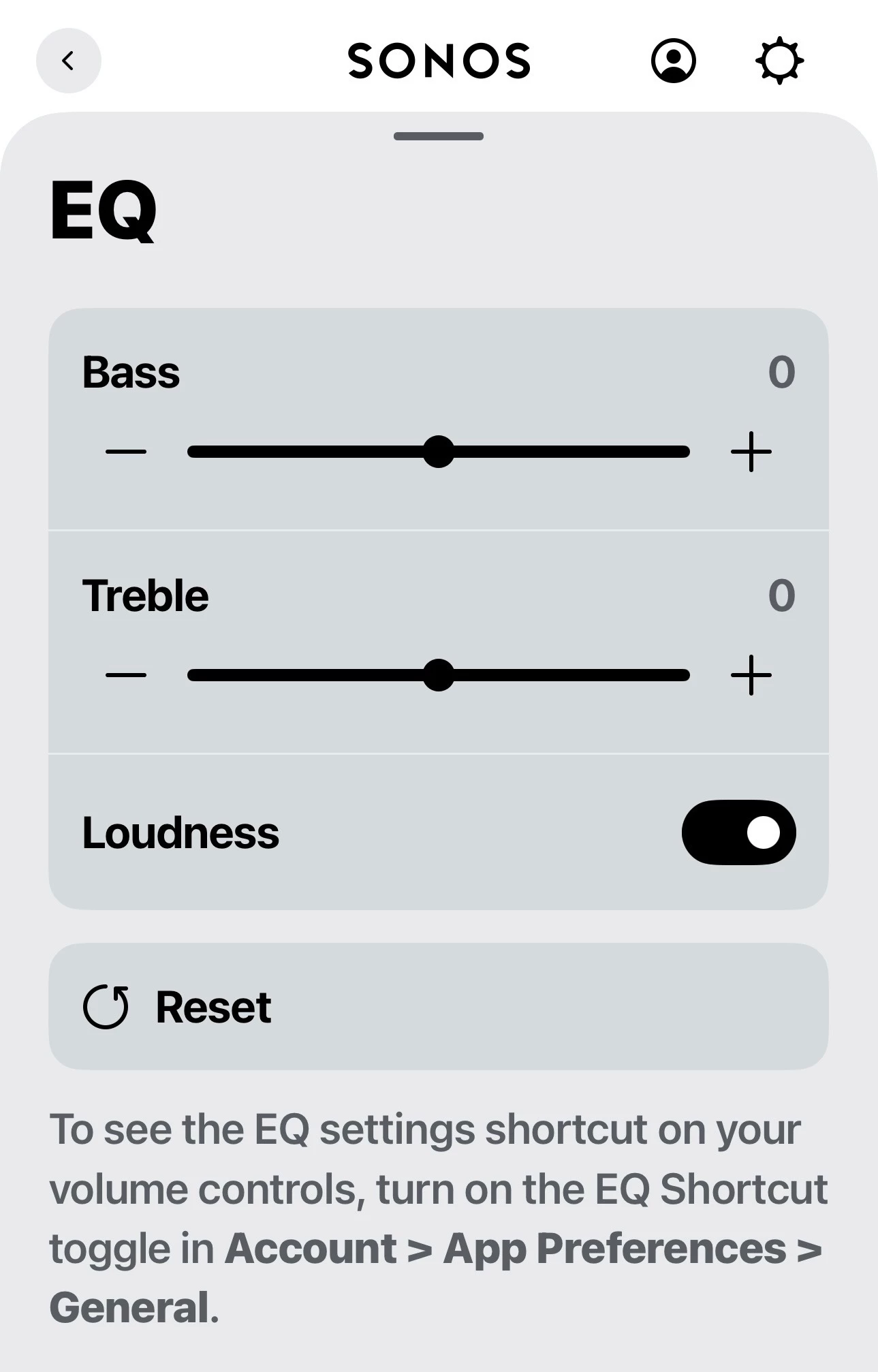
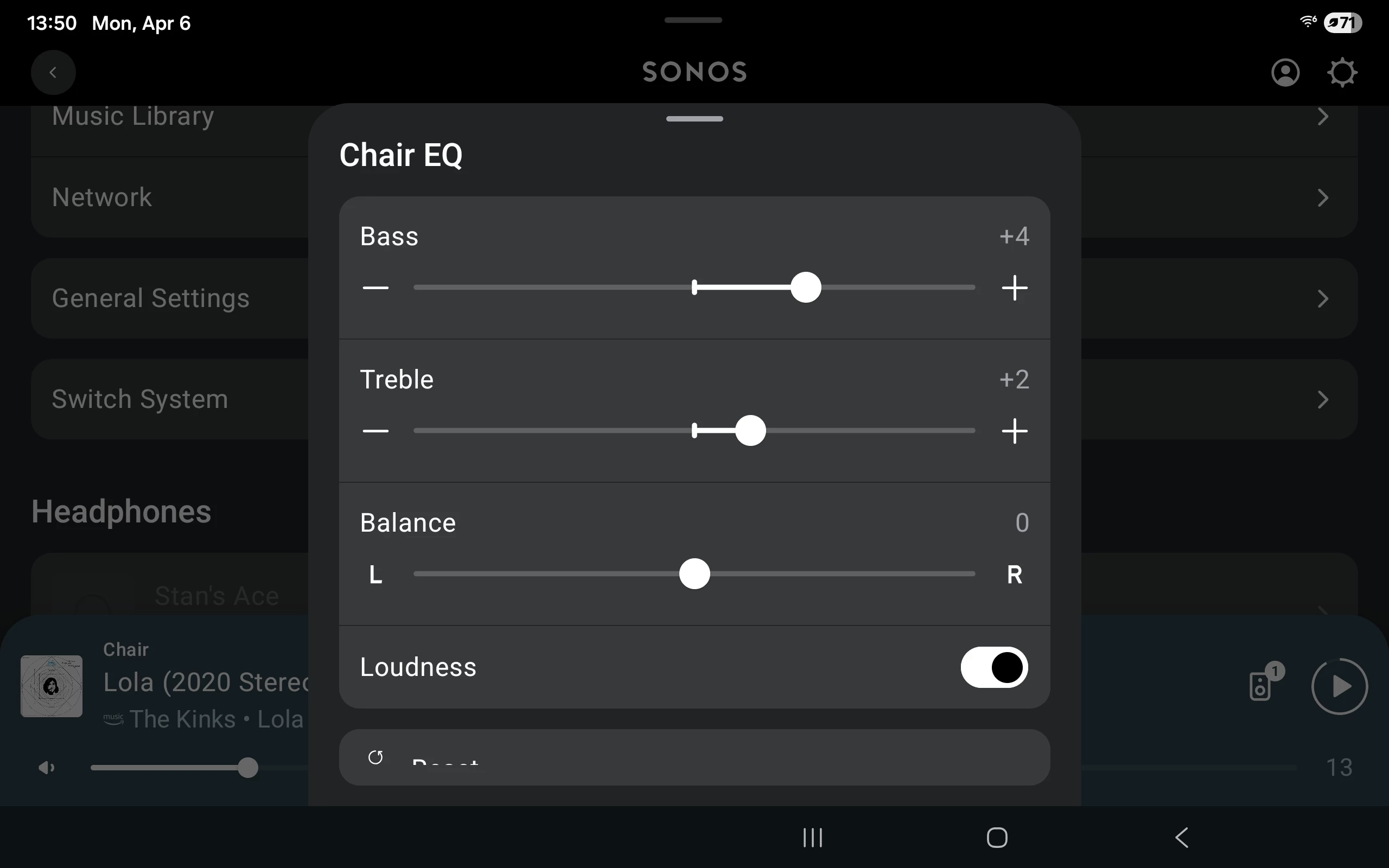
Maybe on the equalization screen that pops up from the volume control screen to go with the Loudness toggle? 


Forum|alt.badge.img+19
  • Senior Virtuoso
  • April 7, 2026

When I decide to turn the sub on or off there are about 7 or 8 taps/steps I need to go through to achieve that. 


How are you doing it? Settings (step/tap1), <choose room> (step/tap2), Sub Audio (step/tap 3), and there’s the Sub on/off toggle. 


106rallye
Forum|alt.badge.img+18
  • April 7, 2026

Not sure if Sonos would want to do this. As I understand it the speaker the Sub (Mini) is connected to will alter it's sound profile because (some of) the bass is taken care of by the Sub. I'm not sure this profile changes when you simply turn off the Sub, so you'd have no base at all ans ist would not be up to Sonos’sound quality standards. If this was possible wouldn't the system have to remember different sound profiles? Even  more so when the room is Trueplayed?


Mr. T
  • April 7, 2026

I wondered why the app mock-up was based on a historic version of the app…


From the “Output Selector”, you can now click on the device pic to take you to that particular room’s settings. You still have to scroll down, even more so now, due to the absurd design decision to put large device pics at the top of each room to locate the Sub Audio option. But that is another method to currently access the Sub On/Off control toggle.


Stanley_4
  • Grand Maestro
  • April 7, 2026

Not sure if Sonos would want to do this. As I understand it the speaker the Sub (Mini) is connected to will alter it's sound profile because (some of) the bass is taken care of by the Sub. I'm not sure this profile changes when you simply turn off the Sub, so you'd have no base at all ans ist would not be up to Sonos’sound quality standards. If this was possible wouldn't the system have to remember different sound profiles? Even  more so when the room is Trueplayed?

This isn't asking for something new, just easier access to something already in the app.


Stanley_4
  • Grand Maestro
  • April 7, 2026

From the “Output Selector”, you can now click on the device pic to take you to that particular room’s settings

You still have to scroll down, even more so now, due to the absurd design decision to put large device pics at the top of each room to locate the Sub Audio option. 

That shortcut is something I will use several times a day, and never even suspected it existed.

Does it seem like the app is designed by people that don't actually use the app? Even on my huge (pre cataract surgery) 12" tablet using it is frustrating, particularly in landscape mode.


Mr. T
  • April 7, 2026

From the “Output Selector”, you can now click on the device pic to take you to that particular room’s settings

You still have to scroll down, even more so now, due to the absurd design decision to put large device pics at the top of each room to locate the Sub Audio option. 

That shortcut is something I will use several times a day, and never even suspected it existed.

Does it seem like the app is designed by people that don't actually use the app? Even on my huge (pre cataract surgery) 12" tablet using it is frustrating, particularly in landscape mode.

I only found the shortcut existed after someone posted about it on r/sonos a few months ago.

There are certainly some questionable design decisions that have been made and continue to be made in recent updates. The Sonos app is definitely not optimised for tablet use. I can see more detail in some popup menus on my iPhone Pro Max than I can on my iPad Pro! 


Forum|alt.badge.img+1
  • Author
  • Avid Contributor I
  • April 7, 2026

 That would be cool.  At this point though the Sub is not a separate “Room”.  Don’t know if it would help to just drop the bass level by the max allowed.


I see what you’re saying. But what if it was just a simple on off and possibly if the sub would align itself right underneath the speakers of that room??  There is a way to do this. And it would be helpful. Thank you for your input


Forum|alt.badge.img+1
  • Author
  • Avid Contributor I
  • April 7, 2026

Maybe on the equalization screen that pops up from the volume control screen to go with the Loudness toggle? 


That’s a smart idea.  There’s a way that they can do this and I’m sure they’re smart enough to figure it out  I think it would be a great addition  Thank you for your in


Forum|alt.badge.img+1
  • Author
  • Avid Contributor I
  • April 7, 2026

Maybe on the equalization screen that pops up from the volume control screen to go with the Loudness toggle? 


That’s a smart idea.  There’s a way that they can do this and I’m sure they’re smart enough to figure it out  I think it would be a great addition  Thank you for your input

When I decide to turn the sub on or off there are about 7 or 8 taps/steps I need to go through to achieve that. 


How are you doing it? Settings (step/tap1), <choose room> (step/tap2), Sub Audio (step/tap 3), and there’s the Sub on/off toggle. 

Yes, you busted me on that. It’s not quite as in depth, but there’s still a lot of changing windows and scrolling in order to find the toggle.  My job in our company is to make things easier, and I am always looking for shortcuts and ways to simplify things that are easy to understand from a consumers point of view and not an engineers point of view. But thank you for your input. That was very helpful.


Forum|alt.badge.img+1
  • Author
  • Avid Contributor I
  • April 7, 2026

I wondered why the app mock-up was based on a historic version of the app…


From the “Output Selector”, you can now click on the device pic to take you to that particular room’s settings. You still have to scroll down, even more so now, due to the absurd design decision to put large device pics at the top of each room to locate the Sub Audio option. But that is another method to currently access the Sub On/Off control toggle.

That’s a good observation. I did that mock up a year back when the big update was first released and it didn’t seem to go anywhere so I thought I would follow up.  Obviously, it’s time I need to update that mock up picture  Thank you for pointing that out


Mr. T
  • April 7, 2026

I wondered why the app mock-up was based on a historic version of the app…

That’s a good observation. I did that mock up a year back when the big update was first released and it didn’t seem to go anywhere so I thought I would follow up.  Obviously, it’s time I need to update that mock up picture  Thank you for pointing that out

I can’t see the Sub addition to the “Output Selector”/Grouping menu being something that is implemented for reasons already stated above.

However, I wouldn’t be against toggles for Sub and Surrounds being added to the TV Audio Now Playing popup, in addition to existing Night Sound and Speech Enhancement options. A large proportion of the TV Audio Now Playing popup is a bland outline of a television and soundbar and I imagine majority of cases when users want to toggle Sub off are for late night TV viewing rather than streaming music. If it is the latter, then they can continue doing it in the room’s settings.


melvimbe
  • April 7, 2026

Not sure if Sonos would want to do this. As I understand it the speaker the Sub (Mini) is connected to will alter it's sound profile because (some of) the bass is taken care of by the Sub. I'm not sure this profile changes when you simply turn off the Sub, so you'd have no base at all ans ist would not be up to Sonos’sound quality standards. If this was possible wouldn't the system have to remember different sound profiles? Even  more so when the room is Trueplayed?


I agree with this.  This issue isn’t so much that that sub is on, but that the user temporarily wants to lower the bass volume.  If you turned off the sub, without lowering the bass, I think Sonos actually will try and compensate for the missing sub by having the woofers on the other speakers in the room cover those lower notes. Wouldn’t just lowering the bass via the equalizer be a better option?  Even if you don’t want to do that for some reason, you can go into settings and lower the relative volume of the sub.


Mr. T
  • April 7, 2026

That’s not the “Output Selector page”, it’s the Room Grouping screen.  It’s purpose is to group a room or rooms to other rooms.  I’d find it extremely confusing if one check box caused a room to group or ungroup, and another turned a single unit within a room on/off.  Also listing a Sub, which is part of a room, separately from the room itself, plus other rooms, is not logical at all. 

Personally, I have neighbors on both sides and on my ceiling, and I’ve never found the need to turn off my sub(s).  Also, I count 4 steps to turn one off - Tap Settings, Room Name, Sub Audio, switch to Off.  

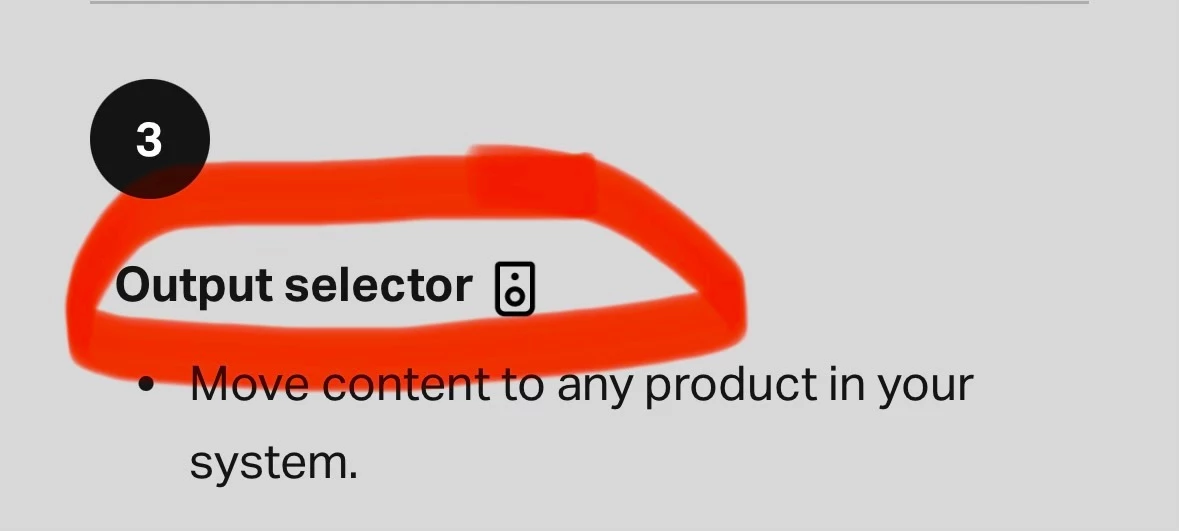
Sonos literally refer to the speaker icon as the “Output Selector” in the app user guide, so not unreasonable for a user to then refer to the subsequent popup as the Output Selector window.


jgatie
  • April 7, 2026

Sonos literally refer to the speaker icon as the “Output Selector” in the app user guide, so not unreasonable for a user to then refer to the subsequent popup as the Output Selector window.


If so, I apologize.  It’s a stupid name though, IMHO.  Grouping is a bit different from selecting what units within a room are going to be “output” to, as the OP found out. 

That aside, my comments still stand . . . listing a Sub which is only part of a room in the same list as actual rooms to be grouped is confusing at best.  As an example, if I select my Living Room Sub and the single Play:1 in my kitchen for “Output”, what is supposed to happen?  Logic would say the Sub will be magically unbonded from the Living Room and then bonded to the Kitchen to play along with the Play:1, and we all know that’s not happening. 


Forum|alt.badge.img
  • Lyricist III
  • April 7, 2026

Sonos literally refer to the speaker icon as the “Output Selector” in the app user guide, so not unreasonable for a user to then refer to the subsequent popup as the Output Selector window.


If so, I apologize.


Mr. T
  • April 7, 2026

Sonos literally refer to the speaker icon as the “Output Selector” in the app user guide, so not unreasonable for a user to then refer to the subsequent popup as the Output Selector window.


If so, I apologize.  It’s a stupid name though, IMHO.  Grouping is a bit different from selecting what units within a room are going to be “output” to, as the OP found out. 

That aside, my comments still stand . . . listing a Sub which is only part of a room in the same list as actual rooms to be grouped is confusing at best.  As an example, if I select my Living Room Sub and the single Play:1 in my kitchen for “Output”, what is supposed to happen?  Logic would say the Sub will be magically unbonded from the Living Room and then bonded to the Kitchen to play along with the Play:1, and we all know that’s not happening. 

Yes, not the most logical of terms to use in the app guide, but understand why the OP used that terminology.

I otherwise agree with your comments, having a device that is already part of a room included as a separate entry in the grouping menu would be confusing. Not to mention users with multiple Subs/Sub Minis in their overall system and somehow having to differentiate between them. So I can’t see this feature request ever seeing the light of day.


Stanley_4
  • Grand Maestro
  • April 7, 2026

The later suggestions, like on the TV screen with the Night Sound, and on the equalization screen with the Loudness, would be a good add though.


MoPac
Forum|alt.badge.img+19
  • Headliner III
  • April 7, 2026

Maybe on the equalization screen that pops up from the volume control screen to go with the Loudness toggle? 


 I’m on up-to-date IOS.  Don’t see the EQ popup from the volume screen.  How do I get the EQ to pop up?


Mr. T
  • April 7, 2026

Maybe on the equalization screen that pops up from the volume control screen to go with the Loudness toggle? 


 I’m on up-to-date IOS.  Don’t see the EQ popup from the volume screen.  How do I get the EQ to pop up?

You need to enable the EQ shortcut toggle first under > Account > App Preferences… before seeing the EQ shortcut icon after interacting with the volume slider.


Forum|alt.badge.img+19
  • Senior Virtuoso
  • April 8, 2026

When I decide to turn the sub on or off there are about 7 or 8 taps/steps I need to go through to achieve that. 


How are you doing it? Settings (step/tap1), <choose room> (step/tap2), Sub Audio (step/tap 3), and there’s the Sub on/off toggle. 


Yes, you busted me on that. It’s not quite as in depth, but there’s still a lot of changing windows and scrolling in order to find the toggle.  My job in our company is to make things easier, and I am always looking for shortcuts and ways to simplify things that are easy to understand from a consumers point of view and not an engineers point of view. But thank you for your input. That was very helpful.


So if I understand you correctly, you admit it’s only three steps rather than the 7 or 8 you first claimed, but 3 is still too many steps? There will (almost) always need to be 2: <select room> and <audio controls> or something similar, to pull up a Sub on/off toggle (or there’s a lot of scrolling to find all the features for settings in a room). So all the engineering effort is to potentially save one step?