


Answered

Update shows different versions

  • August 2, 2026
  • 8 replies
  • 89 views

Dogdad
Forum|alt.badge.img+16

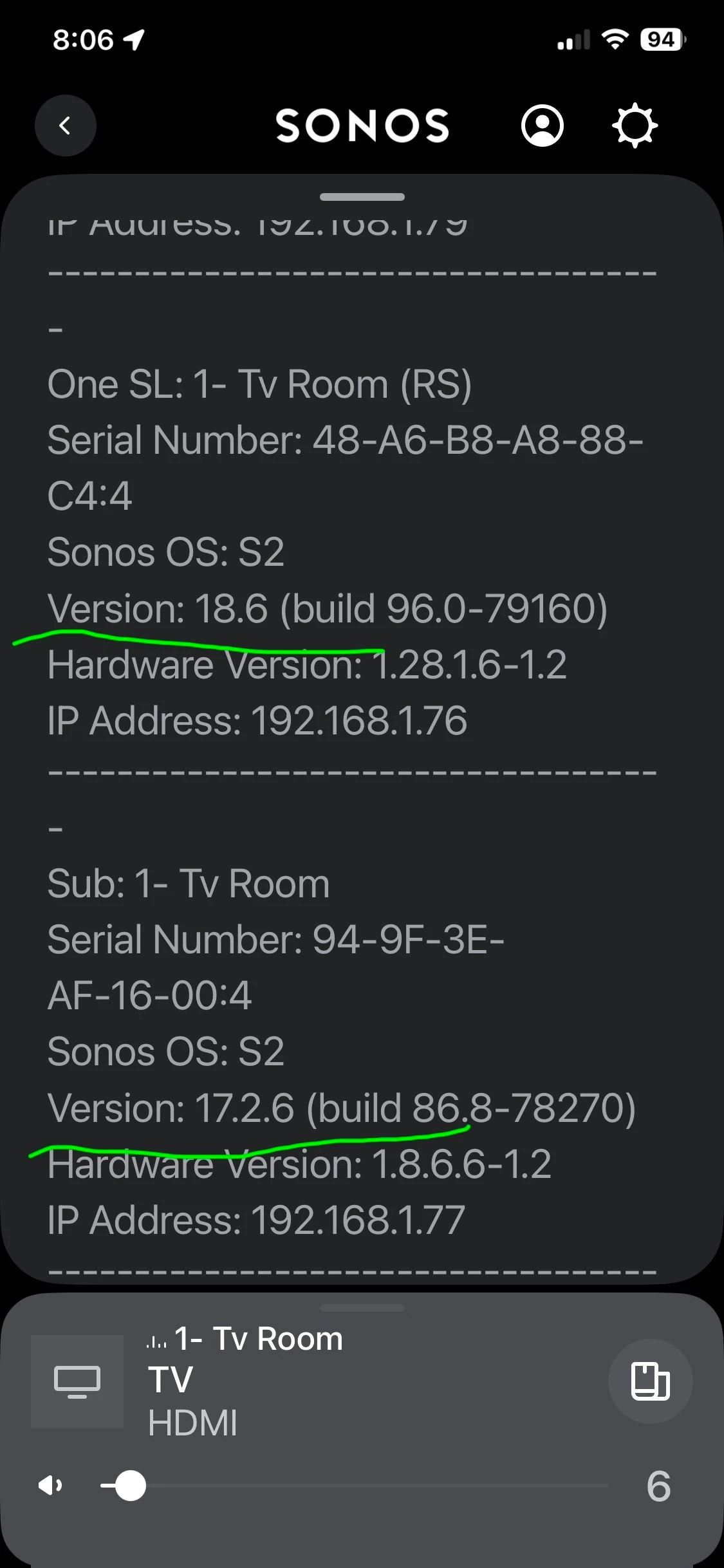
I bit the bullet and did the Sonos update after probably two years. System seems fine . I did notice that one of my subs shows version 17.2.6 and all my other 13 speakers show version 18.6. Normal or does it need to be matched up and if so, how? Thanks 
 

Best answer by Airgetlam

It’s certainly not uncommon for older devices to be on different firmware releases. 
 

I am currently on a variety from 18.6 to 17.2.6, depending on what version is required for older devices. 

8 replies

AjTrek1
  • August 2, 2026

Try running the update again. However, if that’s a Sub 1 (1st gen) it’s quite possible it won’t update beyond that version/build. Call Sonos Tech Support for a definitive answer.


Airgetlam
  • Answer
  • August 2, 2026

It’s certainly not uncommon for older devices to be on different firmware releases. 
 

I am currently on a variety from 18.6 to 17.2.6, depending on what version is required for older devices. 


Dogdad
Forum|alt.badge.img+16
  • Author
  • Headliner III
  • August 2, 2026

Try running the update again. However, if that’s a Sub 1 (1st gen) it’s quite possible it won’t update version/beyond that build. Call Sonos Tech Support for a definitive answer.

How can I tell what generation the sub is? You’re probably correct as I’ve had it a few years. 


Stanley_4
  • Grand Maestro
  • August 2, 2026

Firmware / system release notes show this:

https://support.sonos.com/en-us/article/release-notes-sonos-system-updates

Current system version
96.0-78270
Release date: 7/14/2026

Current legacy system version
86.8-78270 7/14/2026


App release notes:

https://support.sonos.com/en-us/article/release-notes-sonos-app-updates


AjTrek1
  • August 2, 2026

Try running the update again. However, if that’s a Sub 1 (1st gen) it’s quite possible it won’t update version/beyond that build. Call Sonos Tech Support for a definitive answer.

How can I tell what generation the sub is? You’re probably correct as I’ve had it a few years. 

Log into your account @ Sonos.com > click on the head icon > Select System.


Different versions can happen after a long update gap. Try a manual update in the Sonos app and reboot the Sub. If it still stays on 17.2.6, check its connection or try removing and adding it again.


Forum|alt.badge.img+18
  • Local Superstar
  • August 2, 2026

There are different versions of versions 🙄

Sonos uses the terms ‘versions’ and ‘builds’ depending where you look, sometimes a build number is listed as a version number.

The release notes refer to system ‘versions’ that are referred to ‘builds’ in the About my system, should be consistent.

Also, as per ​@Stanley_4 , Since 8/5/25 90.x build release, the release notes state:

Starting today, some older Sonos players will feature a distinct firmware version compared to newer devices, a change designed to maintain product support and enable future innovations without impacting your current high-quality listening experience. These players will continue to receive essential updates, ensuring they are not 'frozen'.


I remember that day well, it was the day I decided to eBay all my older Sonos products for 50% what I paid for them, some 13 years old.

Different versions can happen after a long update gap. Try a manual update in the Sonos app and reboot the Sub. If it still stays on 17.2.6, check its connection or try removing and adding it again.

Sub Gen1 & Gen2 run legacy builds (as per links above), so its not a connection issue.


Stanley_4
  • Grand Maestro
  • August 2, 2026

Unlike the S1 S2 split I haven't had any usability issues from the Legacy firmware split.

The original S1 S2 had to happen as the Linux system Sonos is based on would no longer fit on the S1 devices and trying to backport needed software (like Samba) was no longer a viable option. Essential security stuff is still being maintained on S1 though. 

The Legacy split just means some new features won't be available on older S2 devices, not that they will no longer interoperate with the newer S2 ones.

Until I see something from this that impacts my use I'm not selling my multiple older S2 Sonos devices.

Has anyone noticed an impact from the Legacy split.

