I hate SONOS now!!!!

  • February 25, 2026
  • 44 replies
  • 1171 views

Show first post

44 replies

MoPac
Forum|alt.badge.img+20
  • Headliner III
  • April 8, 2026

The code for Sonosnet is WM:0 (see Check if Sonos is in a wireless or wired setup | Sonos). S2 is the operating system you are on. When one (older - the newer devices do not do Sonosnet) device is connected by cable all (older) devices go over to Sonosnet. So if you want to go over to full wifi no device should be cable connected. 

Maybe this will help too: Recommended settings for using Sonos on wireless networks | Sonos

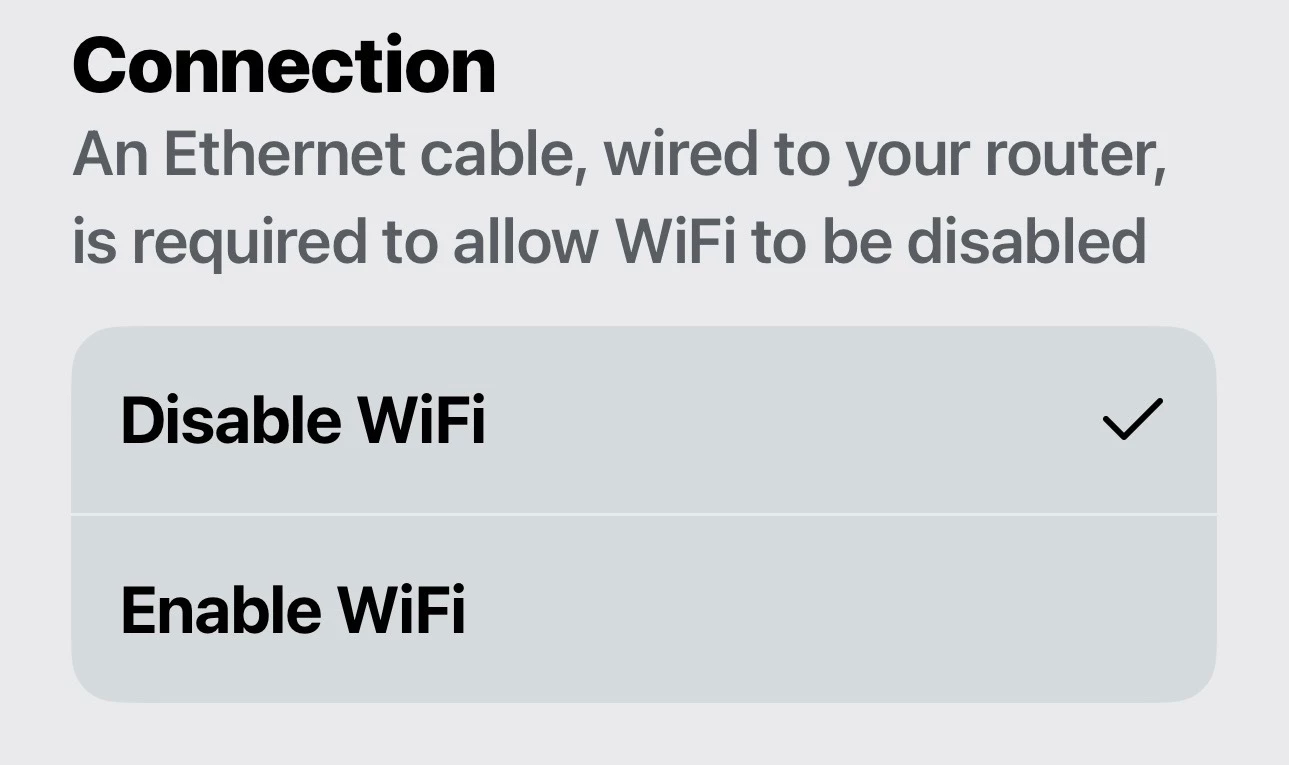
 I have a Port connected via Ethernet.  It’s OK to do that as long as you turn Disable WiFi on the Sonos device connected via Ethernet.  That option, in my case, is in Settings-Port (Room name)-Port (under Product)-Disable WiFi.  This keeps the Sonos device from broadcasting SonosNet.


Stanley_4
  • Grand Maestro
  • April 8, 2026

Of course if you believe the label that says "disable wifi" you will find you have issues with things that require the internal radio be active.

Not an issue on the Port but if you want surrounds or a Sub in that Room you'll need the radio active.


MoPac
Forum|alt.badge.img+20
  • Headliner III
  • April 8, 2026

@Stanley_4:

 Got a question…. I have a Sonos Arc.  At this time it is connected to the network wirelessly.  If I wired the Arc it would then broadcast the 2.4 SonosNet.  So your saying if I checked Disable WiFi on the Arc that I would loose both the 2.4 SonosNet & the proprietary 5 for bonded speakers?


Airgetlam
  • April 8, 2026

It’s been covered extensively, the ‘Disable WiFi’ is mislabeled. It in fact disables all radio emissions from the device, not only what we call SonosNet, but also any 5Ghz transmissions to the surrounds. They should continue to work, if they’re also wired to your router. But if they aren’t wired, they should stop working.

I’d think this is fairly easy to test. 


Stanley_4
  • Grand Maestro
  • April 8, 2026

I tried the wired Arc, with the wifi/radio disabled and Ethernet to a Sub and surrounds a long time back and my network didn't do a great job of getting good the music to them. Ethernet to any of my Sonos is long gone and my home wifi and the 5 gHz Sonosnet are doing a perfect job.

The 2.4 gHz Sonosnet is not available on newer Sonos making things easier.


  • Lyricist I
  • June 7, 2026

I have 20 Sonos devices. I spend so many time. Was nice but now I m done. Sorry Sonos. For small installations it is ok. But larger… you can forget. Too long… too complicated. We are in 2026.  Although you good in sound quality I have to go with other solutions. Again Sonos is good, really. But for large or complex integrations solutions… really not ideal.


AjTrek1
  • June 7, 2026

I have 32 Sonos devices and no issues. There is most definitely a network and/or configuration issue. You can give us more information about your issues and network or just run a diagnostics, make note of the reference ID (do not publish it in the community) and call Sonos Tech Support. 


Forum|alt.badge.img+1
  • Author
  • Enthusiast I
  • June 7, 2026

Maybe you could start a new thread with a focussed subject title such as “Help needed configuring eero network” and see if anyone comes forward with their working solution? 

I will try this for sure. Thanks everyone for your help. 


Forum|alt.badge.img+1
  • Author
  • Enthusiast I
  • June 7, 2026

With those devices listed, I’d downgrade everything to run on the S1 app.

What are the disadvantages of doing that for my S2 products?  And you mean to downgrade all of my S2 to S1?  Thanks. 


AjTrek1
  • June 7, 2026

Hi
Downgrading S2 products to S1 is not something I’d recommend. That’s taking your Sonos backward. It’s like trading in a 2026 model car for a 2016. Your profile doesn’t show what Sonos products you own which is another reason I can’t recommend downgrading.

Need to know why you are considering doing so as it sounds like network issues. Network issues will not be resolved by downgrading S2 products to S1.


  • June 7, 2026

With those devices listed, I’d downgrade everything to run on the S1 app.

What are the disadvantages of doing that for my S2 products?  And you mean to downgrade all of my S2 to S1?  Thanks. 

I downgraded all the devices I use for music listening to S1. All the home theater products are on S2. It may not be recommended, but it was like using the system I originally bought and loved. Especially if your internet is not the greatest.

Sonos app version compatibility

Downgrade a Sonos product to S1

Set up separate S1 and S2 Sonos systems

Known limitations with separate S1 and S2 Sonos systems


  • Lyricist III
  • June 7, 2026

With those devices listed, I’d downgrade everything to run on the S1 app.

What are the disadvantages of doing that for my S2 products?  And you mean to downgrade all of my S2 to S1?  Thanks. 

The main disadvantage is that you can’t add new s2 only Sonos products to your s1 system.
 

But the main advantage is that your older Sonos devices will run much more reliably on s1 than s2 (in my experience). You gain a few features over s2 as well. 


  • Lyricist I
  • August 20, 2026

Well, I bought into this SONOS system and it used to work awesome.  Now, it’s crap. Now I have all of these components and they're all as good as paperweights now.  I cannot get this BS system to work anymore for anything.  I have submitted diagnostics, well when the system will allow me to anyways, most the times I cannot even submit diagnostics because I can't connect to it or it just simply won’t let me.  I'm so frustrated with this system.  I have speakers in every room of my house and I sure wish I could control them.  My speakers drop off, one room will play one thing while the rest of the house is on something else or just gone.  I've spent time with the techs on the phone.  I've had to go to every single piece of equipment and unplug it and plug it back in. I just want to listen to music in my house but I guess I put all my money into the wrong system.  Anyone have a better system they are using now cause I'm ready to throw thousands of dollars away to get music in my house.  Sucks so bad.  So frustrated.  I hate SONOS now.

I don’t have as many speakers as you do but the same frustration.  Sonos used to be a good system.  


Forum|alt.badge.img
  • Enthusiast I
  • September 19, 2026

    Sept. 19, 2026: The recent system updates have created huge headaches with the Sonos system in NJ. The system comprises five Sonos speakers: 1) Playbase–den, 2) Playbase–bedroom, 3) Era 100–living room, 4) Sonos One SL–home office, and 5) Sonos One SL–basement. They all used to work perfectly and could play both content from streaming sources and content from my music library, which resides on a USB drive connected to my WiFi router. The Playbases could also, of course, play audio from the TVs to which they’re connected.

   Now, the only two speakers that are working properly are the Playbases. The Era 100 and the One SLs cannot play content from the music library. They play the first second or two of a song and then stop. Sometimes they can play streaming content, but it’s hit or miss; some stations work and others do not. I have repeatedly tried rebooting and reinstalling everything: router, speakers, etc. I tried using an Ethernet connection with on the One SLs. Nothing works. This is maddening and its not the first time that Sonos updates have crippled my system. The update on May 25, 2024 disabled the optical inputs on the Playbases and basically rendered them useless for TV audio for more than a month. I am now reluctant to recommend Sonos to friends. It is extremely disappointing. I’m trying to figure out whether I should simply replace the Sonos products with something that is more reliable. I’d be most grateful for any ideas, either about how to fix the problem or alternative products.


Stanley_4
  • Grand Maestro
  • September 19, 2026

With the Ethernet tried it probably isn't a Wi-Fi issue but it could be other network issues behind this. Mentioning the update as the cause also points to a network issue.

At this point folks start getting defensive about their network working perfectly. That is not the issue as such, the issue is that Sonos is asking something from your network the working gear isn't. The goal is to find the interoperability issue and fix or work around it.

The first steps, must be done exactly and in order:

  • Power down ALL Sonos devices.
  • Reboot the router and controller.
  • Power up the Sonos.

If that fixes the issue you can call it good, keep the fix in mind and if it becomes an aggravation you can go back to finding the root issue. Often a lot of work and maybe support calls.


buzz
  • September 19, 2026

Avoid Factory Reset because it rarely fixes fundamental issues and involves a lot of extra work. Plus, it destroys diagnostic data that could have been used by SONOS Support to discover the fundamental issue.


Forum|alt.badge.img
  • Enthusiast I
  • September 19, 2026

   9/19/2026 (more): Just for the record, I unpluged all the Sonos equipment AND the router. I waited 30 seconds after unplugging the router then I plugged it back in. Then I waited for it to restablish a connection with the Internet. Then I plugged the Sonos products back in one by one, allowing each one to join the network and testing it before going to the next one. There was no change from before. The two Playbases work perfectly; they can play both streaming content and material in my music library. The other products cannot play content from the music library. They can play some, but not all, streaming content. I have a feeling that the Era 100 and the two Sonos One SLs can handle slow data streams but not faster ones. The graphics on the Android app suggest that data from the music library is streaming from the music library to the speakers, it just isn’t coming out as sound. Bottom line: I’m no better than earlier today. I really wish I had not accepted the latest system update. The really sad part is that everything used to work PERFECTLY and I thought it was great. I loved it. Even after the problems in 2024, I recommended Sonos to so many friends. Now I feel like I owe them an apology.


Stanley_4
  • Grand Maestro
  • September 19, 2026

Rats, that eliminated the usual update problem.

There haven't been a lot of posts about the latest update and streqming issues. I do recall a report of FLAC working but WMA not, that might be throughput related.

I'd suggest submitting a diagnostic and working with support at this point, they may have more reports of any new issues and they can see internal data we users can't. 


AjTrek1
  • September 19, 2026

I’m late to this discussion…

Do you have any WiFi range extenders in your network? If so they may be the issue. The speakers having the problems could be jumping between your main router and an extender. If no extenders are involved then post haste call Sonos Tech Support!