
press250
Prodigy III
July 17, 2024

Workaround(ish): Android App Crashing with Firmware v16.3

  • July 17, 2024
  • 99 replies
  • 6394 views

Those Android users unfortunate enough to have installed the v16.3 firmware released on 17 July may have encountered a nasty bug that crashes the app over and over. Thanks to an intrepid detective on Reddit, we’ve narrowed down the bug and identified a weak workaround.

The bug causing the crash seems to be triggered by local library music. And the local library music does not need to playing, it simply needs to be in the queue of the currently selected Sonos device.

So if you are encountering this bug and your Android app is stuck crashing ...

  • Using a functioning controller* clear the queuesⵜ on all Sonos devices
  • Start Android app, everything works!
  • Play streaming source, everything works!
  • Play local library music, BOOM CRASH BOOM

… hence “weak workaround” as local library music in your queue will continue to crash the app.

* Desktop app and Web app work particularly well
ⵜ or replace the queues with streaming music

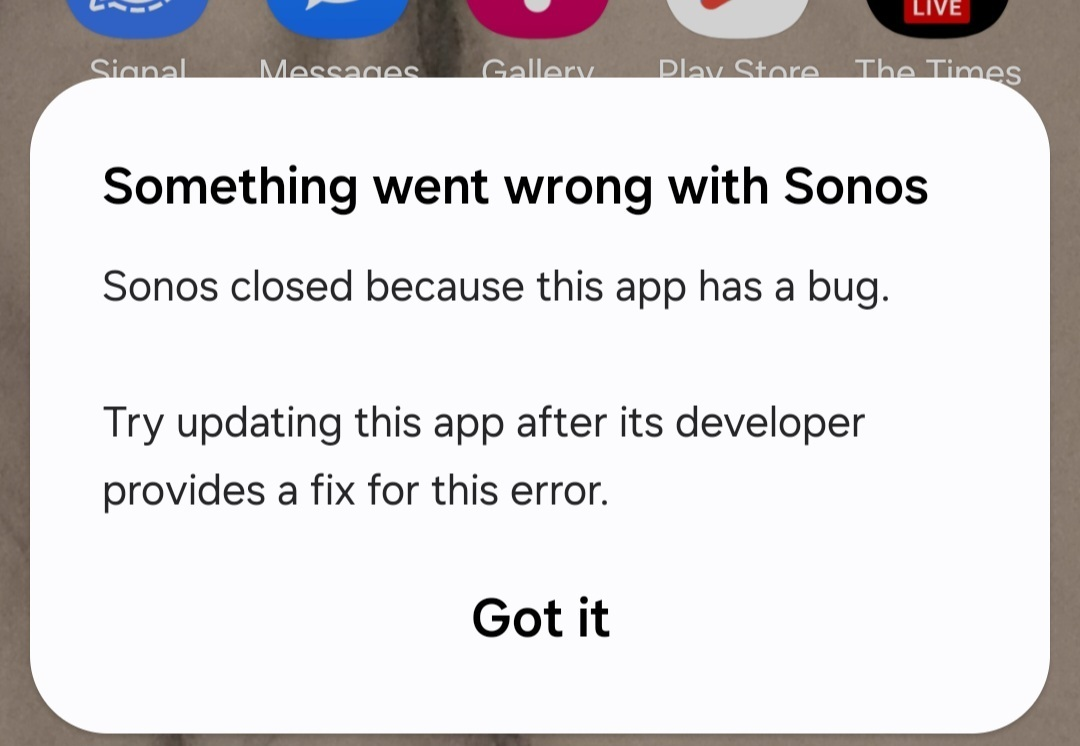
Side note: this bug is not limited to Samsung devices, tho’ it may not impact all Android devices. Samsung devices happen to display the Android OS error message shown below, while other Android devices opt to log the error without a pop-up.
 

This topic has been closed for further comments. You can use the search bar to find a similar topic, or create a new one by clicking Create Topic at the top of the page.
Pinned Reply By MiniMe

Pro-Tip: briefly unpower the speaker(s) that have the track from the LAN library in their playlist. When a speaker reboots it forgets its playlist. Like this you can also recover from the Android app crashing if you don't have another working controller.

99 replies

Enthusiast I
July 21, 2024

Here is another work around that will allow you play your library on your Android device:
 

Use the web app
https://play.sonos.com/

It seems to run faster than the android app.

HTH


I tried this on my Android phone (Google Pixel 6a), but it tells me it doesn’t support my screen size.  It works on my Windows Laptop, but the Sonos app actually already works there, so not much use for it. 

Firefox for Android option to run “Desktop Site” enables this link but interface is fiddly and requires zooming in and out.

Awesome, Thanks so much!  (Can’t believe I didn’t think of that… <facepalm>)  That worked for me and I can finally stop returning to my laptop app just to control my music.  Of course, we still need the phone app fixed, but this will save a little bit of my sanity at least.  Thanks again!!!  

Lyricist II
July 21, 2024

How do I  clear the queue when I can't get the app to open?  If I turn off the WiFi connection on my phone the app will open, but it can't see the system therefore no queue to clear.  I only run sonos on my android phone.

Like most on here I bought the speakers to listen to my local library - first time user just a couple of months ago.  Talk about bad timing!  What a nightmare, sinking all that money into two Fives, with stands, and a Roam.  Why do they despise their customers so much that they would do this to us....?

Prodigy III
July 21, 2024

How do I  clear the queue when I can't get the app to open?  If I turn off the WiFi connection on my phone the app will open, but it can't see the system therefore no queue to clear.  I only run sonos on my android phone.

Like most on here I bought the speakers to listen to my local library - first time user just a couple of months ago.  Talk about bad timing!  What a nightmare, sinking all that money into two Fives, with stands, and a Roam.  Why do they despise their customers so much that they would do this to us....?

Clear the queue using the desktop version of the Sonos app for Windows or Mac, downloadable from the Sonos website 

Enthusiast I
July 21, 2024

How do I  clear the queue when I can't get the app to open?  If I turn off the WiFi connection on my phone the app will open, but it can't see the system therefore no queue to clear.  I only run sonos on my android phone.

Like most on here I bought the speakers to listen to my local library - first time user just a couple of months ago.  Talk about bad timing!  What a nightmare, sinking all that money into two Fives, with stands, and a Roam.  Why do they despise their customers so much that they would do this to us....?

You can use a web browser on your phone and log into the website to access your system remotely: 

https://play.sonos.com/en-us/web-app

*Note: If on your phone, you may need to switch to “desktop site” (in Firefox or Chrome). 


You can also download the desktop “app” for Windows or Mac (download from Sonos website).  This will  allow you to continue using your music library, playlists, etc. - as they haven’t broken it on these apps… yet. 


However, even if you clear the queue, as soon as you create a new queue, this will crash your phone app again.  So, if you’re only trying to access your music library, and not streaming, then the phone app is pretty much dead in the water right now. 


Yes, it was some bad timing… but, I encourage you to stick with it.  Sonos seems to “overhaul” their app every few years and royally screws things up… but they do eventually get their heads out of the collective butts and fix things… just takes time.  At least that’s the pattern I’ve noticed since starting my system 10+ years ago.  I know that’s not comforting to hear when you’ve just sunk a bunch of money into a new system, but trying to find the silver lining for you.  😉

Lyricist II
July 21, 2024

How do I  clear the queue when I can't get the app to open?  If I turn off the WiFi connection on my phone the app will open, but it can't see the system therefore no queue to clear.  I only run sonos on my android phone.

Like most on here I bought the speakers to listen to my local library - first time user just a couple of months ago.  Talk about bad timing!  What a nightmare, sinking all that money into two Fives, with stands, and a Roam.  Why do they despise their customers so much that they would do this to us....?

You can use a web browser on your phone and log into the website to access your system remotely: 

https://play.sonos.com/en-us/web-app

*Note: If on your phone, you may need to switch to “desktop site” (in Firefox or Chrome). 


You can also download the desktop “app” for Windows or Mac (download from Sonos website).  This will  allow you to continue using your music library, playlists, etc. - as they haven’t broken it on these apps… yet. 


However, even if you clear the queue, as soon as you create a new queue, this will crash your phone app again.  So, if you’re only trying to access your music library, and not streaming, then the phone app is pretty much dead in the water right now. 


Yes, it was some bad timing… but, I encourage you to stick with it.  Sonos seems to “overhaul” their app every few years and royally screws things up… but they do eventually get their heads out of the collective butts and fix things… just takes time.  At least that’s the pattern I’ve noticed since starting my system 10+ years ago.  I know that’s not comforting to hear when you’ve just sunk a bunch of money into a new system, but trying to find the silver lining for you.  😉

Thanks guys.   I’ll try the web version and keep checking.  

Prodigy III
July 21, 2024

How do I  clear the queue when I can't get the app to open?  If I turn off the WiFi connection on my phone the app will open, but it can't see the system therefore no queue to clear.  I only run sonos on my android phone.

Like most on here I bought the speakers to listen to my local library - first time user just a couple of months ago.  Talk about bad timing!  What a nightmare, sinking all that money into two Fives, with stands, and a Roam.  Why do they despise their customers so much that they would do this to us....?

You can use a web browser on your phone and log into the website to access your system remotely: 

https://play.sonos.com/en-us/web-app

*Note: If on your phone, you may need to switch to “desktop site” (in Firefox or Chrome). 


You can also download the desktop “app” for Windows or Mac (download from Sonos website).  This will  allow you to continue using your music library, playlists, etc. - as they haven’t broken it on these apps… yet. 


However, even if you clear the queue, as soon as you create a new queue, this will crash your phone app again.  So, if you’re only trying to access your music library, and not streaming, then the phone app is pretty much dead in the water right now. 


Yes, it was some bad timing… but, I encourage you to stick with it.  Sonos seems to “overhaul” their app every few years and royally screws things up… but they do eventually get their heads out of the collective butts and fix things… just takes time.  At least that’s the pattern I’ve noticed since starting my system 10+ years ago.  I know that’s not comforting to hear when you’ve just sunk a bunch of money into a new system, but trying to find the silver lining for you.  😉

Thanks guys.   I’ll try the web version and keep checking.  

And the desktop version (which is different)!

Lyricist III
July 21, 2024

Easier IMO to just make Sonos playlists of the local music you want ("save queue" from the PC app), that will just let you listen to local music from any of the apps, with no crashing.... Direct local music from any app crashes the Android app, local music via Sonos playlists doesn't.

Lyricist III
July 22, 2024

Here is another work around that will allow you play your library on your Android device:
 

Use the web app
https://play.sonos.com/

It seems to run faster than the android app.

HTH


Nope. Screen size not supported 

Prodigy III
July 22, 2024

Here is another work around that will allow you play your library on your Android device:
 

Use the web app
https://play.sonos.com/

It seems to run faster than the android app.

HTH


Nope. Screen size not supported 

Try the site in ‘desktop mode’ instead. (I believe Firefox in ‘desktop mode’ works.)

robin19
Contributor I
July 22, 2024

As this month is meant to be the one when "Local music library search and playback" make a delayed return to the app, it's quite an, umm, achievement to so comprehensively break local library playback in the process. And even more annoying that they've blocked access from older versions of the app at the same time and make it difficult to access the web version of the app on a mobile device. Enjoying my music collection has never been so unenjoyable.