
press250
Prodigy III
July 17, 2024

Workaround(ish): Android App Crashing with Firmware v16.3

  • July 17, 2024
  • 99 replies
  • 6394 views

Those Android users unfortunate enough to have installed the v16.3 firmware released on 17 July may have encountered a nasty bug that crashes the app over and over. Thanks to an intrepid detective on Reddit, we’ve narrowed down the bug and identified a weak workaround.

The bug causing the crash seems to be triggered by local library music. And the local library music does not need to playing, it simply needs to be in the queue of the currently selected Sonos device.

So if you are encountering this bug and your Android app is stuck crashing ...

  • Using a functioning controller* clear the queuesⵜ on all Sonos devices
  • Start Android app, everything works!
  • Play streaming source, everything works!
  • Play local library music, BOOM CRASH BOOM

… hence “weak workaround” as local library music in your queue will continue to crash the app.

* Desktop app and Web app work particularly well
ⵜ or replace the queues with streaming music

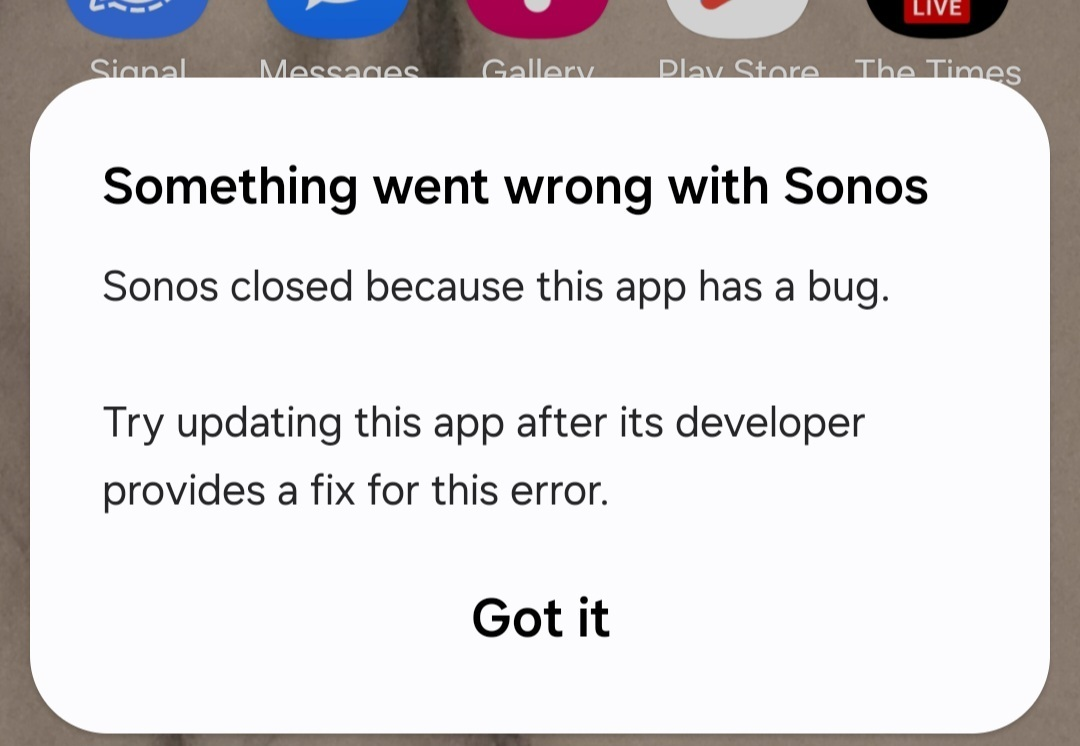
Side note: this bug is not limited to Samsung devices, tho’ it may not impact all Android devices. Samsung devices happen to display the Android OS error message shown below, while other Android devices opt to log the error without a pop-up.
 

This topic has been closed for further comments. You can use the search bar to find a similar topic, or create a new one by clicking Create Topic at the top of the page.
Pinned Reply By MiniMe

Pro-Tip: briefly unpower the speaker(s) that have the track from the LAN library in their playlist. When a speaker reboots it forgets its playlist. Like this you can also recover from the Android app crashing if you don't have another working controller.

99 replies

Lyricist I
July 19, 2024

I only listen to music from my local library so this has rendered my system totally useless.  Such poor customer support. It was bad enough when there was no local music library search.  Now my sonos system is useless.  How about rolling back the dodgy updates? It would nice to listen to my music on my not inexpensive sonos system

Lyricist III
July 19, 2024

I posted yesterday in a different thread about this same problem, here's an update I've discovered to the above posted here - you can play your local music through both the PC app and the Android app if you save whatever local music queue to a Sonos playlist. After it seemed like this was the case I tested it directly by playing a local music album from the PC app, which crashed the Android app, playing that same local music album from the Android app, which also crashed the Android app, and then from the PC app playing that same local music album but then saving the queue as a Sonos playlist, and after clearing the queue so the Android app would open again, playing the resulting playlist, which playsled from both the Android app and the PC app, without crashing the Android app.

press250
press250Author
Prodigy III
July 19, 2024

I posted yesterday in a different thread about this same problem, here's an update I've discovered to the above posted here - you can play your local music through both the PC app and the Android app if you save whatever local music queue to a Sonos playlist. After it seemed like this was the case I tested it directly by playing a local music album from the PC app, which crashed the Android app, playing that same local music album from the Android app, which also crashed the Android app, and then from the PC app playing that same local music album but then saving the queue as a Sonos playlist, and after clearing the queue so the Android app would open again, playing the resulting playlist, which playsled from both the Android app and the PC app, without crashing the Android app.

And some of you say the new app isn’t user friendly!

Trending Lyricist II
July 19, 2024

Here is another work around that will allow you play your library on your Android device:
 

Use the web app
https://play.sonos.com/

It seems to run faster than the android app.

HTH


Just tried this. Won't run on phone. Says screen size too small and directs me to Android app. I can now only control my system via Windows desktop app. Fortunately I have it installed on 3 PCs (2 laptops and a desktop) but it is far less convenient than controlling via the phone.

Sonos seem to have taken a bad situation and actually made it worse. Who knew that was even possible?

Lyricist II
July 19, 2024

I had the same problem with the web app. I found that in Chrome you need to choose the desktop site option (that’s on the drop-down … menu). You have to zoom the screen but it works.
I also found that on Linux the web app doesn’t work properly but Chrome does.

Enthusiast II
July 19, 2024

They’ve literally made the horrible app even worse. 
 

This company is dead in the water. It’s over. 

Contributor I
July 19, 2024

Thanks for the ‘workaround’ for the latest pathetic app update - even though it means that yet again, I can’t use my music library on Sonos. What a joke. The app (on a Pixel 8) kept crashing constantly, so I cleared the queues on the desktop app. At least for now I can use streaming services, which I assume is what Sonos wants to force us into anyway by screwing up this app over and over. I invested in the Sonos system specifically to play my personal music library. At this point, it looks like Enron might have been a better investment.

Trending Lyricist I
July 19, 2024

Here’s hoping this firmware push is laying the ground work for the next App update and they are just now incompatible.

Sucks for sure (I have all the same issues), but maybe it’s a signal that the next app will have our local music features promised last month and delayed until July…

Of course, this could also signal that they have very poor QA (or only care about streaming) or release pipelines and they never meant to push the firmware without the app. Interestingly, the Dutch article floating around suggested the update was supposed to be yesterday which hints at the firmware being pushed accidentally, i.e., app team found a blocker and pulled the brake but the firmware team didn’t...

press250
press250Author
Prodigy III
July 19, 2024

Hi @mrmegadeth, I think you’re on the money …

Here’s hoping this firmware push is laying the ground work for the next App update and they are just now incompatible.

This was my thought when this snafu hit on Tuesday: the v16.3 firmware was supposed to be released in tandem with the widely touted new app release, but the latter was delayed and the former was accidently released early. That said, the app is crashing due to a memory corruption bug that has been present in the Android app for weeks … it simply wasn’t triggered until something shifted in the v16.3 firmware.


Of course, this could also signal that they have very poor QA (or only care about streaming) or release pipelines and they never meant to push the firmware without the app...

And this is very clearly fact across the board: very poor testing methodology, very little testing at all, no QA process. It’s been obvious from the start that Android gets little love compared to iOS (the entire raison d'être for the new app is the Ace headphones, and the new Android app still doesn’t include the signature TV Audio Swap feature) and local library support continues to be bug-ridden and have missing features.

Contributor I
July 20, 2024

From 'The Verge':


Google is purging ‘low-quality’ Android apps next month

 / 

Play Store apps will be required to provide a ‘stable, engaging, responsive user experience’ starting August 31


Wonder if this will apply to the Sonos app....