
press250
Prodigy III
July 17, 2024

Workaround(ish): Android App Crashing with Firmware v16.3

  • July 17, 2024
  • 99 replies
  • 6394 views

Those Android users unfortunate enough to have installed the v16.3 firmware released on 17 July may have encountered a nasty bug that crashes the app over and over. Thanks to an intrepid detective on Reddit, we’ve narrowed down the bug and identified a weak workaround.

The bug causing the crash seems to be triggered by local library music. And the local library music does not need to playing, it simply needs to be in the queue of the currently selected Sonos device.

So if you are encountering this bug and your Android app is stuck crashing ...

  • Using a functioning controller* clear the queuesⵜ on all Sonos devices
  • Start Android app, everything works!
  • Play streaming source, everything works!
  • Play local library music, BOOM CRASH BOOM

… hence “weak workaround” as local library music in your queue will continue to crash the app.

* Desktop app and Web app work particularly well
ⵜ or replace the queues with streaming music

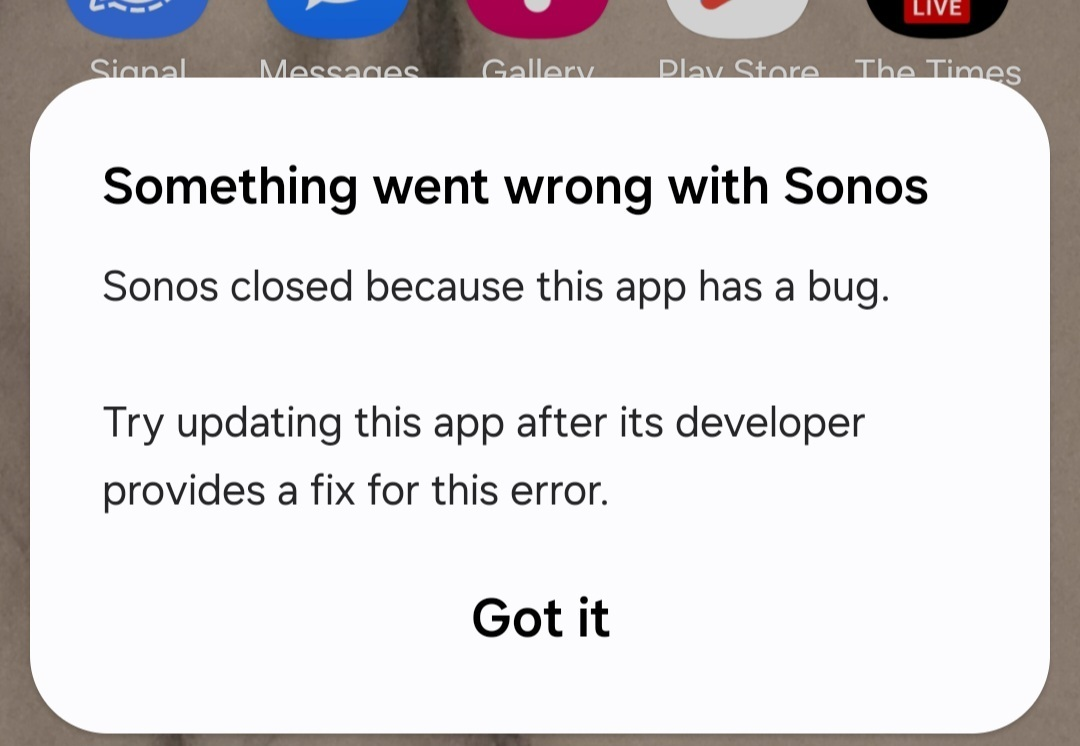
Side note: this bug is not limited to Samsung devices, tho’ it may not impact all Android devices. Samsung devices happen to display the Android OS error message shown below, while other Android devices opt to log the error without a pop-up.
 

This topic has been closed for further comments. You can use the search bar to find a similar topic, or create a new one by clicking Create Topic at the top of the page.
Pinned Reply By MiniMe

Pro-Tip: briefly unpower the speaker(s) that have the track from the LAN library in their playlist. When a speaker reboots it forgets its playlist. Like this you can also recover from the Android app crashing if you don't have another working controller.

99 replies

press250
press250Author
Prodigy III
July 17, 2024

Hey @Bumper, post above may help you out of the latest snafu.

Lyricist I
July 17, 2024

Yes, I’m seeing a similar crash with a non-Samsung Android.  Sometimes I can _start_ a library album before the problem begins.

Prodigy III
July 17, 2024

What do you mean by version 16.3? Mine updated today and is 80.1-55014.


press250
press250Author
Prodigy III
July 17, 2024

What do you mean by version 16.3? Mine updated today and is 80.1-55014.

Hi @furacaopr, on the desktop app it reports “Version: 16.3 (build 80155014)” so we are both talking about the same firmware.

Prodigy III
July 17, 2024

What do you mean by version 16.3? Mine updated today and is 80.1-55014.

Hi @furacaopr, on the desktop app it reports “Version: 16.3 (build 80155014)” so we are both talking about the same firmware.

So, another mess Sonos has introduced, different version numbering schemes for the same firmware 😂🤣😅

Trending Lyricist I
July 17, 2024

Wait, so the ‘workaround’ is ‘use your desktop computer’ or only stream music.

That’s awesome. Thanks for your help. Would you like to buy a playbar, two play 3’s, a play 5, and two play 1’s?

controlav
Lead Maestro
July 17, 2024

What do you mean by version 16.3? Mine updated today and is 80.1-55014.

Hi @furacaopr, on the desktop app it reports “Version: 16.3 (build 80155014)” so we are both talking about the same firmware.

So, another mess Sonos has introduced, different version numbering schemes for the same firmware 😂🤣😅

That is not new: Sonos have always had two version number schemes. the oldest I can find is 13.7-29120 which was also known as 3.2, which was released in 2011.

Author of the leading independent Sonos apps for Android, MacOS, iOS, Windows and Xbox.
press250
press250Author
Prodigy III
July 18, 2024

That is not new: Sonos have always had two version number schemes. the oldest I can find is 13.7-29120 which was also known as 3.2, which was released in 2011.

Yea @controlav, when my Android tablet crashes at the merest hint of a local library file (a queue of local music is enough, it doesn’t have to be playing) I really don’t care about numbering schemes. 

Contributor II
July 18, 2024

Same issue. App repeatedly crashes on 16.3 android if you have anything from your local library added to queue. 

Enthusiast II
July 18, 2024

Confirm on android 12 (Hauwei 2019) app now just closes immediately after loading and playing from local library.

Another tack... latest 16.3 app on Windows & Macbook is fine and allows you to everything as before (16.2 withdrew the update library function yesterday).

Back to the future!