
Trending Lyricist I
September 18, 2024
Answered

Volume control with digits NOW, please!!!!

  • September 18, 2024
  • 29 replies
  • 677 views

Dear Sonos Developers,

I am begging you to add a volume control WITH DIGITS now! We have been asking forever. The volume slider should have a “+” and “-” on either end that go up by ONE digit.


This is my second time asking for this, many others have the same issue/complaints, and years have gone by. If third-party controllers are being created to address this, someone at Sonos must realize this is a desperately needed feature. Third-party apps with these features means your UI needs to change.


Volume control using sliders is terrible. It jumps too loud or too quite and barely works on the iPhone. Sonos has neglected this easy-to-implement feature for far too long.


Who will speak to the CEO about this? Please, we are begging you to implement this. What is the point of making feature requests if they are ignored. We are your customers. Please do something now!
This topic has been closed for further comments. You can use the search bar to find a similar topic, or create a new one by clicking Create Topic at the top of the page.
Best answer by 106rallye

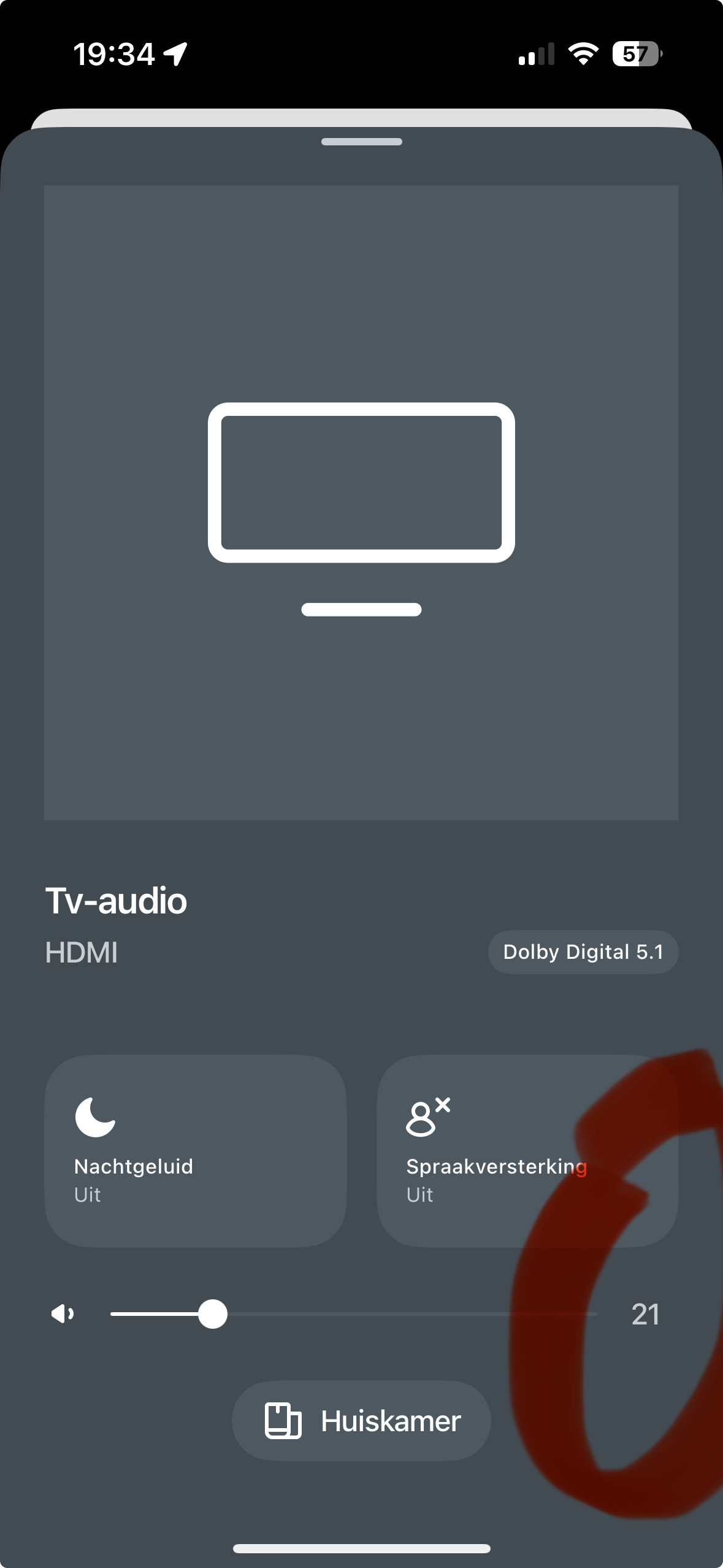
Am I the only one to see a number on the volume scale on my iPhone?

Tapping the line either side of the point will bring the volume up or down one point at the time.

29 replies

September 22, 2024

Sonos announced years ago that they were were not going to develop the PC/Mac app further, at the same time as they removed most of the system management capability. That ship has sailed, I fear.

El GrecusAuthor
Trending Lyricist I
September 22, 2024

@John B you’re kidding? This forum is just a place to scream into the wind?... The Sonos app for iPhone is terrible. There is no scroll bar when using Apple Music. I have to finger swipe to go to the bottom of the artist list. It takes forever. So long that I avoid using the Sonos iPhone app and use a PC or Mac.


It sounds like Sonos is throwing in the towel given their stock performance. I should be stunned that a company with every advantage and a huge lead on their competitors could blow it all. But I’m not stunned. I was in the internet world in the ‘90s and ‘00s. I’ve seen it happen over and over.


I’m throwing in the towel too. Going to use Apple Music app on iPhone (it ain’t perfect either) and use Airplay to stream to my Sonos devices… https://support.sonos.com/en-us/article/stream-airplay-audio-to-sonos


@SONOS if you want to hire me as a UI consultant for a month or two, we can mop up the issues and right the ship. But I just did research on “Corporate Governance”. CEO comes from Blackberry (ouch). Chief Development Officer is from Microsoft (double ouch). These guys are just “resting and vesting”.

I’ve vented my wrath. It is what it is. All the best to everyone.

September 22, 2024

The future is mobile.  And Voice.  And casting.

Next to zero commercial benefit in a desktop-based app

Just a personal opinion.  I may be wrong.

bchertov
Avid Contributor I
October 5, 2024

Another vote for +/- on the volume controller!

If it's low it's hard to tap lower on the volume. Volume control is already a pain because the physical buttons don’t work which drives me crazy 

Lyricist II
October 25, 2024

I struggle with the volume control every day. I usually have my volumes very low, around the 6-8. It’s nearly impossible with the sliders to get this right. Either the volume goes down to zero, or you wind up with a volume that’s too high. Having + and - buttons would be a great help to set the volume. I find that the volume sliders are also very small and don’t always react to my finger, which is hard because they are so small you can’t see them the minute you put your finger on them. Sonos please do something about this… volume is kind of important in an app that’s focused on listening to music / sound!  ;-P

Prodigy I
October 25, 2024

I struggle with the volume control every day. I usually have my volumes very low, around the 6-8. It’s nearly impossible with the sliders to get this right. Either the volume goes down to zero, or you wind up with a volume that’s too high. Having + and - buttons would be a great help to set the volume. I find that the volume sliders are also very small and don’t always react to my finger, which is hard because they are so small you can’t see them the minute you put your finger on them. Sonos please do something about this… volume is kind of important in an app that’s focused on listening to music / sound!  ;-P

I have found that the volume slider handle works like precise seeking in some other apps. That is, once your finger grabs the handle, while keeping your finger touching, move your finger down (or up) and your finger won’t obscure the slider. The handle follows your finger and you can adjust the volume sideways more easily. 
 

I can also easily tap on the volume slider down to 6, sometimes 5, but after that there is no room to tap and I think it then thinks I’m touching on the handle. The above “precise seeking method” is the easiest for me when I want to lower down to 3 or 4 or adjust the volume in general.


But yes, having large enough + - icons could also work. Especially if it’s hard to exactly touch on the handle. 
 

That “precise seeking” works for me in all the various UIs on Android, iPhone and iPad S2 Sonos app. 

Lyricist II
October 25, 2024

I struggle with the volume control every day. I usually have my volumes very low, around the 6-8. It’s nearly impossible with the sliders to get this right. Either the volume goes down to zero, or you wind up with a volume that’s too high. Having + and - buttons would be a great help to set the volume. I find that the volume sliders are also very small and don’t always react to my finger, which is hard because they are so small you can’t see them the minute you put your finger on them. Sonos please do something about this… volume is kind of important in an app that’s focused on listening to music / sound!  ;-P

I have found that the volume slider handle works like precise seeking in some other apps. That is, once your finger grabs the handle, while keeping your finger touching, move your finger down (or up) and your finger won’t obscure the slider. The handle follows your finger and you can adjust the volume sideways more easily. 
 

I can also easily tap on the volume slider down to 6, sometimes 5, but after that there is no room to tap and I think it then thinks I’m touching on the handle. The above “precise seeking method” is the easiest for me when I want to lower down to 3 or 4 or adjust the volume in general.


But yes, having large enough + - icons could also work. Especially if it’s hard to exactly touch on the handle. 
 

That “precise seeking” works for me in all the various UIs on Android, iPhone and iPad S2 Sonos app. 

Thanks for this tip, this is great! At least I can now move my finger up and ‘see’ the slider. It doesn’t work the way it works in some (video) apps where this gesture makes the slider go into ‘slow scroll’ mode, but for the time being this works for me. I hope Sonos finds a way to make it easier to accurately set (low) volumes. It seems such a waste (for me) to have the volume control slider take up all the space from the left to right side of the screen, when I’m almost completely at the left margin all the time.

MoPac
Headliner III
October 25, 2024

 I like the fact you can tap either end of the bar to get single increment volume changes.  The problem with my largish fingers I often tap Mute accidentally when trying to incrementally lower the volume.  An option to change the bar to + / - signs would be nice.

Lyricist II
October 25, 2024

 I like the fact you can tap either end of the bar to get single increment volume changes.  The problem with my largish fingers I often tap Mute accidentally when trying to incrementally lower the volume.  An option to change the bar to + / - signs would be nice.

Thanks for this tip too, I hadn’t realized you could tap the bar itself to change the volume!

Prodigy III
October 25, 2024

Just adding that Android users can always use the volume buttons on their phones. The issue above affects only iOS users.