
Trending Lyricist I
September 18, 2024
Answered

Volume control with digits NOW, please!!!!

  • September 18, 2024
  • 29 replies
  • 677 views

Dear Sonos Developers,

I am begging you to add a volume control WITH DIGITS now! We have been asking forever. The volume slider should have a “+” and “-” on either end that go up by ONE digit.


This is my second time asking for this, many others have the same issue/complaints, and years have gone by. If third-party controllers are being created to address this, someone at Sonos must realize this is a desperately needed feature. Third-party apps with these features means your UI needs to change.


Volume control using sliders is terrible. It jumps too loud or too quite and barely works on the iPhone. Sonos has neglected this easy-to-implement feature for far too long.


Who will speak to the CEO about this? Please, we are begging you to implement this. What is the point of making feature requests if they are ignored. We are your customers. Please do something now!
This topic has been closed for further comments. You can use the search bar to find a similar topic, or create a new one by clicking Create Topic at the top of the page.
Best answer by 106rallye

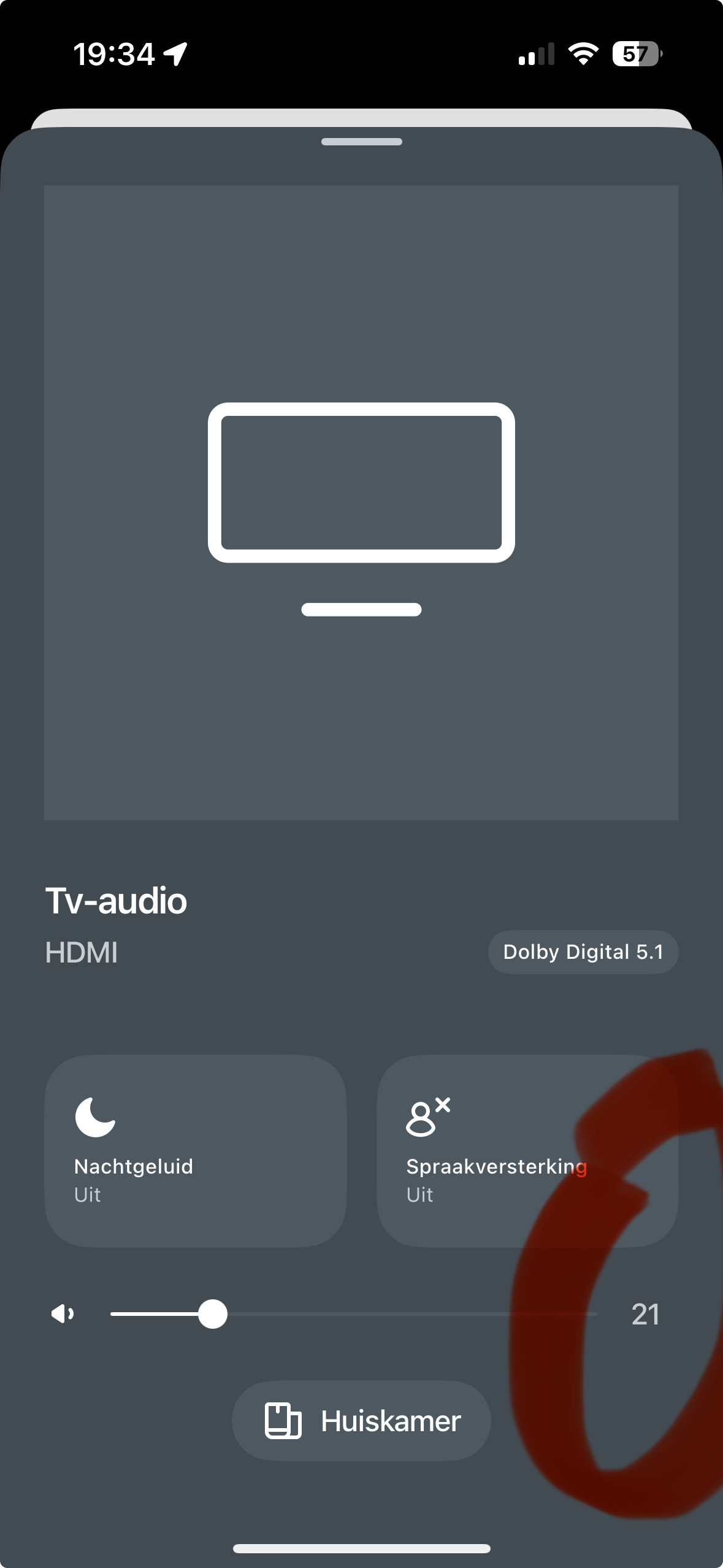
Am I the only one to see a number on the volume scale on my iPhone?

Tapping the line either side of the point will bring the volume up or down one point at the time.

29 replies

Senior Virtuoso
October 25, 2024

Just adding that Android users can always use the volume buttons on their phones. The issue above affects only iOS users.

Are you sure? I thought this had gone from Android devices too. 

jgatie
October 25, 2024

Are you sure? I thought this had gone from Android devices too. 


No, that was playing music “on this phone”.  Only Apple has rules about hard buttons and lock screen controls. 

Senior Virtuoso
October 25, 2024

Thanks for clarifying. 

Lyricist I
November 25, 2024

 I think what is preferred is to have +  -  controls that give you finer volume adjustments.  Yes the numbers have been there, but if you’re trying to hit a particular number it’s harder to do with a slider.  Keep the slider as an option, but also offer +  - as an option also.


+/- has always been there, you just need to tap to one side of the slider or the other.  

If you are in the lower volumes (1-2-3) there is no room to tap on the slider to the left. And these are the volumes I use most often. For some reason, the upper half of the slider is never used by me as volumes in that range of the slider are extremely high.

November 25, 2024

 I think what is preferred is to have +  -  controls that give you finer volume adjustments.  Yes the numbers have been there, but if you’re trying to hit a particular number it’s harder to do with a slider.  Keep the slider as an option, but also offer +  - as an option also.


+/- has always been there, you just need to tap to one side of the slider or the other.  

If you are in the lower volumes (1-2-3) there is no room to tap on the slider to the left. And these are the volumes I use most often. For some reason, the upper half of the slider is never used by me as volumes in that range of the slider are extremely high.

Set a volume limit to give you easier control at lower levels.  To reduce low volumes even further, flick the slider to zero then tap back up.  Not perfect but it’s the best currently available.

Prodigy III
November 25, 2024

​@El2009 

Also be aware that when you touch the circle on the slider line, you can also then drag your finger down beneath the line to see it better, and still control the up and down sliding from there. Your finger doesn’t need to be on the line. It’s the way I control volume in small increments as I find it easier to see the volume adjustments that way.

Senior Virtuoso
November 25, 2024

I still find a touch-and-hold-and-roll action to be effective. Watch the volume number change: it’s really quite easy to get a “single-digit” volume change. 

Prodigy III
November 25, 2024

I still find a touch-and-hold-and-roll action to be effective. Watch the volume number change: it’s really quite easy to get a “single-digit” volume change. 

I can’t disagree with that. I definitely find a slight roll of the finger to one side or the other to be the most effective...

Collaborator II
November 25, 2024

I just bought the Symfonisk Sonos controller from Ikea. Never used the app volume control since.