
Trending Lyricist I
September 18, 2024
Answered

Volume control with digits NOW, please!!!!

  • September 18, 2024
  • 29 replies
  • 677 views

Dear Sonos Developers,

I am begging you to add a volume control WITH DIGITS now! We have been asking forever. The volume slider should have a “+” and “-” on either end that go up by ONE digit.


This is my second time asking for this, many others have the same issue/complaints, and years have gone by. If third-party controllers are being created to address this, someone at Sonos must realize this is a desperately needed feature. Third-party apps with these features means your UI needs to change.


Volume control using sliders is terrible. It jumps too loud or too quite and barely works on the iPhone. Sonos has neglected this easy-to-implement feature for far too long.


Who will speak to the CEO about this? Please, we are begging you to implement this. What is the point of making feature requests if they are ignored. We are your customers. Please do something now!
This topic has been closed for further comments. You can use the search bar to find a similar topic, or create a new one by clicking Create Topic at the top of the page.
Best answer by 106rallye

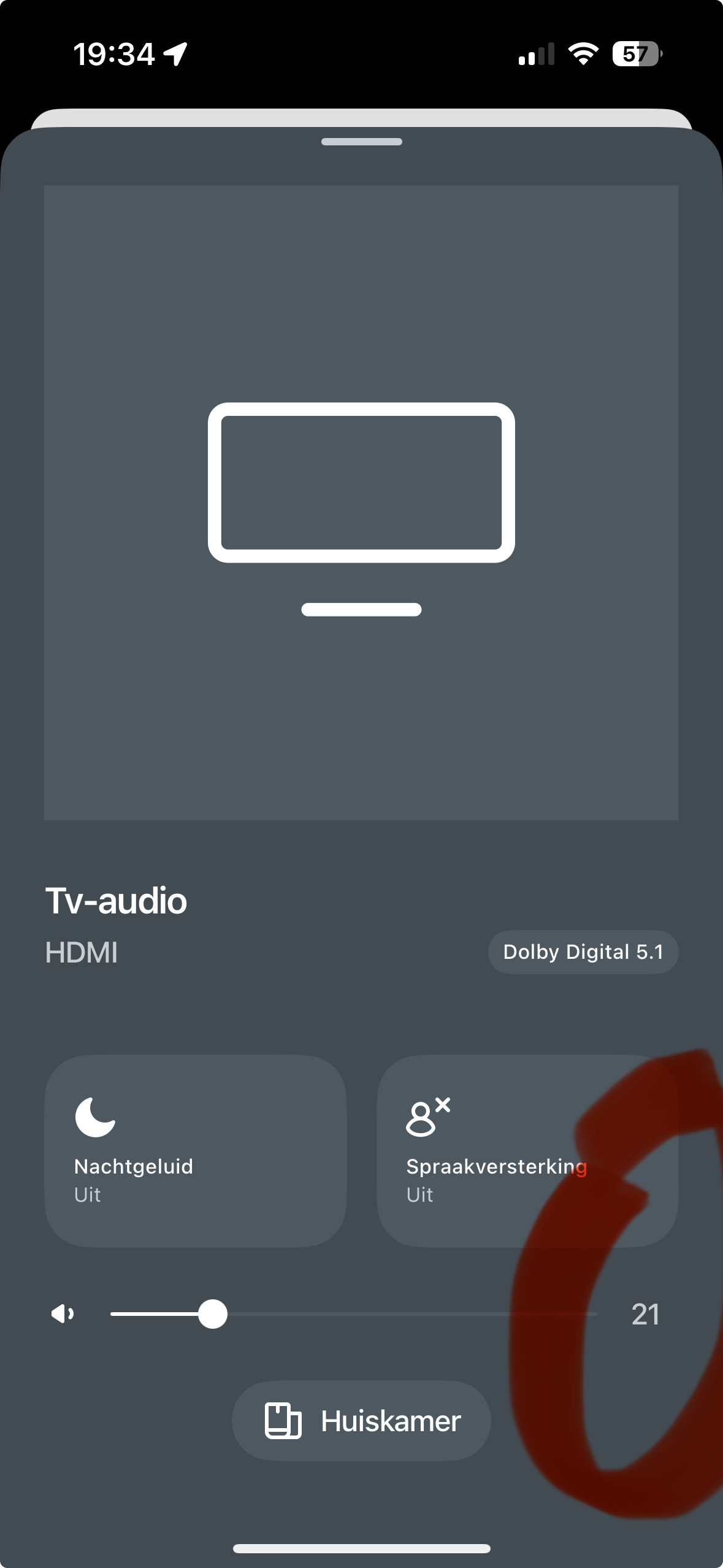
Am I the only one to see a number on the volume scale on my iPhone?

Tapping the line either side of the point will bring the volume up or down one point at the time.

29 replies

MoPac
Headliner III
September 18, 2024

 That’s on my wish list also.  Hard to see the slider with my big fingers in the way.

AjTrek1
September 18, 2024

In the meantime if you are using an iOS device go to Settings > Sound & Haptics > Scroll down to System Sounds & Haptics > System Haptics > Turn On

You’ll get a more tactile feel when moving the volume slider for a more precise click measurement  (volume level).


Together Everyone Achieves More = T.E.A.M.
106rallye
106rallyeAnswer
September 18, 2024

Am I the only one to see a number on the volume scale on my iPhone?

Tapping the line either side of the point will bring the volume up or down one point at the time.

MoPac
Headliner III
September 18, 2024

 I think what is preferred is to have +  -  controls that give you finer volume adjustments.  Yes the numbers have been there, but if you’re trying to hit a particular number it’s harder to do with a slider.  Keep the slider as an option, but also offer +  - as an option also.

jgatie
September 18, 2024

 I think what is preferred is to have +  -  controls that give you finer volume adjustments.  Yes the numbers have been there, but if you’re trying to hit a particular number it’s harder to do with a slider.  Keep the slider as an option, but also offer +  - as an option also.


+/- has always been there, you just need to tap to one side of the slider or the other.  

MoPac
Headliner III
September 18, 2024

 Your right!  Never knew that.  This Community is awesome!

jgatie
September 18, 2024

 Your right!  Never knew that.  This Community is awesome!


It’s a pain at the very min/max of the slide, but the lowest can be adjusted by just sliding it all the way to the left, then tapping up, and hopefully not many are trying to max out the volume at the other end. 

El GrecusAuthor
Trending Lyricist I
September 21, 2024

Fingers are too big to hit the slider at low volumes. I keep hitting the “mute” button. Everyone in the office looks up like I’m crazy. @MoPac is right, just add “+” and “-” buttons. Why hide this functionality?


And sliding to “0” and then tapping back up gets the same response from everyone in the office, “why are you constantly turning the music off and then back on??”.


Sonos, we’re still begging, please add add “+” and “-” buttons so we can get back to work and not spend time on Sonos forums.

MoPac
Headliner III
September 21, 2024

 Would be nice to also display a large volume number while the volume is being changed, similar to how it shows on SonoPhone.  On SonoPhone the number display works best when using the slider.  Not so much when using the +  -.

El GrecusAuthor
Trending Lyricist I
September 22, 2024

And there are no digits on the PC app either. Like we said, make your UI consistent across devices and platforms.

Also, clicking on the volume bar goes up by two digits on the PC app while only one digit on the iPhone app. Consistency, please. We don’t want to learn random micro-quirks in the UI. Make it easy on users.

Anyone noticed the Sonos stock performance year-to-date? Down 25%. The engineers should be racing to fix these UI flaws. They are not complicated.