
Contributor I
January 18, 2021
Answered

Unable to play X - and the song is not encoded correctly

I was getting this error from time to time, but now I'm getting it on 3/4 of songs... Seems random, as sometimes a song that was working fine would refuse to play and start showing this error (or vice versa). 

My music source is YouTube Music. I've tried rebooting the speaker, reinstalling te app, rebooting the Wi-Fi router, etc. Also tried using an ethernet cable instead of Wi-Fi. Nothing seems to work. 

Diagnostic number : 1167656549

Screenshot :
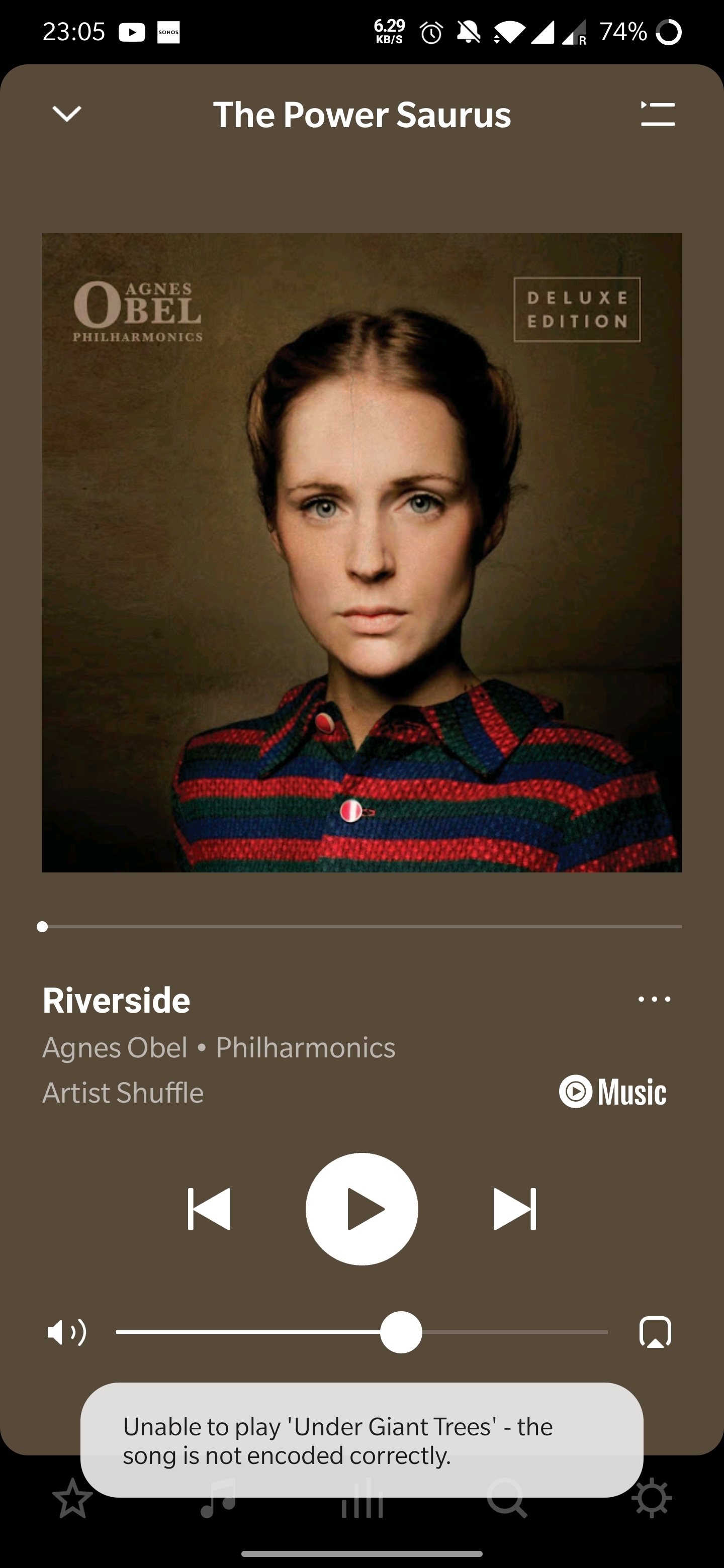
Thanks in advance! 

 

This topic has been closed for further comments. You can use the search bar to find a similar topic, or create a new one by clicking Create Topic at the top of the page.
Annazel S
Annazel SAnswer
Retired Sonos Staff
January 22, 2021

Hi @kubulozaurus.rex.

Thanks for your response and update.

Upon checking the diagnostic report, errors that we observed on the initial diagnostic are still showing and the Android controller’s WiFi connection is ‘unknown’.

We appreciate the time and effort you've spent troubleshooting with us, but at this point, it would be best to reach out to Sonos Support so we can take a closer look at this in real-time and expedite the process. I suggest our phone team for they have more resources available on their system for advanced troubleshooting, and the tools our agents can use would be very useful in this case, there can be an advantage if they need to remote into the controller to see what's going on.


​If you have any questions, please feel free to let us know.

Help others find useful content by clicking the like button and selecting the best answer to your question

101 replies

Lyricist III
March 8, 2023

In addition to contacting the worthless customer support at Sonos, I did a factory reset of all my devices. This didn't work either.

Contributor I
March 20, 2023

My CD collection ripped to a PC used to play absolutely fine and now about half are listed as “not encoded properly” whilst they still play fine on the PC Media player.  Other tracks ripped on the same device/software play absolutely fine.

To blame Spotify or any other provider is not acceptable and Sonos should be looking at this issue.  It’s clearly been a problem for a while and still has not been resolved.

Lyricist III
March 20, 2023

Sonos is crap with crap customer support. They said they would escalate my call to engineering and call me back. I'm still waiting on an update 3 weeks later.

Lyricist I
March 31, 2023

I am having the same issue with Apple Music as my provider I am very anxious that this is not going to be resolved. I have invested a lot in to my Sonos systems! very worried! 

Lyricist III
April 10, 2023

I have been getting this problem as well and also use Apple Music. If you have an Apple Music subscription there is. A work around. In the Apple Music app delete the album from your library then add it back again. Doesn’t mean Sonos should’nt fix it though. Clearly NOT a wifi problem as this would not solve the issue if it was.

Lyricist I
April 12, 2023

I have this issue with Apple Music. It’s got nothing to do with “YouTube’s Engineers”. It’s only certain songs. It’s clearly a Sonos issue for them to fix.

Ken_Griffiths
April 12, 2023

@JohnnyQ, 
Any chance of naming some tracks that don’t work for you via the built-in Apple service. I subscribe to Apple Music and I’m sure there must be many others here too. I’m happy to see if the tracks you name work for my Sonos setup and will let you know whether they play on my setup (or not) - if not, then it will at least give the Staff here some data to work with and perhaps will help Apple (or Sonos) to fix the issue. I’ll add a diagnostic here too if they don’t play.

I’m not currently seeing any issues with the tracks I’ve been listening to since the latest update and that’s playing standard audio and many Atmos tracks too.

Lyricist III
April 17, 2023

@JohnnyQ, 
Any chance of naming some tracks that don’t work for you via the built-in Apple service. I subscribe to Apple Music and I’m sure there must be many others here too. I’m happy to see if the tracks you name work for my Sonos setup and will let you know whether they play on my setup (or not) - if not, then it will at least give the Staff here some data to work with and perhaps will help Apple (or Sonos) to fix the issue. I’ll add a diagnostic here too if they don’t play.

I’m not currently seeing any issues with the tracks I’ve been listening to since the latest update and that’s playing standard audio and many Atmos tracks too.

The issue is related to iTunes Match vs Apple Music.  Something changed recently with either Apple or Sonos where Sonos can no longer play songs that are in your Apple library that were loaded via iTunes Match vs songs on Apple Music.  This is why removing them from your library and re-adding works.  You are removing the iTunes Match version and putting in the DRMed, newly encoded Apple Music version. 

The issue is for people like me that have thousands of songs dating back years from iTunes Match, some of which are rare songs and music not on Apple Music.  They can no longer be played via Sonos directly.  Whether this is caused by an Apple change or Sonos change, I don’t know.  I can play the songs in Apple Music app, but not on Sonos app.

Ken_Griffiths
April 17, 2023

@JohnnyQ, 
Any chance of naming some tracks that don’t work for you via the built-in Apple service. I subscribe to Apple Music and I’m sure there must be many others here too. I’m happy to see if the tracks you name work for my Sonos setup and will let you know whether they play on my setup (or not) - if not, then it will at least give the Staff here some data to work with and perhaps will help Apple (or Sonos) to fix the issue. I’ll add a diagnostic here too if they don’t play.

I’m not currently seeing any issues with the tracks I’ve been listening to since the latest update and that’s playing standard audio and many Atmos tracks too.

The issue is related to iTunes Match vs Apple Music.  Something changed recently with either Apple or Sonos where Sonos can no longer play songs that are in your Apple library that were loaded via iTunes Match vs songs on Apple Music.  This is why removing them from your library and re-adding works.  You are removing the iTunes Match version and putting in the DRMed, newly encoded Apple Music version. 

The issue is for people like me that have thousands of songs dating back years from iTunes Match, some of which are rare songs and music not on Apple Music.  They can no longer be played via Sonos directly.  Whether this is caused by an Apple change or Sonos change, I don’t know.  I can play the songs in Apple Music app, but not on Sonos app.

I thought Apples iTunes Match was there to allow users to remove DRM - that’s what I did with my iTunes Match annual subscription many years ago and then ditched it. Anyhow I found this from Sonos Support literature…

Some purchased music may be protected by Digital Rights Management (DRM). This prevents these files from being shared via third-party apps like the Sonos app. This issue most commonly affects music purchased from iTunes before they switched to DRM-free music.

Apple no longer sells DRM protected music and all music now for sale is free of any playback restrictions. If you still have some tracks that are DRM protected and unplayable on Sonos, iTunes Match allows you to upgrade your music to a DRM-free version. More information on iTunes Match and instructions on upgrading to DRM-free can be found on Apple’s website.

—

The link embedded above isn’t very helpful, clearly it isn’t a Sonos issue from what’s been said here already, but if your DRM protected music purchases were from Apple originally, then maybe speak with their customer support service and see what they say.

Lyricist III
April 17, 2023

@JohnnyQ, 
Any chance of naming some tracks that don’t work for you via the built-in Apple service. I subscribe to Apple Music and I’m sure there must be many others here too. I’m happy to see if the tracks you name work for my Sonos setup and will let you know whether they play on my setup (or not) - if not, then it will at least give the Staff here some data to work with and perhaps will help Apple (or Sonos) to fix the issue. I’ll add a diagnostic here too if they don’t play.

I’m not currently seeing any issues with the tracks I’ve been listening to since the latest update and that’s playing standard audio and many Atmos tracks too.

The issue is related to iTunes Match vs Apple Music.  Something changed recently with either Apple or Sonos where Sonos can no longer play songs that are in your Apple library that were loaded via iTunes Match vs songs on Apple Music.  This is why removing them from your library and re-adding works.  You are removing the iTunes Match version and putting in the DRMed, newly encoded Apple Music version. 

The issue is for people like me that have thousands of songs dating back years from iTunes Match, some of which are rare songs and music not on Apple Music.  They can no longer be played via Sonos directly.  Whether this is caused by an Apple change or Sonos change, I don’t know.  I can play the songs in Apple Music app, but not on Sonos app.

I thought Apples iTunes Match was there to allow users to remove DRM - that’s what I did with my iTunes Match annual subscription many years ago and then ditched it. Anyhow I found this from Sonos Support literature…

Some purchased music may be protected by Digital Rights Management (DRM). This prevents these files from being shared via third-party apps like the Sonos app. This issue most commonly affects music purchased from iTunes before they switched to DRM-free music.

Apple no longer sells DRM protected music and all music now for sale is free of any playback restrictions. If you still have some tracks that are DRM protected and unplayable on Sonos, iTunes Match allows you to upgrade your music to a DRM-free version. More information on iTunes Match and instructions on upgrading to DRM-free can be found on Apple’s website.

—

The link embedded above isn’t very helpful, clearly it isn’t a Sonos issue from what’s been said here already, but if your DRM protected music purchases were from Apple originally, then maybe speak with their customer support service and see what they say.

Correct.  These ARE iTunes Match tracks so they are DRM-free.  Apple Music songs DO have DRM because you must maintain a subscription in order to play the songs.  So by removing the non-DRM song from my library (iTunes Matched) and replacing with DRMed (Apple Music), it works.  My guess is with the 15.2 update that added Atmos support, they broke something in handling Apple music without DRM.  This is most definitely a bug in Sonos code.

BTW - I just got off a 45 minute call with Sonos support that was completely useless.  They didn’t acknowledge anything was wrong.  They kept reciting information from their website that was irrelevant.  We’ll see if I get any information from the tier 3 escalation.