
Contributor I
January 18, 2021
Answered

Unable to play X - and the song is not encoded correctly

I was getting this error from time to time, but now I'm getting it on 3/4 of songs... Seems random, as sometimes a song that was working fine would refuse to play and start showing this error (or vice versa). 

My music source is YouTube Music. I've tried rebooting the speaker, reinstalling te app, rebooting the Wi-Fi router, etc. Also tried using an ethernet cable instead of Wi-Fi. Nothing seems to work. 

Diagnostic number : 1167656549

Screenshot :
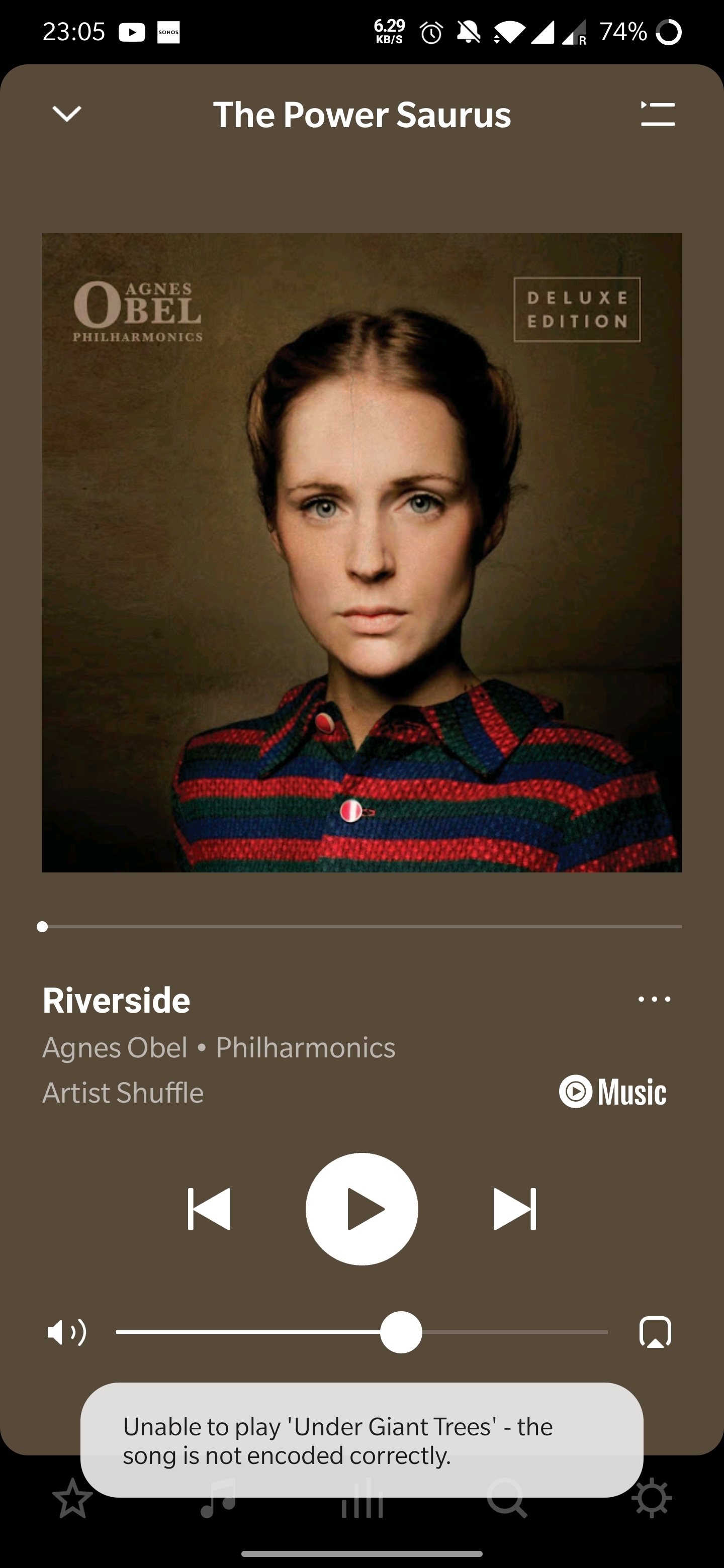
Thanks in advance! 

 

This topic has been closed for further comments. You can use the search bar to find a similar topic, or create a new one by clicking Create Topic at the top of the page.
Annazel S
Annazel SAnswer
Retired Sonos Staff
January 22, 2021

Hi @kubulozaurus.rex.

Thanks for your response and update.

Upon checking the diagnostic report, errors that we observed on the initial diagnostic are still showing and the Android controller’s WiFi connection is ‘unknown’.

We appreciate the time and effort you've spent troubleshooting with us, but at this point, it would be best to reach out to Sonos Support so we can take a closer look at this in real-time and expedite the process. I suggest our phone team for they have more resources available on their system for advanced troubleshooting, and the tools our agents can use would be very useful in this case, there can be an advantage if they need to remote into the controller to see what's going on.


​If you have any questions, please feel free to let us know.

Help others find useful content by clicking the like button and selecting the best answer to your question

101 replies

Ken_Griffiths
April 17, 2023

@davidbashman,

It’s been quite a while (years, I guess), but I recall I ‘matched’ my purchased and ripped tracks via iTunes and then deleted the ones in my local iTunes folders and downloaded the DRM-free tracks. I recall the itunes match subscription was yearly and around £21.99 per year (or similar). I subscribed monthly and separately for ‘leased’ Apple tracks in those days,  which I had not purchased and they wouldn’t play when my subscription ended - so I deleted those and kept all my own purchased (DRM-free) tracks on my NAS in a separate library.. alongside those many CD tracks I ripped separately from my CD’s (all tagged using MP3Tag). I eventually moved away from Apple and switched to Amazon Music, trying Spotify and Deezer too in-between.

In recent times, I have resubscribed to Apple mainly to see what I think of their service now they’ve introduced (lossy) Atmos music on Sonos and I have uploaded/matched my local library back to the iCloud servers again and now have that online library, which appears in the S2 App (see screenshot attached).

I’ve not (yet) added any Apple ‘leased’ tracks to my library so it’s all just my matched/uploaded DRM -free tracks and whilst there are thousands of them and I haven’t tested them all - I’ve not yet encountered an issue whilst playing them or any tracks from other areas of the App… albeit in the other areas I’ve mostly been listening to Atmos playlists on both the Arc and Era 300’s.

So I’m not seeing the same issue so far, but if I do encounter an issue I will report back here and let you know. Note I’ve only re-subscribed to the Apple service some six or seven weeks ago so not had the chance to test everything but will let you know if I see the same issue.

I did just randomly select a few tracks across the library and they all started playing okay.

Anyhow I hope you get things sorted. 👍

Contributor I
April 19, 2023

Same problem with Apple Music. I'll try what has been suggested previously and see if that works. Any other suggestions? Thanks.

Trending Lyricist III
May 7, 2023

This morning I added some podcast from Spotify to Albums in the Sonos app and none of them will play. They all give this [not coded correctly] message. When played straight from the Spotify app everything works fine. Other Spotify tracks also play fine too so somehow it's only the podcasts.

I added them by playing one from Spotify, then ooen the Sonos app and add them to Albums. I do it this way because i can't search for podcast in the Sonos app, it never gives me any results.


Lyricist I
June 4, 2023

i have the problem with itunes where i downloaded cds to my library - clouded music will play but the music that was downloaded from cd to itunes errors - support could not help 

Airgetlam
June 4, 2023

When were they downloaded? Have you tried deleting the downloaded files, and getting fresh copies from Apple?

Bruce
Lyricist III
June 14, 2023

@JohnnyQ, 
Any chance of naming some tracks that don’t work for you via the built-in Apple service. I subscribe to Apple Music and I’m sure there must be many others here too. I’m happy to see if the tracks you name work for my Sonos setup and will let you know whether they play on my setup (or not) - if not, then it will at least give the Staff here some data to work with and perhaps will help Apple (or Sonos) to fix the issue. I’ll add a diagnostic here too if they don’t play.

I’m not currently seeing any issues with the tracks I’ve been listening to since the latest update and that’s playing standard audio and many Atmos tracks too.

The issue is related to iTunes Match vs Apple Music.  Something changed recently with either Apple or Sonos where Sonos can no longer play songs that are in your Apple library that were loaded via iTunes Match vs songs on Apple Music.  This is why removing them from your library and re-adding works.  You are removing the iTunes Match version and putting in the DRMed, newly encoded Apple Music version. 

The issue is for people like me that have thousands of songs dating back years from iTunes Match, some of which are rare songs and music not on Apple Music.  They can no longer be played via Sonos directly.  Whether this is caused by an Apple change or Sonos change, I don’t know.  I can play the songs in Apple Music app, but not on Sonos app.

This makes a TON of sense.  I’ve got a ton of music that I uploaded or added to my Apple Music library via iTunes Match years ago.  Deleting from my library and re-adding (with the AM DRM version) works for me, but there’s no chance I’m going to do this dance for thousands of songs.

Ken_Griffiths
June 14, 2023

This makes a TON of sense.  I’ve got a ton of music that I uploaded or added to my Apple Music library via iTunes Match years ago.  Deleting from my library and re-adding (with the AM DRM version) works for me, but there’s no chance I’m going to do this dance for thousands of songs.

Many (many) years ago, I opted to get an iTunes Match yearly subscription, it was less than £20 IIRC🤔?

I highlighted every single ‘digitally purchased’ track in iTunes and deleted those tracks, literally in minutes, then I highlighted all again (each now showing as being stored in the iCloud) and downloaded the track again, giving me the DRM-free version of every highlighted track - it took seconds to undertake these things, but took many hours (overnight) to re-download the thousands of tracks - I have a medium-large music  library (25,000 tracks) many purchased digitally and many ripped from purchased CD’s put together over a good many years - but it was well worth that single yearly iTunes Match subscription payment to sort these things back in the day - and it really is easy to delete and re-download all overnight, or perhaps several nights, if your library is huge.

The action of doing the switch to DRM-free does not take much effort at all to get the process underway, once the download starts for all, you can just walk away and goto bed, or work, or whatever.

Enthusiast I
June 25, 2023

Same problem here with Sirius and Google play music which morphed into the crappy YouTube music. I have had the not encoded message for years but is getting worse as time moves on. When it disconnects the wifi is still available so I find it hard to believe it is a wifi router issue. I actually got a new router because I thought it may be the problem but no, it still exists. This is undoubtedly a Sonos issue as the cross service problem shows. As I said it is now happening 5-6 times in 6 hours and if there isn't a fix soon I will selling my Sonos and go elsewhere 

So, ¿what’s your new router? It seems to me  that many models of standard home Wifi routers are either not compatible with Sonos, or prompt to have unstability issues. My Sonos Roam is been like this for months, pausing the music randomly using Airplay, Spotify Connect and Apple Music, so it seems to me that Sonos just works fine in pristine or interference free environments, I’ve really no idea what to do       


La discapacidad visual no es ningún impedimento, a disfrutar Bros
Lyricist III
June 26, 2023

please sonos this issue has been a problem for months and months - invested heavily in sonos and apple - since 2007 sonos and mid 90s apple - dont let us down!

Lyricist I
July 16, 2023

Aaand the same error occurred yesterday with YouTube Music. Tried all the workarounds listed here.  No change. Sad.