
Contributor I
January 18, 2021
Answered

Unable to play X - and the song is not encoded correctly

I was getting this error from time to time, but now I'm getting it on 3/4 of songs... Seems random, as sometimes a song that was working fine would refuse to play and start showing this error (or vice versa). 

My music source is YouTube Music. I've tried rebooting the speaker, reinstalling te app, rebooting the Wi-Fi router, etc. Also tried using an ethernet cable instead of Wi-Fi. Nothing seems to work. 

Diagnostic number : 1167656549

Screenshot :
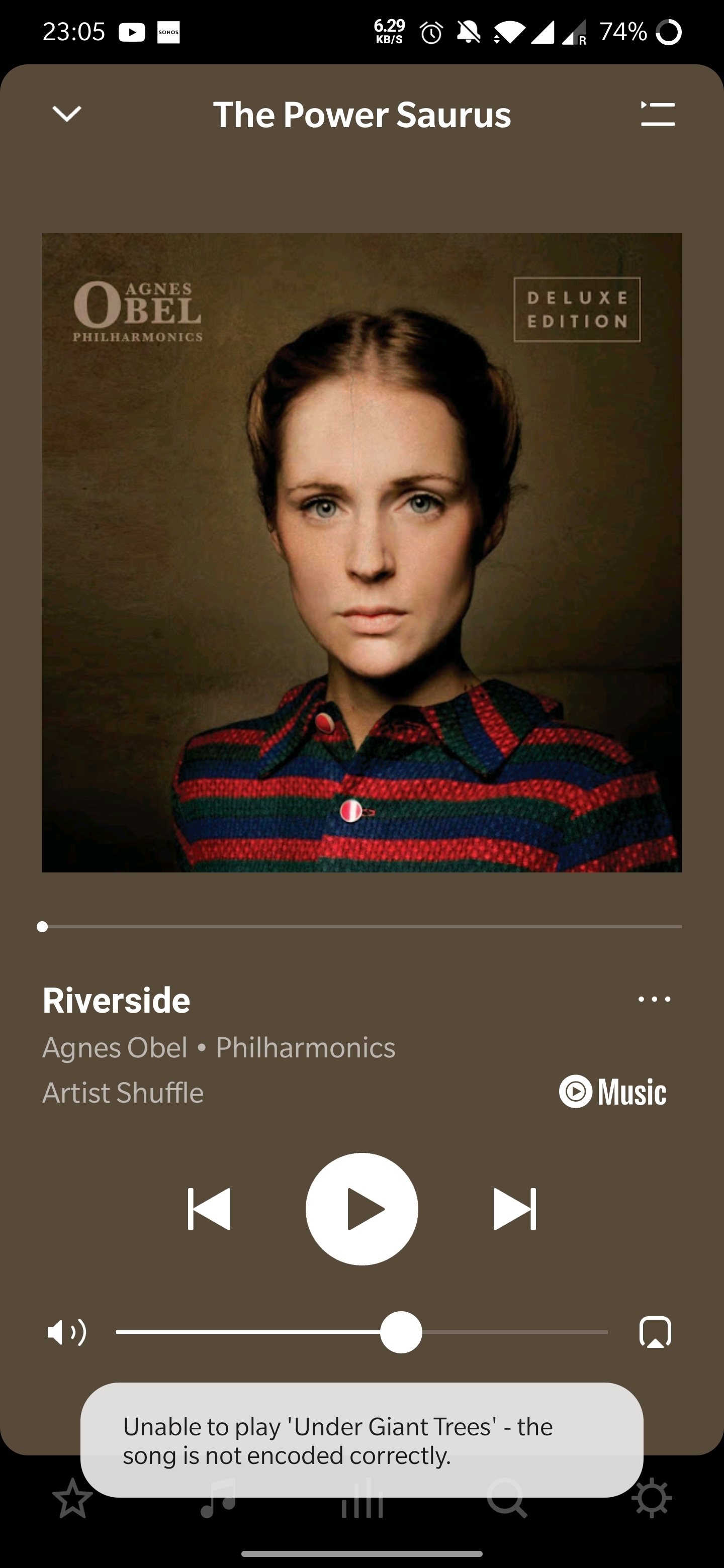
Thanks in advance! 

 

This topic has been closed for further comments. You can use the search bar to find a similar topic, or create a new one by clicking Create Topic at the top of the page.
Annazel S
Annazel SAnswer
Retired Sonos Staff
January 22, 2021

Hi @kubulozaurus.rex.

Thanks for your response and update.

Upon checking the diagnostic report, errors that we observed on the initial diagnostic are still showing and the Android controller’s WiFi connection is ‘unknown’.

We appreciate the time and effort you've spent troubleshooting with us, but at this point, it would be best to reach out to Sonos Support so we can take a closer look at this in real-time and expedite the process. I suggest our phone team for they have more resources available on their system for advanced troubleshooting, and the tools our agents can use would be very useful in this case, there can be an advantage if they need to remote into the controller to see what's going on.


​If you have any questions, please feel free to let us know.

Help others find useful content by clicking the like button and selecting the best answer to your question

101 replies

Contributor I
November 14, 2022

I’ll add my data point. My music is all local -- I occasionally will listen to a SXM channel, but mostly my library is ALAC or FLAC files that I ripped from CDs. The library resides on my iMac.

Things were working fine for the past two years or so. I have two sets of stereo pairs, each pair a One connected via ethernet and a One SL connected via WiFi. Each room has a WiFi access point so the One SLs are no more than 10ft from the router.

At first it happed fairly rarely and I just assumed I had a bad fine. Once it started happing more frequently, I’ve gone back and played the files on my Mac with iTunes or VLC and they play fine, so I don’t believe it is an encoding issue.

I haven’t done the phone support -- I guess I will do that but I’ve spent too much of my life on hold to some support/customer service line to look forward to that.

Ken_Griffiths
November 14, 2022

I’ll add my data point. My music is all local -- I occasionally will listen to a SXM channel, but mostly my library is ALAC or FLAC files that I ripped from CDs. The library resides on my iMac.

Things were working fine for the past two years or so. I have two sets of stereo pairs, each pair a One connected via ethernet and a One SL connected via WiFi. Each room has a WiFi access point so the One SLs are no more than 10ft from the router.

At first it happed fairly rarely and I just assumed I had a bad fine. Once it started happing more frequently, I’ve gone back and played the files on my Mac with iTunes or VLC and they play fine, so I don’t believe it is an encoding issue.

I haven’t done the phone support -- I guess I will do that but I’ve spent too much of my life on hold to some support/customer service line to look forward to that.

My thoughts are it’s the network connection, possibly related to the WiFi extenders, perhaps🤔 - I would simply reboot the entire local network, including all the extenders to see if that resolves the issue.

Lyricist III
February 23, 2023

What did Sonos say, when you submitted a diagnostic after one of these events, and contacted them?

They played a few songs on Sonos radio that worked and he said it was a YouTube music issue. I spent two hours on the phone with them trouble shooting and this is what they came up with.

This has been an issue for two years now, judging by this thread. Others have submitted diagnostics with live tech support to no avail. People bitching on this thread have every right to do so. The Sonos engineers are clueless about what the issue is. 

Lyricist III
February 23, 2023

I’ll add my data point. My music is all local -- I occasionally will listen to a SXM channel, but mostly my library is ALAC or FLAC files that I ripped from CDs. The library resides on my iMac.

Things were working fine for the past two years or so. I have two sets of stereo pairs, each pair a One connected via ethernet and a One SL connected via WiFi. Each room has a WiFi access point so the One SLs are no more than 10ft from the router.

At first it happed fairly rarely and I just assumed I had a bad fine. Once it started happing more frequently, I’ve gone back and played the files on my Mac with iTunes or VLC and they play fine, so I don’t believe it is an encoding issue.

I haven’t done the phone support -- I guess I will do that but I’ve spent too much of my life on hold to some support/customer service line to look forward to that.

My thoughts are it’s the network connection, possibly related to the WiFi extenders, perhaps🤔 - I would simply reboot the entire local network, including all the extenders to see if that resolves the issue.

Ken, are you an engineer at Sonos? Tech support? It's incredibly frustrating the amount of money people have spent on these speakers to be having an issue like this...for two years now! How clueless are you? How many times do people have to tell you, yeah, I tried that!? 

Airgetlam
February 23, 2023

No, if Ken were an engineer at Sonos, his account would be marked as a ‘Sonos’ employee account. Like most of us who have large post counts, we tend to suggest things that have worked in99.99% of the cases, and then try to refer people who continue to have difficulty to deal with actual Sonos support, rather than getting an answer here in the community. Only Sonos employees have access to the hard data present in the system diagnostic. 

Bruce
Lyricist III
February 23, 2023

No, if Ken were an engineer at Sonos, his account would be marked as a ‘Sonos’ employee account. Like most of us who have large post counts, we tend to suggest things that have worked in99.99% of the cases, and then try to refer people who continue to have difficulty to deal with actual Sonos support, rather than getting an answer here in the community. Only Sonos employees have access to the hard data present in the system diagnostic. 

For readers experiencing this issue, tech support is as worthless as this thread and you'd be better off switching to a different speaker. There. Issue resolved! 

Ken_Griffiths
February 23, 2023

Ken, are you an engineer at Sonos? Tech support? It's incredibly frustrating the amount of money people have spent on these speakers to be having an issue like this...for two years now! How clueless are you? How many times do people have to tell you, yeah, I tried that!? 

No, I’m not a Sonos employee and apologies 🙏 if I’ve perhaps upset you in some way. I’m just another Sonos user like yourself and was trying to offer some simple things to try to fix your issue. I’ll just step out and leave it with you and just to add I sincerely hope you get it sorted. If not, you can always go onto submit a Sonos Diagnostic Report, noting it’s reference number, and then contact Sonos Support Staff direct via this LINK.

Good luck and hope you find the answer to the issue.

Lyricist III
February 23, 2023

Ken, are you an engineer at Sonos? Tech support? It's incredibly frustrating the amount of money people have spent on these speakers to be having an issue like this...for two years now! How clueless are you? How many times do people have to tell you, yeah, I tried that!? 

No, I’m not a Sonos employee and apologies 🙏 if I’ve perhaps upset you in some way. I’m just another Sonos user like yourself and was trying to offer some simple things to try to fix your issue. I’ll just step out and leave it with you and just to add I sincerely hope you get it sorted. If not, you can always go onto submit a Sonos Diagnostic Report, noting it’s reference number, and then contact Sonos Support Staff direct via this LINK.

Good luck and hope you find the answer to the issue.

Thanks Ken. As stated, I did this. 

Contributor I
February 27, 2023

By the way, in case it helps anyone, i get this message when I start playing from the Sonos app but not all mediapayers. So, if I start playing on my phone from spotify and then cast it to my Sonos speakers from the Spotify app as opposed to Sonos app, it seems to work. God knows why...


Airgetlam
February 28, 2023

Probably because Spotify uses different servers to feed your phone than they do to feed your Sonos. 

Bruce