
Contributor I
January 18, 2021
Answered

Unable to play X - and the song is not encoded correctly

I was getting this error from time to time, but now I'm getting it on 3/4 of songs... Seems random, as sometimes a song that was working fine would refuse to play and start showing this error (or vice versa). 

My music source is YouTube Music. I've tried rebooting the speaker, reinstalling te app, rebooting the Wi-Fi router, etc. Also tried using an ethernet cable instead of Wi-Fi. Nothing seems to work. 

Diagnostic number : 1167656549

Screenshot :
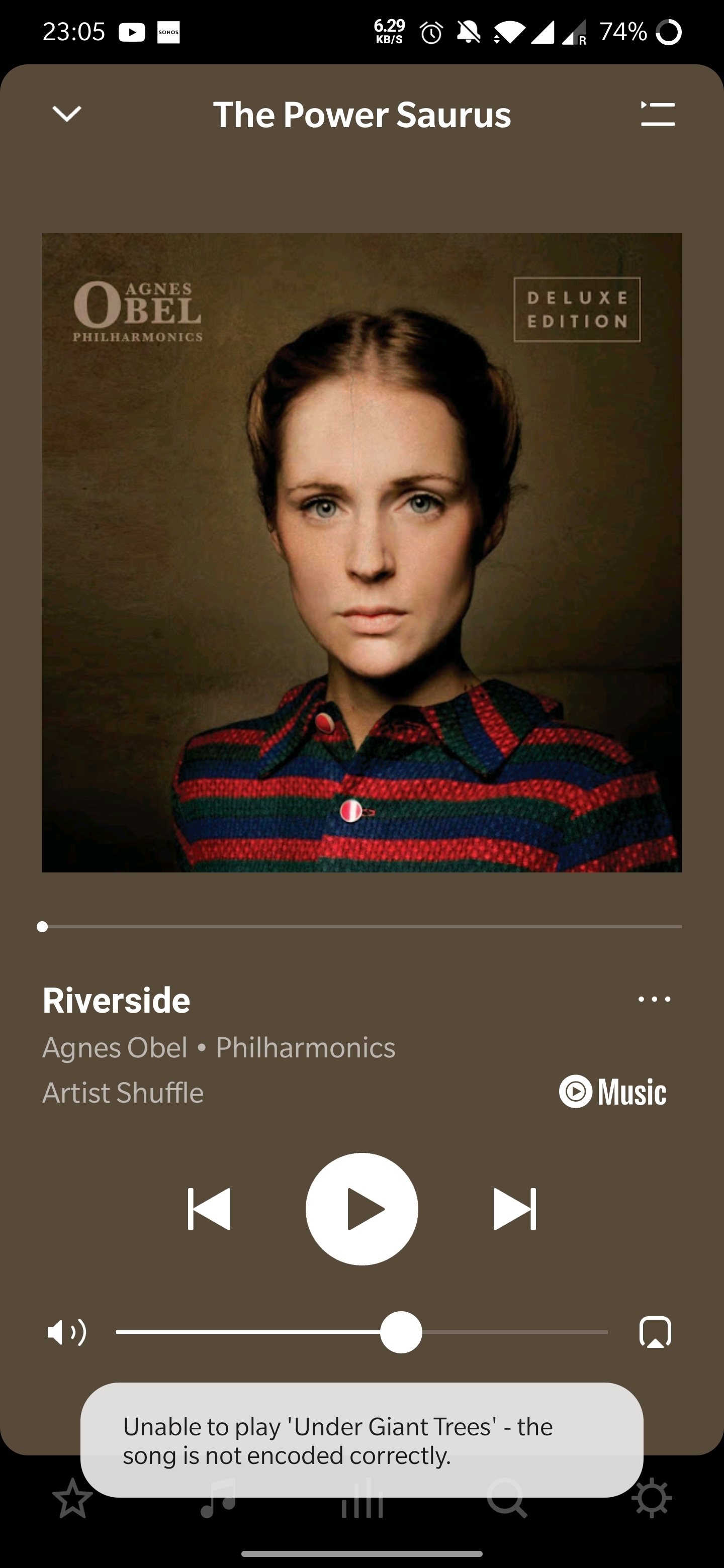
Thanks in advance! 

 

This topic has been closed for further comments. You can use the search bar to find a similar topic, or create a new one by clicking Create Topic at the top of the page.
Annazel S
Annazel SAnswer
Retired Sonos Staff
January 22, 2021

Hi @kubulozaurus.rex.

Thanks for your response and update.

Upon checking the diagnostic report, errors that we observed on the initial diagnostic are still showing and the Android controller’s WiFi connection is ‘unknown’.

We appreciate the time and effort you've spent troubleshooting with us, but at this point, it would be best to reach out to Sonos Support so we can take a closer look at this in real-time and expedite the process. I suggest our phone team for they have more resources available on their system for advanced troubleshooting, and the tools our agents can use would be very useful in this case, there can be an advantage if they need to remote into the controller to see what's going on.


​If you have any questions, please feel free to let us know.

Help others find useful content by clicking the like button and selecting the best answer to your question

101 replies

Airgetlam
November 16, 2021

Sonos has always had a published list of file types it can read, as noted in the supported audio formats FAQ. Sonos has never been able to read all music formats. in most cases, the responsibility lies with the streaming company to provide files that match these requirements, one of the reasons that most streaming companies have separate end points for Sonos to reach out to. But in the case of local files, it’s unfortunate that you weren’t able to test before giving away your collection. 

If I were to guess, when you ripped these files, you likely chose a bit rate that was higher than Sonos can read. Many people assume higher is better, but that is not always the case. 
 

Bruce
Contributor I
November 16, 2021

Thanks very much Airgetiam!

That is very interesting.  One thing I should have mentioned is that a very few of the LP recordings do work, which doesn’t make sense to me if they are all from the same recording device (no provision to specify/alter output type).  Working files seem to be much shorter duration—under 3 minutes (some of the other files are as much as 15-20 min and some Wagner and others are off duration charts).  I made the LP recordings with the base model of the ION recording turntable and need to check output specs.   For some of the live recordings I used the H2 Handy recorder and I know I designated  bit rate over 16.   Have also noted in a quick search that it seems to be possible to convert .wav to lower bit rate.  With over 1K files would be big job but no need to do them all at once and could tag filename.   I still wouldn’t want to discourage Sonos from broadening playback capacity that seems to affect many, but realize companies need to measure use of resources.   Anyway, thanks very much for feedback, and if I come up with anything that may be of more general interest may chime in again.

John

Airgetlam
November 16, 2021

I unfortunately don’t have any personal experience in ‘down-rezzing’ files, but I would assume you could just save them as a slightly different name, and do a few as a test, it should likely work. 

I’d agree, there’s always the opportunity for more from Sonos speakers, but also recognize the cost of effort versus the benefit to the largest population of users. And frankly. Sonos has long been a non-supporter of high-rez, since the science shows there is no audible benefits, so there’s less of a chance that they’ll expend a lot of energy in that direction. Not impossible, though. 

Bruce
Contributor I
November 16, 2021

Airgetiam!!

My Sonos just succeeded in playing a file that had not previously worked.   I loaded the .wav into Audacity, and executed EXPORT/EXPORT MULTIPLE.  Resulting display offers a Format option—I selected 16 bit WAV, then clicked on EXPORT (directed to destination folder with original file, but renamed the export file).  Then I needed to open Sonos app and remove the master folder that is supposed to include the newly formatted file, and then add it back in.   (I tried an option under ‘manage’ that sounded like it would update new files but couldn’t make that work.  It would be nice to know if that ‘manage’ function does work and how to make that happen--because the reconnecting procedure is time consuming).   Only then did the new file show up in the Sonos app, and it played right away.

While it will be a long time before all my files are likely to be converted, this is great news for me, and hope it helps others.   Thanks very much, Airgetiam!!

John

Airgetlam
November 16, 2021

Delighted that you’ve achieved success! At least now, with a bunch of extra work, you’ll be able to get back to being able to play your stored music. 

Enjoy!

Bruce
Lyricist I
December 7, 2021

Sama encoding issue with apple music, amazon and spotify. So annoying. This just started happening to me 2 months ago. I did a wireless refresh and still same encoding and random so g skip issue.

Airgetlam
December 7, 2021

What did Sonos say, after you submitted a diagnostic, and you contacted them?

Bruce
Contributor I
December 7, 2021

Same here with Tidal. It coincided with Tidal offering Hi-fi quality to Standard subscribers. 

I raised the issue with Tidal support; they suggested rebooting Sonos and the router, but it did not fix the issue - still getting the ‘not encoded correctly’ message.

Contributor I
December 11, 2021

I have the same “not encoded correctly” issue on spotify and tidal streaming services. Playlists that we have been using for a year all of the sudden no longer work after the most recent update. This has been happening only within the last month. I will be submitting a diagnostic. I have unplugged every speaker, then rebooted the router and sequentially plugged back in all devices to no avail. This is definitely a sonos issue.

Trending Lyricist I
December 25, 2021

I have just started encountering the “encoding” issue on my Christmas playlist.  The playlist is imported from my laptop which stores all my music.  The music files are a mixture of songs downloaded from Itunes or from CD’s (via) my Laptop and added to the my Itunes Christmas playlist.

Its infuriating !


Any thoughts ?