
Contributor I
January 18, 2021
Answered

Unable to play X - and the song is not encoded correctly

I was getting this error from time to time, but now I'm getting it on 3/4 of songs... Seems random, as sometimes a song that was working fine would refuse to play and start showing this error (or vice versa). 

My music source is YouTube Music. I've tried rebooting the speaker, reinstalling te app, rebooting the Wi-Fi router, etc. Also tried using an ethernet cable instead of Wi-Fi. Nothing seems to work. 

Diagnostic number : 1167656549

Screenshot :
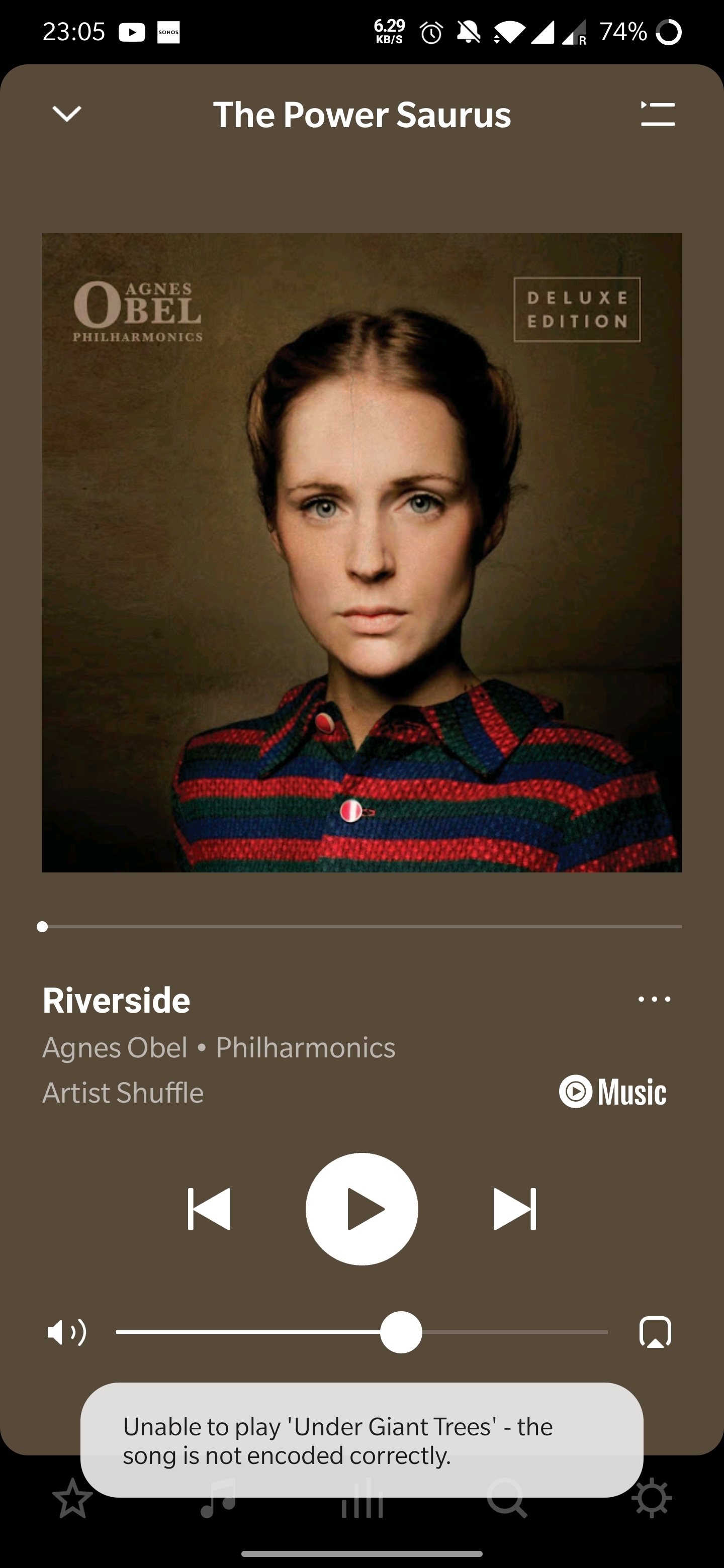
Thanks in advance! 

 

This topic has been closed for further comments. You can use the search bar to find a similar topic, or create a new one by clicking Create Topic at the top of the page.
Annazel S
Annazel SAnswer
Retired Sonos Staff
January 22, 2021

Hi @kubulozaurus.rex.

Thanks for your response and update.

Upon checking the diagnostic report, errors that we observed on the initial diagnostic are still showing and the Android controller’s WiFi connection is ‘unknown’.

We appreciate the time and effort you've spent troubleshooting with us, but at this point, it would be best to reach out to Sonos Support so we can take a closer look at this in real-time and expedite the process. I suggest our phone team for they have more resources available on their system for advanced troubleshooting, and the tools our agents can use would be very useful in this case, there can be an advantage if they need to remote into the controller to see what's going on.


​If you have any questions, please feel free to let us know.

Help others find useful content by clicking the like button and selecting the best answer to your question

101 replies

Lyricist I
October 31, 2021

Same problem on SXM. Just stops out of the blue and gives me this message. After a few minutes it works again. 

Lyricist I
November 1, 2021

I have the same problem when I play BBC Radio 1,  music stops randomly

Lyricist I
November 8, 2021

I will echo the previous posts. Any play list created via Amazon Music will not play. The songs are no longer encoded correctly. 

Ken_Griffiths
November 8, 2021

I will echo the previous posts. Any play list created via Amazon Music will not play. The songs are no longer encoded correctly. 

I’ve just tried several Amazon Music Service Playlists including one called ‘Easy Hits’ …and as you can perhaps see (screenshot attached) they’re working okay here, but it might be a local issue.

The Sonos status page isn’t showing anything at the moment, but maybe keep an eye on that for any updates. 

Sonos Services Status Page

Lyricist I
November 8, 2021

I will echo the previous posts. Any play list created via Amazon Music will not play. The songs are no longer encoded correctly. 

I’ve just tried several Amazon Music Service Playlists including one called ‘Easy Hits’ …and as you can perhaps see (screenshot attached) they’re working okay here, but it might be a local issue.

The Sonos status page isn’t showing anything at the moment, but maybe keep an eye on that for any updates. 

Sonos Services Status Page

The issue I have (sounds like it is similar to others on this thread) is that playlists or songs from Amazon that I saved a while ago are now not playing and have an error saying the song isn't encoded correctly.  Current playlists will play. Seems maybe the playlist points to a file that has been changed on Amazon.  Really could do with a quick way to re add songs to playlists in order to get the 'new' song location.  Or for it to be fixed within Sonos or Amazon. I've also tried re-adding Amazon music in the app, but without success.  Songs in the playlists that are saved locally still play, it just skips any that are streamed from Amazon.

Ken_Griffiths
November 8, 2021

The issue I have (sounds like it is similar to others on this thread) is that playlists or songs from Amazon that I saved a while ago are now not playing and have an error saying the song isn't encoded correctly.  Current playlists will play. Seems maybe the playlist points to a file that has been changed on Amazon.  Really could do with a quick way to re add songs to playlists in order to get the 'new' song location.  Or for it to be fixed within Sonos or Amazon. I've also tried re-adding Amazon music in the app, but without success.  Songs in the playlists that are saved locally still play, it just skips any that are streamed from Amazon.

It seems Amazon are switching their ‘standard music account users’ over to their HD/UltraHD services at no extra charge to the customer, so I wonder if that’s the reason🤔? …and that some of the older saved playlist shortcuts are pointing to tracks that have been updated to higher resolution audio, but the shortcut should be sending the Sonos Speaker the original (lower bitrate) version. but is somehow getting ‘confused’ …causing these ‘occasional’ (saved playlist) errors.

I’ve seen some users here say they’ve re-added/saved their tracks/playlists again and that they then work okay. So maybe its a problem with some old shortcut links to some files on the Amazon servers… just a guess 🤔?

I’ve been subscribed to the Amazon HD/UltraHD Unlimited service since it was first launched, so maybe that’s perhaps why I’m not (yet) encountering this issue too (possibly).

Contributor I
November 10, 2021

I’ve had the same exact issue over the last day or so with Amazon Music. Based on our recent posts, there must have been an issue either with Amazon introducing HD (like eworthi said), or with some other software update. However, I just unplugged my Sonos bridge, unplugged and restarted my router, and then plugged Sonos back in, and so far (fingers crossed) it seems to now be working.

Good luck!


same problem for free sonos radio, it seems Sonos internal problem. 


Airgetlam
November 10, 2021

I’ve had the same exact issue over the last day or so with Amazon Music. Based on our recent posts, there must have been an issue either with Amazon introducing HD (like eworthi said), or with some other software update. However, I just unplugged my Sonos bridge, unplugged and restarted my router, and then plugged Sonos back in, and so far (fingers crossed) it seems to now be working.

Good luck!


same problem for free sonos radio, it seems Sonos internal problem. 


I’m curious to know what Sonos said about your issue, after supplying them a diagnostic and calling in?

Bruce
Lyricist I
November 10, 2021

 I checked my emails and my Amazon music account has been automatically updated to include Amazon Music HD.

I have just had the following from Sonos support


"We have noticed issues with the old playlists after updating to Amazon Music HD.

We have two workarounds, either re-create the Sonos playlist by searching for the respective Amazon music content and adding it to a new Sonos Playlist or re-create the playlist on Amazon Music Natively.

This is an uncommon issue that our team is aware of working to address in a future software release."

Contributor I
November 16, 2021

I’ve had the same problem getting ‘file not encoded properly’ error message. My source files are .wav, created either from an LP recording device or Audacity, or in some cases recording sessions.   I think my device is an A100.   Know less than nothing about the technical stuff, but in reading this trail it feels like Sonos devices return this encoding error message from many different sources.   Assuming those source devices work fine with other players, it feels illogical to suspect they are all the cause.  Doesn’t it seem more likely the coding error problem may have to do with the Sonos devices?  Or perhaps some of the technology the Sonos devices are using?   I spent a year recording my LP collection and gave the vinyl away over a year ago thinking I’d still be able to listen to the music.  Sad my only playback is Windows Media Player, and empathize with the other writers in this trail.  Wouldn’t it be be great if Sonos  figures this out; and have been hoping some update will bring this music back!!!