
Contributor I
January 18, 2021
Answered

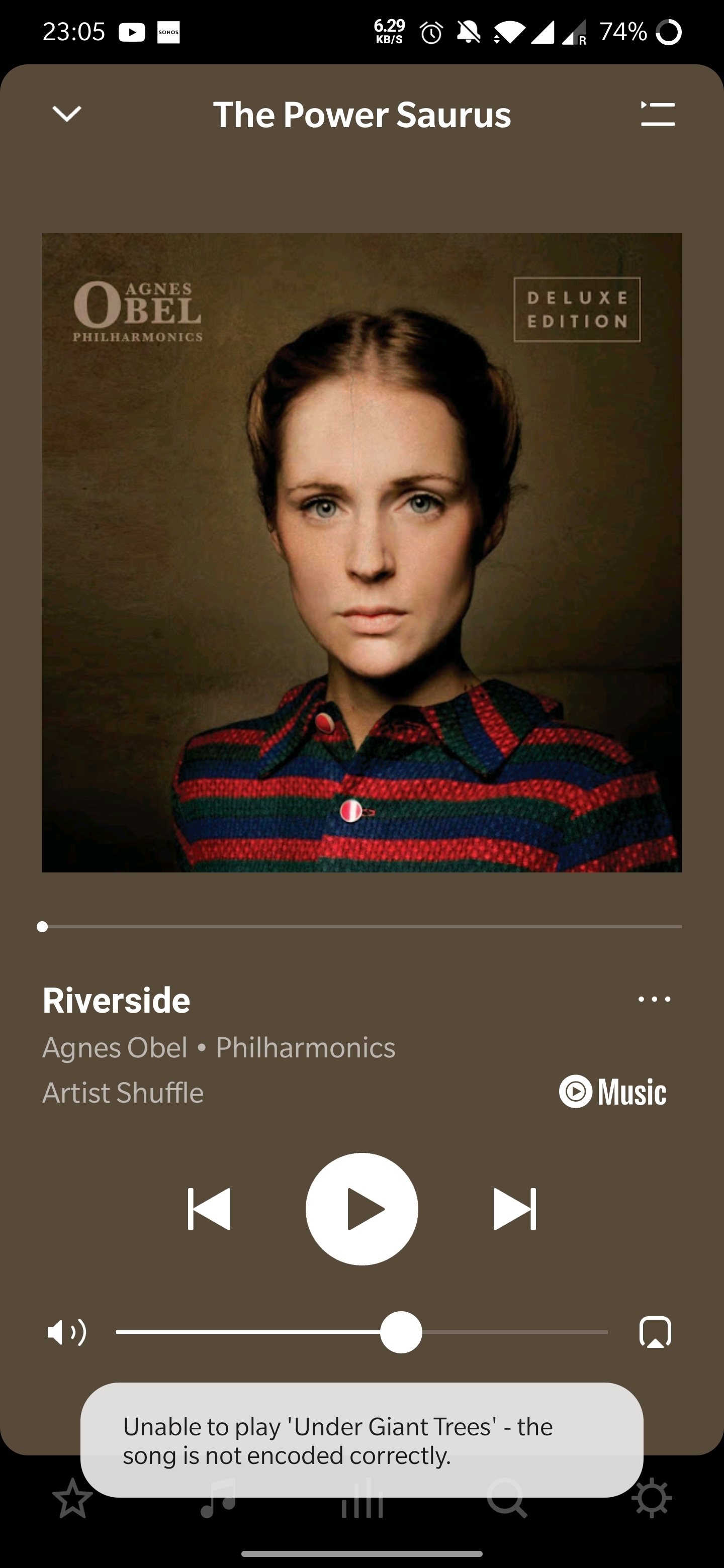
Unable to play X - and the song is not encoded correctly

I was getting this error from time to time, but now I'm getting it on 3/4 of songs... Seems random, as sometimes a song that was working fine would refuse to play and start showing this error (or vice versa). 

My music source is YouTube Music. I've tried rebooting the speaker, reinstalling te app, rebooting the Wi-Fi router, etc. Also tried using an ethernet cable instead of Wi-Fi. Nothing seems to work. 

Diagnostic number : 1167656549

Screenshot :
Thanks in advance! 

 

This topic has been closed for further comments. You can use the search bar to find a similar topic, or create a new one by clicking Create Topic at the top of the page.
Annazel S
Annazel SAnswer
Retired Sonos Staff
January 22, 2021

Hi @kubulozaurus.rex.

Thanks for your response and update.

Upon checking the diagnostic report, errors that we observed on the initial diagnostic are still showing and the Android controller’s WiFi connection is ‘unknown’.

We appreciate the time and effort you've spent troubleshooting with us, but at this point, it would be best to reach out to Sonos Support so we can take a closer look at this in real-time and expedite the process. I suggest our phone team for they have more resources available on their system for advanced troubleshooting, and the tools our agents can use would be very useful in this case, there can be an advantage if they need to remote into the controller to see what's going on.


​If you have any questions, please feel free to let us know.

Help others find useful content by clicking the like button and selecting the best answer to your question

101 replies

Airgetlam
December 25, 2021

When you’re seeing it from local files, it would suggest a certain amount of wifi interference, either between the Sonos and your router, or the laptop and the router, or both. 

Before I submitted a diagnostic, I’d test by unplugging all Sonos devices from power, and shutting down the laptop. While they’re powered down, I’d reboot my router. Once the router comes back up, I’d power on the laptop first, then plug in the Sonos devices, and test to see if that error goes away. 

Bruce
Airgetlam
December 25, 2021

Oh, that process would not only be working for WiFi, but also if it was completely wired, too, as it’s intended to fix a basic network issue that applies to both.

Bruce
Trending Lyricist I
December 25, 2021

Thanks for the prompt reply Airgetlam.

I'll give it a whirl, once I've overcome the Christmas festivities and report back.

Thanks again.

Lyricist III
December 29, 2021

There seems to be an issue with SONOS streaming. I see there has been postings on this forum that are similar symptoms as I am experiencing. Music stops and "the song is not encoded correctly" is displayed on the SONOS app for Windows. Then next song starts to play after several seconds. SONOS Controller for PC Version 13.4.1. Speakers used and displaying this issue are wired ethernet so no WiFi issues.

Diagnostics sent: Your confirmation number is: 1173691071.

Trending Lyricist I
December 29, 2021

This is exactly my experience in terms of the issue..in practical terms my Sonos runs on WiFi.

Lyricist I
January 29, 2022

I’m getting sick of this. Every time a Sonos update, same issue, and always blaming streaming service.

Songs starts playing absolutely fine then part way through stops with errors not encoded correctly. Same on next song, it’s playing fine then just stops midway through not encoded correctly. Was working fine yesterday, today after update, it’s broken again. 


I can’t see me buying Sonos again, i’m fed up of issues just trying to get it to play my music - shouldn’t be this hard.

If i use web app the steaming service strangely enough works just fine through my pc speakers.

Trending Lyricist I
January 30, 2022

I have to say...my patience is running out with Sonos. 

Lyricist III
January 30, 2022

There seems to be an issue with SONOS streaming. I see there has been postings on this forum that are similar symptoms as I am experiencing. Music stops and "the song is not encoded correctly" is displayed on the SONOS app for Windows. Then next song starts to play after several seconds. SONOS Controller for PC Version 13.4.1. Speakers used and displaying this issue are wired ethernet so no WiFi issues.

Diagnostics sent: Your confirmation number is: 1173691071.

My issue was only with one speaker, a SONOS Five. If I unplugged my SONOS Five and PING that assigned IP address I was still getting a response! My issue was due to an IP address conflict. I solved the issue by logging into my router and finding the conflicting device on my local network. Once I forced the other device to use a different unassigned IP address the streaming problem with my SONOS Five went away. Hope this helps, you problem may be similar to mine.

jgatie
January 30, 2022

My issue was only with one speaker, a SONOS Five. If I unplugged my SONOS Five and PING that assigned IP address I was still getting a response! My issue was due to an IP address conflict. I solved the issue by logging into my router and finding the conflicting device on my local network. Once I forced the other device to use a different unassigned IP address the streaming problem with my SONOS Five went away. Hope this helps, you problem may be similar to mine.


In my 14 years posting here, I’ve found IP conflicts are the cause of 98% of all problems, despite the protests of “My network is fine!”. 

Airgetlam
January 30, 2022

I’d have to concur. It’s unfortunate that most routers do not have a better facility to point out the issue. 

Bruce