
Avid Contributor I
October 24, 2022
Answered

Trueplay noise error update 14.18

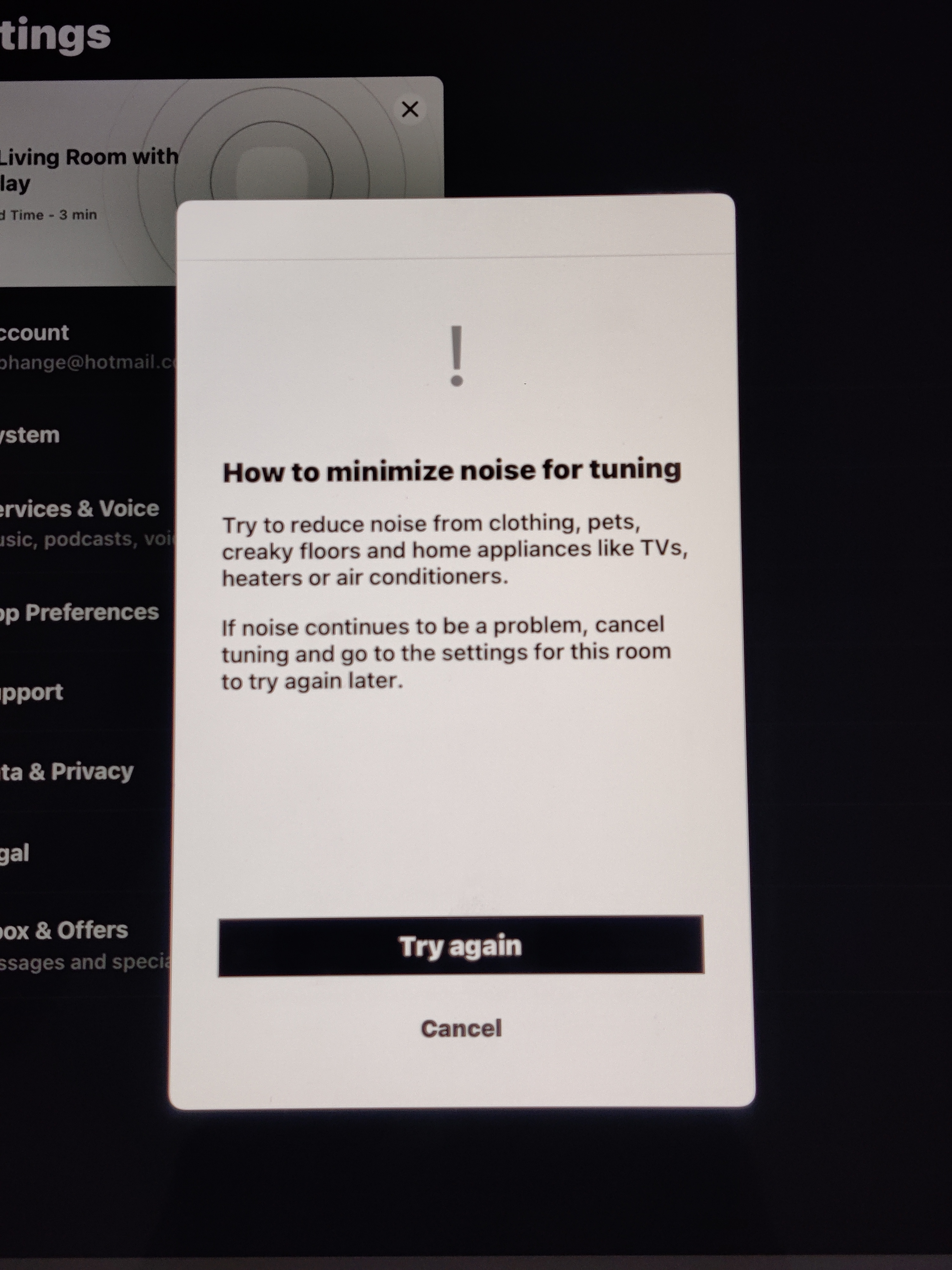
I am observing a trueplay tuning error after the latest update 14.18.

In the Living Room I have Beam (Gen1), Two Play 1 & Sub (Gen 2). But I couldn't succeed in doing it. I tried a number of times but the process stops in the first step while testing the tone sound for left right balancing. This process stops everytime at the same moment just before finishing it,  gives a noise error message. I am sure there is no noise and room is as quiet as it can be possible.

In my bedroom I have two play-5 which were successfully re-tuned for trueplay after the update but the living room 5.1 system is not getting tuned. If the iPad has any issues it should not have to be worked in another room stereo system.

I have factory resetted each speaker in the living room, reinstalled the app on the ipad, removed case of iPad, tried to tune at different times and what not! But nothing has helped me. I have also disabled bluetooth of iPad, other devices on network, light etc after discussing with Sonos support but nothing helped me yet.
Hoping soon I find working solution. . .  !

This topic has been closed for further comments. You can use the search bar to find a similar topic, or create a new one by clicking Create Topic at the top of the page.
Corry P
Corry PAnswer
Sonos Staff
October 24, 2022

Hi @bnilesh & @jgatie 

I can only recommend you both get in touch with our technical support team to document the issue and “get the ball rolling” on an investigation. There do seem to be a few users reporting this and I have reported it up the chain myself, but a few cases with documented diagnostics will help a lot.

"Common sense is the collection of prejudices acquired by age eighteen." - Albert Einstein

25 replies

Corry P
Sonos Staff
October 24, 2022

Hi @bnilesh 

Thanks for your post!

It may help to check there’s no fluff stuck in the iPad’s microphone recess. I also recommend rebooting the iPad to ensure no other apps are running that might interfere, or to try other controller device, if that’s an option. Ensuring that you do not shift your grip on the device while tuning may also improve matters.

Rebooting the Play:5s may also help, but resetting them would have achieved the same thing. It’s worth a try, however.

I highly recommend that you do not factory reset any devices going forward.

I hope this helps.


"Common sense is the collection of prejudices acquired by age eighteen." - Albert Einstein
bnileshAuthor
Avid Contributor I
October 24, 2022

Hi Corry,

Thanks for your help. I forgot to mention that I tried rebooting iPad too. In the first test of trueplay tuning for 5.1 system, one is supposed to keep iPad vertical at eye level. I was bit frustrated after lot of tries so I doubted about my gripping...though I had done trueplay tuning in past. I kept iPad flat on surface just to ensure no gripping issues there but alas same result. I only have one iPad and other all devices are android based.

BTW in living room Play1's are surround along with SUB and Beam. I also tried to rebooting all devices in the room multiple times apart from factory resetting once.

jgatie
October 24, 2022

I’m still getting this error.  Same as the OP, iPad is only used for Trueplay.  All background apps are stopped, no fuzz in the microphone, have tried turning the iPad upside down and on its side.  I’ve used it to Trueplay before, it’s just not acting like it always did.  Strange.

Corry P
Corry PAnswer
Sonos Staff
October 24, 2022

Hi @bnilesh & @jgatie 

I can only recommend you both get in touch with our technical support team to document the issue and “get the ball rolling” on an investigation. There do seem to be a few users reporting this and I have reported it up the chain myself, but a few cases with documented diagnostics will help a lot.

"Common sense is the collection of prejudices acquired by age eighteen." - Albert Einstein
bnileshAuthor
Avid Contributor I
October 25, 2022

After discussing with support team I gave a try to tune trueplay without surround i.e. Beam+SUB. I did succeeded in it. But when I add surrounds I am supposed to do it again where earlier problem still persists. Seems need to be patient still this issue is resolved in the upcoming update.

TheChemist
Trending Lyricist I
November 3, 2022

...Hi, in my bedroom (5 x 4 meters) i have Sonos ARC, two Sonos One and Sub (gen3) ... i have the same problem, after updating to version 4.18 i am unable to perform trueplay a due to too noisy environment (which did not happen in the past) ... i confirm that the new revision is better for dialogue and very good for surround and bass (now both well present) ... an upgrade would be appropriate to better manage trueplay volume ... please provide ... thank you ...

TheChemist
jgatie
November 17, 2022

FYI @Corry P, the update from today fixed this issue for me.  Arc/Sub/surrounds are now Trueplay’d and sound excellent. 

bnileshAuthor
Avid Contributor I
November 18, 2022

@jgatie Do you mean update 14.19 ?

I have same problem still with that update. I tried it thrice just now.


jgatie
November 18, 2022

@jgatieDo you mean update 14.19 ?

I have same problem still with that update. I tried it thrice just now.


Yes, 14.19.  I had to update both the Sonos hardware and the iPad app.

bnileshAuthor
Avid Contributor I
November 18, 2022

@jgatieDo you mean update 14.19 ?

I have same problem still with that update. I tried it thrice just now.


Yes, 14.19.  I had to update both the Sonos hardware and the iPad app.

Even with sonos hardware & app update I am having problem. Can you explain in detail what exactly you did ? What are your surround speakers ? I am having PLAY-1 as surround along with Beam & Sub.