
Contributor II
November 16, 2022
Answered

Sonos Controller Update Failed. An Unexpected Error Occurred. Please Try Again

  • November 16, 2022
  • 53 replies
  • 26702 views

On MacOS 13.1, running on an M1 MacBook Pro.

Consistent error message when trying to update the MacOS Sonos app (on prompt in app). Only solution is to uninstall and reinstall.

Very frustrating!

Any ideas how to stop this happening?
This topic has been closed for further comments. You can use the search bar to find a similar topic, or create a new one by clicking Create Topic at the top of the page.
Best answer by ewolkoff

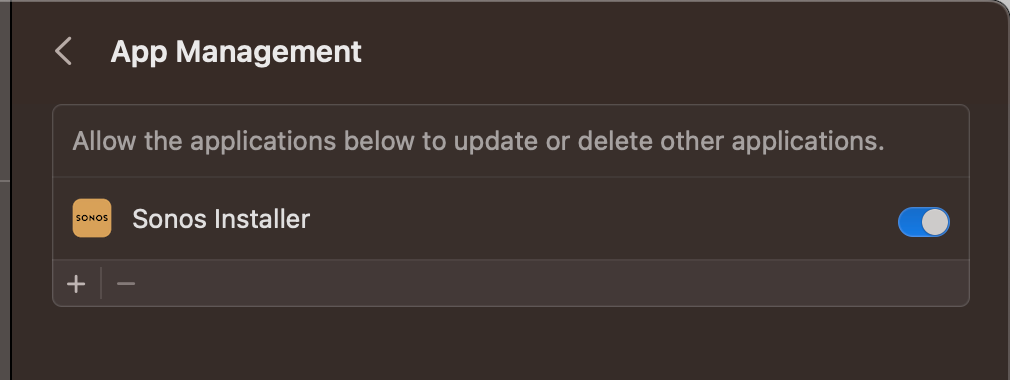
The true fix is to go to Settings-->Privacy and Security--->App Management--->Turn on Sonos Installer.   Then you won’t have this update issue anymore and the app will update as intended.  


53 replies

Contributor I
November 22, 2022

Not necessary to uninstall, just download the app from https://support.sonos.com/en-us/downloads as suggested above. Close current app if open. Open the .dmg downloaded and drag into applications as instructed and “replace” current app. No set up then involved.

Worked for me like a charm.

Macbook Pro Apple M2
macOS Ventura 13.0.1

I did the reinstall but checked the update available and same issue. There is still an update available, not able to install. Got a message telling me that MacOS prevented one app from updating another.

Airgetlam
November 22, 2022

@chucklin72 Is there an update for the controller, or for your speakers?

What version of the Mac controller do you have installed? There’s often a two step process, one being the controller, the other being the software/firmware update on the speakers. 

One’s easier to “fix” than the other, but if your speakers are being blocked from reaching the update servers, we’ve been leading you down the wrong path. Probably because there’s an issue right now with updating the Mac controller, so we’ve been assuming that’s what you were running in to. 

Bruce
Lyricist I
November 29, 2022

Having the same problem on Macbook Pro and Mac Mini

Lyricist I
December 3, 2022

Not necessary to uninstall, just download the app from https://support.sonos.com/en-us/downloads as suggested above. Close current app if open. Open the .dmg downloaded and drag into applications as instructed and “replace” current app. No set up then involved.

Worked for me like a charm.

Macbook Pro Apple M2
macOS Ventura 13.0.1

I did the reinstall but checked the update available and same issue. There is still an update available, not able to install. Got a message telling me that MacOS prevented one app from updating another.

exactly…….fine to do the download over the top of the old one but there are then other updates waiting and they fail exactly the same as before? so are some people missing something????????

Avid Contributor II
January 9, 2023

This update problem still exists. I did the above items to do an update (to version 14.19) a month ago. Now the Sonos app is saying an update is ready, again. When I try to do it on my MacBook Pro I get the same message during the uupdate process: “Update Failed. An Unexpected Error Occurred. Please Try Again.” I am running Ventura 13.1 on my MacBook Pro.

Also, twice in the last month the Sonos app has disconnected from Apple Music, so a reconnect process must be done to access it.

What’s going on? I have had five years of reliable service from my Play 5 and two Play 1’s, using both my MacBook and iPhone or iPad Sonos apps, with no problems for months on end. Now, things are wonky. Is there a disconnect between Sonos and Apple that didn’t exist before?

Airgetlam
January 9, 2023

Delete your install of the Sonos controller on the Mac.

Go to Sonos’ website, install the new controller from there. When prompted, “Join existing system”. 

And yes, Apple made a change to the install process (and approvals needed to run that software) and Sonos has yet to catch up with that change.

Bruce
Avid Contributor II
January 9, 2023

Thanks for your helpful response. 
 

I wonder why such a prominent player as Sonos would take so long to fix an annoying problem like this? Makes me feel like my question on this thread was valid. 

Contributor I
March 29, 2023

I want to jump in here as well. This is highly annoying. I have been replacing the app on every updated controller. I’d also like to add that I cannot see why Sonos makes it so hard to find the controller app link as well. It should have its own download page that is easy to find from the main page rather than having to navigate so deep into the site to find it. Poor form, Sonos.

Airgetlam
March 29, 2023

I’ve had zero issues for the last three updates in using the “Check for updates….” in my Mac controller, using a 15 inch 2019 MacBook Pro, running the latest version of the OS (there’s been more than one in the time under discussion).

Yes, for several releases, Sonos didn’t work for updating properly, but that’s been resolved on my machine, so I’m not sure what issue you’re running in to. 

Bruce
Lyricist I
April 2, 2023

this doesnt work for me. even deleting and re-installing app isnt working. still always prompts to update controller and it doesnt work