
Contributor II
November 16, 2022
Answered

Sonos Controller Update Failed. An Unexpected Error Occurred. Please Try Again

  • November 16, 2022
  • 53 replies
  • 26702 views

On MacOS 13.1, running on an M1 MacBook Pro.

Consistent error message when trying to update the MacOS Sonos app (on prompt in app). Only solution is to uninstall and reinstall.

Very frustrating!

Any ideas how to stop this happening?
This topic has been closed for further comments. You can use the search bar to find a similar topic, or create a new one by clicking Create Topic at the top of the page.
Best answer by ewolkoff

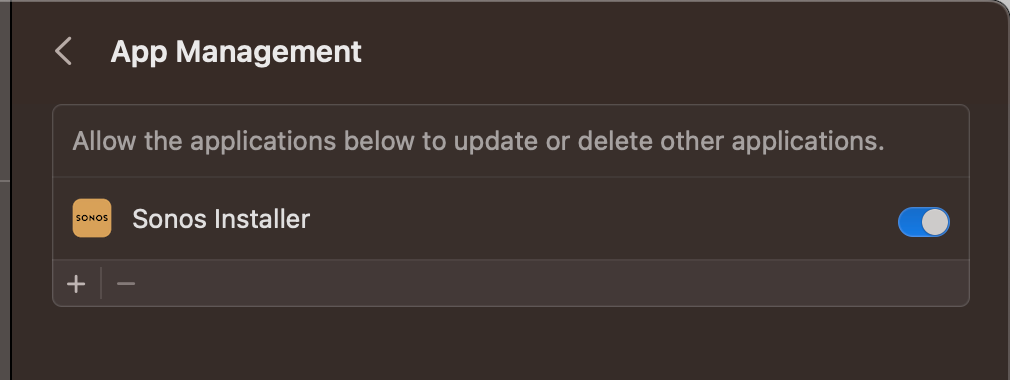
The true fix is to go to Settings-->Privacy and Security--->App Management--->Turn on Sonos Installer.   Then you won’t have this update issue anymore and the app will update as intended.  


53 replies

lucas_4
November 17, 2022

Same Problem here both on Mac Book Pro 13-inch, 2018, Four Thunderbolt 3 Ports and Imac

Mister Gee
Lyricist I
November 17, 2022

Unfortunately you’ll need to Uninstall and re-install the Sonos app from here: https://support.sonos.com/en-us/downloads

To Uninstall, launch the Sonos app and then choose Uninstall from the Sonos menu in the menubar.  Once uninstalled, you can install the version you downloaded from the link above.  Just choose “Join an Existing System” when you launch for the first time, and you’ll be right back where you left off.


I believe this has to do with some of the security restrictions in macOS Ventura, but that’s really for the Sonos developers to investigate.

Airgetlam
November 17, 2022

Which, based on my conversations with Customer Support, they are both aware, and working on a fix. 

Bruce
Lyricist I
November 17, 2022

Which, based on my conversations with Customer Support, they are both aware, and working on a fix. 

Indeed - just takes some time for them to re-engineer due to how the updater works.  They are aware, and frankly, the above workaround is pretty simple, so it’s not a catastrophic issue.

Basically, for the geeks among us, macOS Ventura doesn’t allow one app to update another, without being added to a ‘whitellist’ in System Preferences.

The problem seems to be that it’s not the Sonos app itself doing the updater, it’s a second app it downloads called “Sonos Updater” - so because it’s downloaded on-the-fly, it can’t be pre-added to the whitelist, hence you get into this catch-22 position where you can’t preauthorize the updater app the Sonos app downloads to update itself …


Contributor I
November 18, 2022

Not necessary to uninstall, just download the app from https://support.sonos.com/en-us/downloads as suggested above. Close current app if open. Open the .dmg downloaded and drag into applications as instructed and “replace” current app. No set up then involved.

Prominent Collaborator I
November 18, 2022

See:


Lyricist I
November 20, 2022

Having the same update error for past few days.

I Uninstalled the MAC OS version on my iMac, downloaded and installed.

Now the app on my iMac cannot find the Sonos network.

On the same wifi network.

Arrggghhhhh!!!

Airgetlam
November 20, 2022

Your issue is different than those above.

And unfortunately there’s not enough information to make a real judgement about what is going on, but I’d certainly suggest trying adding an Ethernet cable between your router and one of your Sonos devices, waiting a few minutes for things to settle down, then trying again.

If that doesn’t work, please give us more information about your system. 

Bruce
Lyricist I
November 20, 2022

I updated the App via the Update function, restarted twice and then on the 3rd go it asked to Join the Existing system.

All working fine now.


Lyricist I
November 21, 2022

Not necessary to uninstall, just download the app from https://support.sonos.com/en-us/downloads as suggested above. Close current app if open. Open the .dmg downloaded and drag into applications as instructed and “replace” current app. No set up then involved.

Worked for me like a charm.

Macbook Pro Apple M2
macOS Ventura 13.0.1