
Contributor II
November 16, 2022
Answered

Sonos Controller Update Failed. An Unexpected Error Occurred. Please Try Again

  • November 16, 2022
  • 53 replies
  • 26702 views

On MacOS 13.1, running on an M1 MacBook Pro.

Consistent error message when trying to update the MacOS Sonos app (on prompt in app). Only solution is to uninstall and reinstall.

Very frustrating!

Any ideas how to stop this happening?
This topic has been closed for further comments. You can use the search bar to find a similar topic, or create a new one by clicking Create Topic at the top of the page.
Best answer by ewolkoff

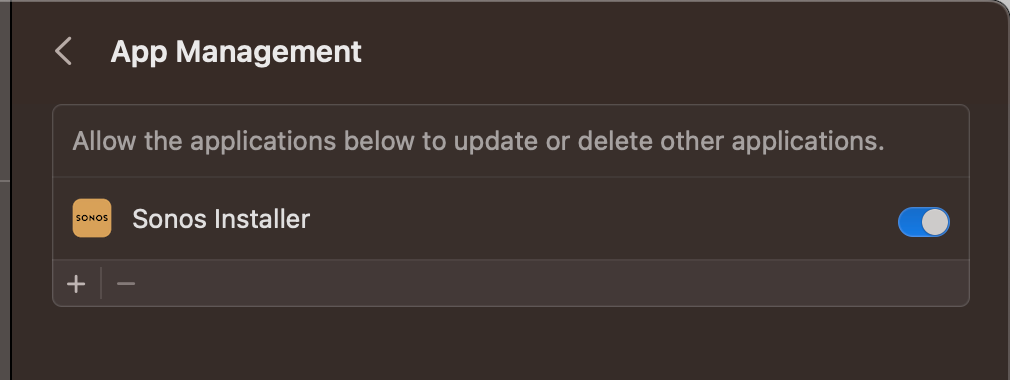
The true fix is to go to Settings-->Privacy and Security--->App Management--->Turn on Sonos Installer.   Then you won’t have this update issue anymore and the app will update as intended.  


53 replies

Lyricist I
April 5, 2023

I get this issue every time there is an update. I’ve now bookmarked the downloads page since it’s so hard to find… it would help if the app was a proper Mac app rather than the multi-platform kludge it is. 

Lyricist I
April 6, 2023

Just ran into this as well, hoped that last time was the last, but guess not...

Contributor I
April 18, 2023

try going to your mac system settings, privacy and security and then app management, then sonos and allow sonos installer, …...worked for me after trying loads different things

Lyricist II
April 18, 2023

I have been uninstalling and re-installing S2 desktop app for MacBook Pro (Ventura 13.3.1). However not working with today’s update. When I try to open the newest download (Sonos_72.2-39150.dmg) or drag into Applications folder, nothing happens. Sonos & Sonos Installer are included in “app management” in system settings. Any suggestions? Thank you

Laura P.
Airgetlam
April 18, 2023

I’ve not had time to test 15.3 yet on my M1 Mac. Have you tried deleting the old one, emptying the trash, then a reboot before installing (or attempting to install) the new version?

Bruce
Lyricist II
April 18, 2023

Thanks. I was able to reinstall a couple of times, but was reverting to older version. Rebooted. Tried again, and this time finally installing. Thank you! Good luck to all! :)


Laura P.
Airgetlam
April 18, 2023

It may have just been you catching the link in the process of it being updated. 

Bruce
Contributor I
June 17, 2023

On MacOS 13.1, running on an M1 MacBook Pro.

Consistent error message when trying to update the MacOS Sonos app (on prompt in app). Only solution is to uninstall and reinstall.

Very frustrating!

Any ideas how to stop this happening?


Airgetlam
June 17, 2023

Try deleting the application completely. Reboot your Mac, then go to Sonos and download a fresh copy. When confronted, choose ‘join existing system’

Bruce
Lyricist II
June 25, 2023

Sonos - this problem has been around for a long, long time.  It seems like I’ve had to do updates this way at least for the last 4-5 times, maybe a lot more.