
Contributor II
May 1, 2023
Answered

Sonos cannot index USB drive on TP-Link Router

  • May 1, 2023
  • 32 replies
  • 1283 views

Is this problem still on the SONOS software team’s bug list to be resolved?  Has any progress been made?


Prior thread below.

Sonos cannot connect to USB drive on TP-Link router

 
Cannot share USB audio files with SONOS v2 system
Model: TP-Link Archer C8  
Hardware Version: V3
Firmware Version: 1.1.3 Build 20220510 rel.32759(5553)

The USB drive plugged into the Archer C8 shows it is active in the Archer C8 advanced USB settings.  All files are shared with no login required.

The network address is:  \\192.168.1.1\sda1\USB_Music

Windows explorer can find the music files OK and can play them,  but the SONOS v2 system cannot access the music library.

Sonos initially connects to the USB drive at the network address entered, but gives the error message below after about 10 seconds.

I have worked extensively with SONOS customer support, but they were unable to resolve this problem.  SONOS suspects a problem with the TP-Link Archer C8's implementation of SMB1 and/or SMB2 protocols.

I have tried sharing the USB drive with and without user login and password, but neither works.

I just updated this router to the latest version firmware, but that did not resolve this problem.

Any suggestions from other users would be welcomed.

SONOS Error messge below:
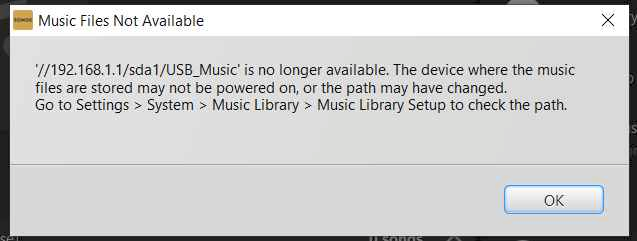
 

This topic has been closed for further comments. You can use the search bar to find a similar topic, or create a new one by clicking Create Topic at the top of the page.
Best answer by Corry P

Hi @gmendenh 

Thanks for your post!

This issue has not yet been addressed. There is still no ETA to share, unfortunately.

32 replies

Contributor I
November 3, 2023

Just upgraded my router to a TP-AEX5400 and ran into this issue.   From what I gather still no update on a fix.  Just chiming in to follow and see about solutions either being updates or workarounds.

Lyricist I
November 4, 2023

If sonos just allowed legacy smb connections as well as more recent ones then it would work with the older routers like it used to.

Trending Lyricist I
January 13, 2024

We are still waiting to have this fixed.  Sonos doesn’t recognized the USB drive attached to my TP-Link router?  Any time line when this will be addressed?

Dez S
Lyricist III
February 21, 2024

I am having the same exact issue with my TP-Link Deco mesh router. 

I spoke with Sonos Tech Support about it, and of course they acted like they never heard of this before, yet I see some of you have been encountering this for months.

I’d like this addressed, as the router has the USB port set to share and Sonos sees the library in the USB port and has the login credentials saves. Not sure why Indexing the library is an issue.

Airgetlam
February 21, 2024

Does the TP-Link router treat connected USB drives as NAS devices? I.e does it have the necessary software to run SMB? Not all routers have built in NAS firmware to use USB connected drives as an NAS.  Also, remember that Sonos S1 uses SMB v1, but S2 can use SMB v2 or above.

The Sonos speaker (Linux) is running the library index, by connecting to the NAS via SMB, and not the Sonos controller on your device. 

However, if it shows up as a shared drive, and not an NAS, it’s handled differently by Sonos. 

Bruce
Dez S
Lyricist III
February 22, 2024

Does the TP-Link router treat connected USB drives as NAS devices? I.e does it have the necessary software to run SMB? Not all routers have built in NAS firmware to use USB connected drives as an NAS.  Also, remember that Sonos S1 uses SMB v1, but S2 can use SMB v2 or above.

The Sonos speaker (Linux) is running the library index, by connecting to the NAS via SMB, and not the Sonos controller on your device. 

However, if it shows up as a shared drive, and not an NAS, it’s handled differently by Sonos. 

I am not sure. All I know is the TP-Link router allows you to use the USB port as a network share with a USB 3.0 port to attach a flash drive, SSD or hard drive.

Very convenient to share media. But after the initial media index, it won’t index it again and says it’s “not available”

Airgetlam
February 22, 2024

It is hard to place blame on either TP-Link or Sonos without this knowledge. The use of a USB device, whatever version, suggests (but not certain) not an NAS drive, which begs the question, if your TP-Link is allowing access from other devices to a network share. This information should be in the TP-Link manual. 

Which version of the Sonos OS are you currently running? Have you set the share on this USB folder to all devices? Is there any VPN, port blocking, or other virus protection running anywhere? What device and OS is your controller running on?

Bruce
Dez S
Lyricist III
February 22, 2024

It is hard to place blame on either TP-Link or Sonos without this knowledge. The use of a USB device, whatever version, suggests (but not certain) not an NAS drive, which begs the question, if your TP-Link is allowing access from other devices to a network share. This information should be in the TP-Link manual. 

Which version of the Sonos OS are you currently running? Have you set the share on this USB folder to all devices? Is there any VPN, port blocking, or other virus protection running anywhere? What device and OS is your controller running on?

I am running the latest, Sonos 16.0. on a PC with Windows 11 Pro and on and iPad Pro with iPadOS 17.3.1

I have the USB set in the TP-Link Deco router as Access Authentication with username & password, which was entered in the Sonos app when it first read the drive.

Sharing on Windows looks normal?:


Airgetlam
February 22, 2024

We’re reaching the limits of my comfort level, to be honest, especially as my preferred OS is MacOS. 

As a test, if you copy a handful of songs to your C: drive, does Sonos work with them?

Bruce
Dez S
Lyricist III
February 22, 2024

We’re reaching the limits of my comfort level, to be honest, especially as my preferred OS is MacOS. 

As a test, if you copy a handful of songs to your C: drive, does Sonos work with them?

Yes. The same songs are on my computer in various folders. When I’ve indexed them in the past, it always worked and self-indexed daily.

Now with this new router with a USB share, I bought it purposely for that. To share my music across the network with the Sonos app. Getting the Music Library set in Sonos is not the issue, it’s trying to Index them again under “Library Update” or “Update Music Library Now” doesn’t work. Says that shared USB drive isn’t available, yet it is still in my list under Music Library | Path and in the Music Source list in the app.

I am seeing that this has been going on for months with others. Why doesn’t Sonos create an Index file within the app, a database…………….and NOT write to the USB drive, if that’s the issue?