
Contributor II
May 1, 2023
Answered

Sonos cannot index USB drive on TP-Link Router

  • May 1, 2023
  • 32 replies
  • 1283 views

Is this problem still on the SONOS software team’s bug list to be resolved?  Has any progress been made?


Prior thread below.

Sonos cannot connect to USB drive on TP-Link router

 
Cannot share USB audio files with SONOS v2 system
Model: TP-Link Archer C8  
Hardware Version: V3
Firmware Version: 1.1.3 Build 20220510 rel.32759(5553)

The USB drive plugged into the Archer C8 shows it is active in the Archer C8 advanced USB settings.  All files are shared with no login required.

The network address is:  \\192.168.1.1\sda1\USB_Music

Windows explorer can find the music files OK and can play them,  but the SONOS v2 system cannot access the music library.

Sonos initially connects to the USB drive at the network address entered, but gives the error message below after about 10 seconds.

I have worked extensively with SONOS customer support, but they were unable to resolve this problem.  SONOS suspects a problem with the TP-Link Archer C8's implementation of SMB1 and/or SMB2 protocols.

I have tried sharing the USB drive with and without user login and password, but neither works.

I just updated this router to the latest version firmware, but that did not resolve this problem.

Any suggestions from other users would be welcomed.

SONOS Error messge below:
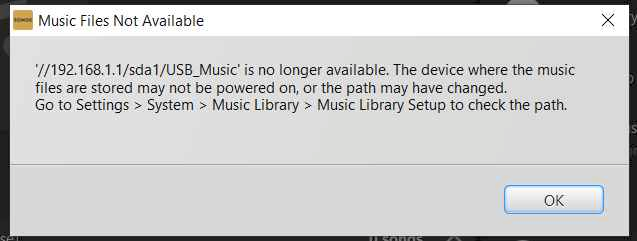
 

This topic has been closed for further comments. You can use the search bar to find a similar topic, or create a new one by clicking Create Topic at the top of the page.
Best answer by Corry P

Hi @gmendenh 

Thanks for your post!

This issue has not yet been addressed. There is still no ETA to share, unfortunately.

32 replies

Corry P
Corry PAnswer
Sonos Staff
May 2, 2023

Hi @gmendenh 

Thanks for your post!

This issue has not yet been addressed. There is still no ETA to share, unfortunately.

"Common sense is the collection of prejudices acquired by age eighteen." - Albert Einstein
gmendenhAuthor
Contributor II
May 2, 2023

OK Cory,  Thanks for your answer.  Looking at several threads on this site, it seems that quite a few SONOS users are experiencing this serious bug and are unable to use their personal music libraries with SONOS.  I hope you can raise the priority with the software team fix this problem.  This is causing significant user dissatisfaction with an otherwise great ecosystem.

gmendenhAuthor
Contributor II
May 10, 2023

Please check to make sure this issue is still on the bug working list of the software team.

Trending Lyricist I
May 25, 2023

I found a solution that worked for me. Like everyone, I had tweaked the network, router, firewall etc, and kept on getting the same message.

Started to suspect that the error message may be misleading, or not entirely accurate.

Then, by chance, I browsed the music folders and noticed files that I think were created by Sonos in almost every folder. These files were called Folder.jpg, and AlbumArt*.jpg, and dated from 2021.  It made me wonder whether there was some issue related to these files, and decided to remove all of them. If Sonos needed them, I presume they would get re-created, or if Sonos was trying to remove them, maybe that caused an error.

After doing so, the re-index worked without error. I now have my Music Library back.

I hope that this works for others too, who have a USB/Network Drive with their music collection. In my case, the USB drive was inserted into my TP-Link router as I did not want to have my computer switched on to use Sonos.

btw, deleting these files is easier using the ’find’ feature to list all files in your Music folder with name folder.jpg and then deleting. Do the same file with all jpg files starting with AlbumArtwork. 

Trending Lyricist I
July 9, 2023

I am still having this issue of getting my Sonos to recognize the USB plugged into my TP Link router.  Any news from Sonos?

Airgetlam
July 9, 2023

It would be an issue that TP-Link should be looking at. Sonos uses SMB protocols to reach out to available NAS installations, TP-Link needs to respond properly to that.
 

Note, not all routers have the hardware/CPU necessary to do this, but it’s not up to Sonos to ‘fix’. 

Bruce
106rallye
July 10, 2023

Since Sonos states they are working on it, they at least feel responsible for a solution.

Trending Lyricist I
July 27, 2023

I spoke with Sonos this week.  I was told they are aware of this and they still plan to address it. 

Trending Lyricist I
October 19, 2023

We are still waiting for this to be addressed.  Any news from Sonos?

Lyricist I
October 30, 2023

This has just started being a problem on my system after working fine for years. What changed? Same asus ac68u router same usb ssd. New update on sonos?