
Enthusiast I
April 12, 2023
Answered

Sonos Amazon Music Unlimited Playlists

  • April 12, 2023
  • 108 replies
  • 4838 views

Today my Sonos is refusing to load any playlist I created on Amazon Music Unlimited that has more than 100 songs. I’ve reset router, cable modem, all speakers/amps, controller, deleted and reactivated the amazon account. All apps and Sonos controller are up to date. I verified my amazon account is active and still at the unlimited level, which it is. 

What is really odd is I can load any playlist, no matter what size, if it was created by amazon. I just can’t load my playlists, unless they have 100 or less songs. I contacted Sonos support and was told amazon limits playlist to 100 songs on Sonos, although only my personal playlist are not working if over 100 songs. I contacted amazon and they said they do not limit playlist songs to 100 on Sonos.

I really don’t want to switch from amazon, I have been happy for a couple of years with their unlimited service.

Just wondering if anyone has any suggestions?

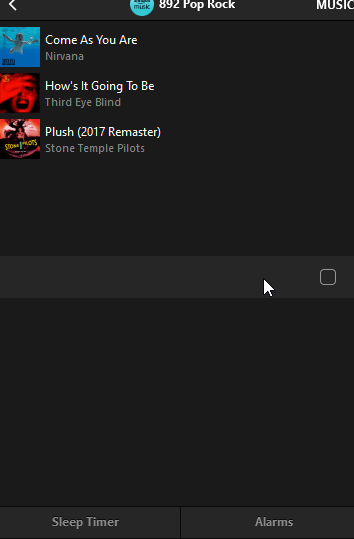
The attached pictures shows what I see when I try to load a playlist with over 100 songs. Song 100 shows then just blanks for all the remaining songs. This is the PC app but it does the same on my iPhone app.


Thanks!
 

This topic has been closed for further comments. You can use the search bar to find a similar topic, or create a new one by clicking Create Topic at the top of the page.
Best answer by mpbakios

Problem has been fixed by Amazon.  Personal playlists up to 500 tracks are now playing normally on both the Sonos and Bluesound OS.  

108 replies

Stanley_4
Grand Maestro
April 25, 2023

Submitting diagnostics after any odd thing happens could be of value to the Sonos team, post the number and what you did and what happened here so they can find it if they come looking, call them if you want a response to your bug report.

GregBelAuthor
Enthusiast I
April 25, 2023

First all my playlists, except for one, are under 500 songs. I guess in reality, for me, the 500 song limit is not a problem. I do have one playlist of just over 2,500 songs. If I use the Sonos app to look at the playlist all 2,500+ songs appear. If I use the Sonos app to play the huge playlist, only the first 500 songs load into the queue and play. It does create the queue in seconds.

If i highlight the 2,500+ Amazon playlist songs in the Sonos app and drag and drop that list into the Sonos queue, all the songs load into the queue. But, It took about 10 minutes to load into the queue.

Now if I use the Sonos App to Save my huge “Amazon Playlist” as a “Sonos Playlist” I can use the Sonos app to load and play the newly created Sonos Playlist. All 2,500+ songs load into the Sonos queue in seconds and all the songs are in the queue ready to play.

The image below shows the queue with the 2,536 songs I dragged and dropped into the Sonos queue.

I don’t know why Amazon has this limit on Sonos. Since I only have one huge playlist my workaround will work for me but really why have this limit at all.


Trending Lyricist I
April 25, 2023

Submitting diagnostics after any odd thing happens could be of value to the Sonos team, post the number and what you did and what happened here so they can find it if they come looking, call them if you want a response to your bug report.

I tried it again, didn’t work.  Submitted diagnostics.  The ref number is 61550305, if any Sonos person is monitoring this.  Problem was trying to add a larger Amazon playlist 400+ items to the Sonos queue.  Message that occurred was “Unable to add songs to the queue.”

Ken_Griffiths
April 25, 2023

Submitting diagnostics after any odd thing happens could be of value to the Sonos team, post the number and what you did and what happened here so they can find it if they come looking, call them if you want a response to your bug report.

I tried it again, didn’t work.  Submitted diagnostics.  The ref number is 61550305, if any Sonos person is monitoring this.  Problem was trying to add a larger Amazon playlist 400+ items to the Sonos queue.  Message that occurred was “Unable to add songs to the queue.”

There is an approx. 15s time-out for all services in the App - so if your playlist is taking too long, it maybe hitting that time-limit instead perhaps🤔, that’s if your connection to the Amazon servers is slow.

How quick is the internet connection?

Meanwhile, I just increased the same playlist mentioned earlier to a larger playlist (400+) and that’s working okay, but I do have a fairly quick internet connection.

Trending Lyricist I
April 25, 2023

There is an approx. 15s time-out for all services in the App - so if your playlist is taking too long, it maybe hitting that time-limit instead perhaps🤔, that’s if your connection to the Amazon servers is slow.

How quick is the internet connection?


I’m not sure how fast the connection is, but I loaded a lot larger playlist into the queue just fine.  It’s only this particular one that doesn’t load.

Ken_Griffiths
April 25, 2023

There is an approx. 15s time-out for all services in the App - so if your playlist is taking too long, it maybe hitting that time-limit instead perhaps🤔, that’s if your connection to the Amazon servers is slow.

How quick is the internet connection?


I’m not sure how fast the connection is, but I loaded a lot larger playlist into the queue just fine.  It’s only this particular one that doesn’t load.

Is the Amazon playlist publicly shared? If so, post a link and I’ll give it a try… or maybe make a copy and post a link to its copy, if you prefer that.

Even try the copied playlist yourself to see if that works for you instead and delete the old one if it does work.

Trending Lyricist I
April 25, 2023

I made a copy of the playlist and it has the same problem as the original.

Here’s a link to the playlist:

https://music.amazon.com/user-playlists/9482a441209a49908b66125d841040casune?marketplaceId=ATVPDKIKX0DER&musicTerritory=US&ref=dm_sh_yhwIrzea7WGHhyuM58f1DiHOw


When I try to display the list using the Sonos app, it loads only the first 200, stopping at Johnny Cash (Drive On).  And when I try to add it to the Sonos queue, it fails.

Ken_Griffiths
April 25, 2023

I made a copy of the playlist and it has the same problem as the original.

Here’s a link to the playlist:

https://music.amazon.com/user-playlists/9482a441209a49908b66125d841040casune?marketplaceId=ATVPDKIKX0DER&musicTerritory=US&ref=dm_sh_yhwIrzea7WGHhyuM58f1DiHOw


When I try to display the list using the Sonos app, it loads only the first 200, stopping at Johnny Cash (Drive On).  And when I try to add it to the Sonos queue, it fails.

The Kitchen Dancing playlist (420 tracks) is working fine here - see screenshot.

Ken_Griffiths
April 25, 2023

@Crossbow,

Maybe try a reboot of the router and power-cycle the speakers you are targeting and see if that resolves the matter - it will clear the speaker queue too.

Ken_Griffiths
April 25, 2023

Just for your information @Crossbow, the last track I see in the Sonos speaker queue is The Galway Girl by Steve Earle.