
Enthusiast I
April 12, 2023
Answered

Sonos Amazon Music Unlimited Playlists

  • April 12, 2023
  • 108 replies
  • 4838 views

Today my Sonos is refusing to load any playlist I created on Amazon Music Unlimited that has more than 100 songs. I’ve reset router, cable modem, all speakers/amps, controller, deleted and reactivated the amazon account. All apps and Sonos controller are up to date. I verified my amazon account is active and still at the unlimited level, which it is. 

What is really odd is I can load any playlist, no matter what size, if it was created by amazon. I just can’t load my playlists, unless they have 100 or less songs. I contacted Sonos support and was told amazon limits playlist to 100 songs on Sonos, although only my personal playlist are not working if over 100 songs. I contacted amazon and they said they do not limit playlist songs to 100 on Sonos.

I really don’t want to switch from amazon, I have been happy for a couple of years with their unlimited service.

Just wondering if anyone has any suggestions?

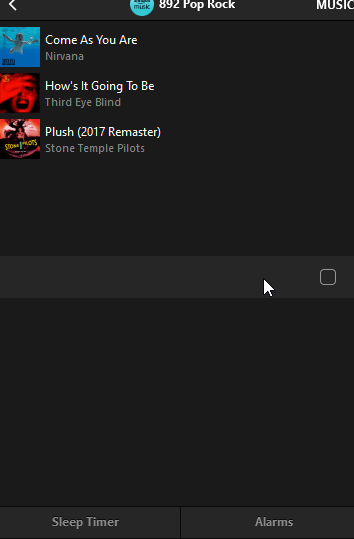
The attached pictures shows what I see when I try to load a playlist with over 100 songs. Song 100 shows then just blanks for all the remaining songs. This is the PC app but it does the same on my iPhone app.


Thanks!
 

This topic has been closed for further comments. You can use the search bar to find a similar topic, or create a new one by clicking Create Topic at the top of the page.
Best answer by mpbakios

Problem has been fixed by Amazon.  Personal playlists up to 500 tracks are now playing normally on both the Sonos and Bluesound OS.  

108 replies

Contributor I
April 17, 2023

This is definitely a new issue.  Been trying to find a solution and keep coming across this 15 second rule thing - but it’s not that.


I have a regular playlist with around 450 tracks in it, always loaded fine.  Now it won’t.  Through a process of elimination, I tried a couple of smaller playlists < 100 and they were good.  I happened to test one with 102 tracks in it and it hit the same problem.


It feels like I know have an expensive system where it’s difficult to access the music I want to listen too...whereever the problem lies, surely it needs to be recognised as a new fault?


**Edit** I know it looks like the fault lies with Amazon, so how do we get this resolved?

Ken_Griffiths
April 17, 2023

This is definitely a new issue.  Been trying to find a solution and keep coming across this 15 second rule thing - but it’s not that.


I have a regular playlist with around 450 tracks in it, always loaded fine.  Now it won’t.  Through a process of elimination, I tried a couple of smaller playlists < 100 and they were good.  I happened to test one with 102 tracks in it and it hit the same problem.


It feels like I know have an expensive system where it’s difficult to access the music I want to listen too...whereever the problem lies, surely it needs to be recognised as a new fault?


**Edit** I know it looks like the fault lies with Amazon, so how do we get this resolved?

Maybe report the issue direct to Amazon aswell via their forum or customer services (online). That is what I chose to do. If enough people make them aware of the issue, maybe Amazon will quickly change the playlist track-limit back to 500 tracks, which was the previous limit.🤞

Contributor I
April 17, 2023

This is definitely a new issue.  Been trying to find a solution and keep coming across this 15 second rule thing - but it’s not that.


I have a regular playlist with around 450 tracks in it, always loaded fine.  Now it won’t.  Through a process of elimination, I tried a couple of smaller playlists < 100 and they were good.  I happened to test one with 102 tracks in it and it hit the same problem.


It feels like I know have an expensive system where it’s difficult to access the music I want to listen too...whereever the problem lies, surely it needs to be recognised as a new fault?


**Edit** I know it looks like the fault lies with Amazon, so how do we get this resolved?

Maybe report the issue direct to Amazon aswell via their forum or customer services (online). That is what I chose to do. If enough people make them aware of the issue, maybe Amazon will quickly change the playlist track-limit back to 500 tracks, which was the previous limit.🤞


Thanks Ken,

I’ve just been down the rabbit-hole that is Amazon customer service, and eventually found some posts on their forums.  I’ve lefts comments on existing posts to hopefully bump them up and get attention again.

Quite poor really...

Corry P
Sonos Staff
April 17, 2023

Hi @GregBel et al

We are investigating an issue whereby personal playlists from Amazon music will not display more than 100 tracks, though we do not have a time-frame to share in regards to a resolution.

Thanks for reporting!

"Common sense is the collection of prejudices acquired by age eighteen." - Albert Einstein
Lyricist II
April 17, 2023

Option to subscribe to Qobuz, the only other service Sonos will allow to stream at lossless quality.  2000 track limit per playlist; they load without issue to your Sonos queue. Song Shift can transfer all your playlists from Amazon to Qobuz for free. So maybe ditch Amazon??

GregBelAuthor
Enthusiast I
April 17, 2023

I tried to debug this:

The largest Amazon-supplied playlist I could find was 150 items and it loaded instantly.

I tried to make a “personal” Amazon playlist of my 400 Purchased songs, but could not even figure out how to. Amazons UX (web and iOS) seemed to require me to add each track one at a time, I could not see how to turn their Queue into a Playlist. (And people have the nads to complain about the Sonos UX??). If someone can tell me how to easily make 100+ track-sized Amazon playlists I can debug this further but without a repro I am stuck.

@controlav It’s easy with the iOS app. Just start playing your queue. Click on the hamburger icon with the triangle on it, on the lower left of the screen this should open your queue of songs. Then click the hamburger icon on the lower right, with the little + sign on it. You then should be able to create a new playlist of the current queue. You can also use the PC app by highlighting all the songs in he queue and then right clicking.

Renowned Enthusiast II
April 17, 2023


Hi @GregBel et al

We are investigating an issue whereby personal playlists from Amazon music will not display more than 100 tracks, though we do not have a time-frame to share in regards to a resolution.


Corry - Thanks for the update. I do want to say that although the first 100 tracks of the playlist will display, NONE of the tracks will actually load on the queue, so the playlist can’t be played via the Sonos app.

Trending Lyricist I
April 17, 2023

I’ve been having the same problem on my Sonos One.  Using the Sonos app on my PC, I see only the first 100 items in my Amazon Unlimited playlists, even though there are blank spaces after that that seem to be placeholders for the rest of the items in that playlist.  From the Sonos app, I cannot play any song in that playlist, not even songs from the first 100.  I have done all the rebooting and restarting and nothing changes.

I normally use Amazon Alexa to play the songs on this playlist.  Using Alexa, I can get the playlist to shuffle, but the same songs keep playing, so I suspect it’s only playing from the first 100.  However, using Alexa on the Sonos One, I cannot add songs to the playlist, nor can I delete them from the playlist.

Using the Amazon music app on my PC and on my iPhone, I can play all the songs on my playlist just fine, shuffled or in order.

I don’t know who’s to blame for this problem, but it does seem to be specifically related to Sonos.  Even if Amazon did something to affect Sonos, Sonos should be EXTREMELY motivated to address this issue with Amazon and find a fix.  Otherwise, why would I ever consider purchasing another Sonos product???

Airgetlam
April 18, 2023

I’d agree that Sonos would be extremely motivated, but I suspect the issue is on Amazon’s servers, so Sonos will just be feeding their engineers data….when Amazon is interested in dedicating time to the issue.
 

Given that Sonos has no financial interaction with Amazon, either paying or receiving money from them, the only clout they ‘may’ be able to provide is ‘we service a bunch of your users for you, and here’s some hard data’. I would suspect that Amazon would be more interested in hearing from individuals who are paying them money for a service, and not getting it. 

Bruce
Contributor I
April 18, 2023

Same here on my android app. Yesterday morning it worked, 2 hours later it didn’t. nothing changed in my set up at all. My two main Amazon playlists are about 500 songs each and single albums play Ok.