
Enthusiast I
April 12, 2023
Answered

Sonos Amazon Music Unlimited Playlists

  • April 12, 2023
  • 108 replies
  • 4838 views

Today my Sonos is refusing to load any playlist I created on Amazon Music Unlimited that has more than 100 songs. I’ve reset router, cable modem, all speakers/amps, controller, deleted and reactivated the amazon account. All apps and Sonos controller are up to date. I verified my amazon account is active and still at the unlimited level, which it is. 

What is really odd is I can load any playlist, no matter what size, if it was created by amazon. I just can’t load my playlists, unless they have 100 or less songs. I contacted Sonos support and was told amazon limits playlist to 100 songs on Sonos, although only my personal playlist are not working if over 100 songs. I contacted amazon and they said they do not limit playlist songs to 100 on Sonos.

I really don’t want to switch from amazon, I have been happy for a couple of years with their unlimited service.

Just wondering if anyone has any suggestions?

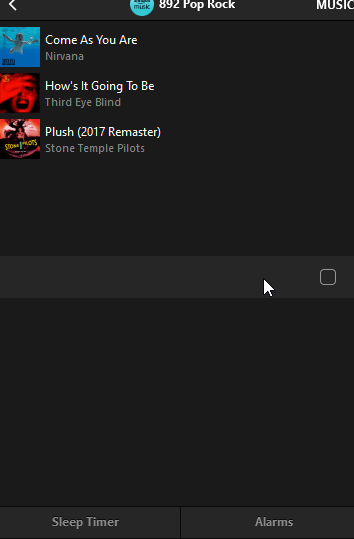
The attached pictures shows what I see when I try to load a playlist with over 100 songs. Song 100 shows then just blanks for all the remaining songs. This is the PC app but it does the same on my iPhone app.


Thanks!
 

This topic has been closed for further comments. You can use the search bar to find a similar topic, or create a new one by clicking Create Topic at the top of the page.
Best answer by mpbakios

Problem has been fixed by Amazon.  Personal playlists up to 500 tracks are now playing normally on both the Sonos and Bluesound OS.  

108 replies

Lyricist I
April 16, 2023

I’m not exactly sure when it started, but i noticed it yesterday Saturday morning (4/15), both on my Android phone and Windows PC, with any of my personal Amazon Music Unlimited playlists with over 100 songs.

All other playlists created by Amazon exceeding over 100 works fine.

Bop 'til you drop
Lyricist II
April 16, 2023

Sonos needs to get this issue resolved with Amazon immediately. They already have very limited options for Hi-res streaming.  I subscribed to Amazon because Sonos does not support Hi-res streaming on Tidal which is my preferred service.   

Contributor I
April 16, 2023

Side note to my earlier post...I am still able to load 100+ playlists from my “Music Library” (songs on my server) so this does seem to just be an Amazon/Sonos issue (for me at least).  And I can still ultimately get 100+ Amazon songs in the queue, but just the Music Source / Amazon Music / My Music / Playlist will only show the first 100 songs (I get the “unable to add songs to the queue”)

controlav
Lead Maestro
April 16, 2023

I tried to debug this:

The largest Amazon-supplied playlist I could find was 150 items and it loaded instantly.

I tried to make a “personal” Amazon playlist of my 400 Purchased songs, but could not even figure out how to. Amazons UX (web and iOS) seemed to require me to add each track one at a time, I could not see how to turn their Queue into a Playlist. (And people have the nads to complain about the Sonos UX??). If someone can tell me how to easily make 100+ track-sized Amazon playlists I can debug this further but without a repro I am stuck.

Author of the leading independent Sonos apps for Android, MacOS, iOS, Windows and Xbox.
Ken_Griffiths
April 16, 2023

I tried to debug this:

The largest Amazon-supplied playlist I could find was 150 items and it loaded instantly.

I tried to make a “personal” Amazon playlist of my 400 Purchased songs, but could not even figure out how to. Amazons UX (web and iOS) seemed to require me to add each track one at a time, I could not see how to turn their Queue into a Playlist. (And people have the nads to complain about the Sonos UX??). If someone can tell me how to easily make 100+ track-sized Amazon playlists I can debug this further but without a repro I am stuck.

When viewing the queue, try this in iOS AM App… 


Lyricist I
April 16, 2023

Same problem here- with playlists over 100 songs.  My other amazon playlists will play without a problem.  And other music services like TuneIn work fine.   There were no issues two days ago the last time my daughter played from the playlist.  and the same issue no matter which device we are working from. 

same problem no matter which device we use to try and connect.   

There are a few posts about the same problem in the Amazon Music support forum-  the amazon staff made a bunch of suggestions around checking for app updates, installing/reinstalling the app, disconnecting and then reconnecting the amazon account to the sonos app, trying a different device, clearing caches, etc.  I tried it all- nothing works  The amazon rep I was chatting with suggested that I try renaming the playlist-  didn’t work. 


Trending Lyricist I
April 16, 2023

@GusGusNFTSo you can play Amazon Music Unlimited Playlists, that you created, with over 100 songs using the Sonos App and your HEOS setup?

No. HEOS work on Denon / Marantz products. 

controlav
Lead Maestro
April 16, 2023

Thank you @Ken_Griffiths  I managed to create a playlist to debug against.

Amazon reject enumerating more than 100 items from these playlists, they generate this error:

Unsupported EntityId: library/playlists/<guid>/#library_playlist"

This is 100% Amazon’s problem, nothing to do with Sonos.

Author of the leading independent Sonos apps for Android, MacOS, iOS, Windows and Xbox.
controlav
Lead Maestro
April 16, 2023

Thanks to the code I already added to my Windows app for the 10-second timeout, it does manage to load the first 100 items from these problematic Amazon playlists. It cannot load any more because Amazon simply refuse to give up anything after the 100th track.

Author of the leading independent Sonos apps for Android, MacOS, iOS, Windows and Xbox.
Lyricist I
April 17, 2023

Morning,

I also have the issue of no longer being able to play an Amazon playlist of over 100 on my sonos system. I don't use Spotify as it doesn't offer the Dolby Atmos.

I have read a few posts on this and until Sonos sort this out I read a post about how to get all your music back onto one playlist. So thought I would pass it on.

In my case I had 357 songs, so on Amazon Music I created 4 playlists, 1-100, 101-200, 201-300, 301-400.Then created a Sonos Playlist on the Sonos app and added the 4 playlists. 

So instead of going onto the Sonos app and selecting Amazon then playlist, I just now go to my Favorites on the Sonos app and the "compilation" of the 4 playlists are all combined and it works.

A lot of fiddling around I know but worth it in the end.

Hope this helps "for now" 🤪