
Enthusiast I
April 12, 2023
Answered

Sonos Amazon Music Unlimited Playlists

  • April 12, 2023
  • 108 replies
  • 4838 views

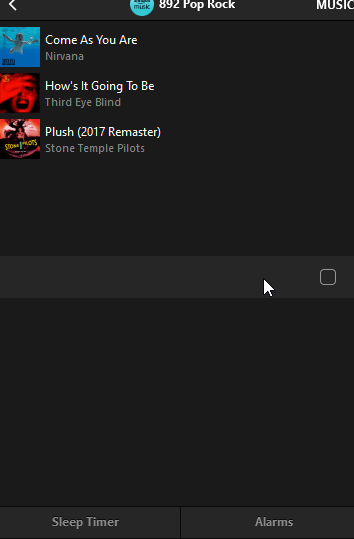
Today my Sonos is refusing to load any playlist I created on Amazon Music Unlimited that has more than 100 songs. I’ve reset router, cable modem, all speakers/amps, controller, deleted and reactivated the amazon account. All apps and Sonos controller are up to date. I verified my amazon account is active and still at the unlimited level, which it is. 

What is really odd is I can load any playlist, no matter what size, if it was created by amazon. I just can’t load my playlists, unless they have 100 or less songs. I contacted Sonos support and was told amazon limits playlist to 100 songs on Sonos, although only my personal playlist are not working if over 100 songs. I contacted amazon and they said they do not limit playlist songs to 100 on Sonos.

I really don’t want to switch from amazon, I have been happy for a couple of years with their unlimited service.

Just wondering if anyone has any suggestions?

The attached pictures shows what I see when I try to load a playlist with over 100 songs. Song 100 shows then just blanks for all the remaining songs. This is the PC app but it does the same on my iPhone app.


Thanks!
 

This topic has been closed for further comments. You can use the search bar to find a similar topic, or create a new one by clicking Create Topic at the top of the page.
Best answer by mpbakios

Problem has been fixed by Amazon.  Personal playlists up to 500 tracks are now playing normally on both the Sonos and Bluesound OS.  

108 replies

controlav
Lead Maestro
April 15, 2023

It makes no sense that it's true that Amazon limits to 100 songs,as it was all working fine and playing my playlist on sonos last week,and my playlist still plays fine on my phone and in my car etc,so it was working last week,and stopped the same day as others reported,so obviously something must have changed between sonos and amazon in that time!!!

This is an Amazon-SMAPI-only change, for some reason. Nothing to do with Sonos. No idea why they did this though, could be accidental like the no-searching-Audible change a few weeks ago seems to be, and if no-one tells them, it doesn’t get fixed. So, please yell at Amazon.

Author of the leading independent Sonos apps for Android, MacOS, iOS, Windows and Xbox.
GregBelAuthor
Enthusiast I
April 15, 2023

Neither Sonos or Amazon have a way to report a problem. They only have agents that are trained to help with setup problems, but no way to report a problem, There is  no way to get a trouble ticket of any kind started like other companies have. You can only complain and hope that gets reported. There is no way to follow up or even see that the problem has been reported.

Today I took one of my Amazon playlist with 388 songs and using Amazon Music web site I split the playlist into 4 playlist each with 100 or less songs. I then used the “Sonos App” and added each of those playlists into a “Sonos Playlist” Took me about 20 minutes.

The new “Sonos Playlist” has 388 amazon prime songs now. I added the new Sonos playlist to my Sonos Favorites. I can play that playlist just fine, all 388 songs load into the sonos queue and the queue plays.

If’s funny that only My Amazon Music Unlimited Playlists of over 100 songs just won’t load anymore. I doubt Amazon is doing this. When I did contact Amazon they said they did not limit playlist on Sonos to 100 tracks.

Seems to me the Sonos App is having a problem and needs a fix. Hopefully enough others complain that a fix will come soon.


SarahN
Local Superstar
April 15, 2023

Neither Sonos or Amazon have a way to report a problem. They only have agents that are trained to help with setup problems, but no way to report a problem, There is  no way to get a trouble ticket of any kind started like other companies have. You can only complain and hope that gets reported. There is no way to follow up or even see that the problem has been reported.

Today I took one of my Amazon playlist with 388 songs and using Amazon Music web site I split the playlist into 4 playlist each with 100 or less songs. I then used the “Sonos App” and added each of those playlists into a “Sonos Playlist” Took me about 20 minutes.

The new “Sonos Playlist” has 388 amazon prime songs now. I added the new Sonos playlist to my Sonos Favorites. I can play that playlist just fine, all 388 songs load into the sonos queue and the queue plays.

If’s funny that only My Amazon Music Unlimited Playlists of over 100 songs just won’t load anymore. I doubt Amazon is doing this. When I did contact Amazon they said they did not limit playlist on Sonos to 100 tracks.

Seems to me the Sonos App is having a problem and needs a fix. Hopefully enough others complain that a fix will come soon.


My feeling is it's a Sonos app issue too. I only have 2 Amazon playlists that are over 100 songs and funnily enough, only the other week I was fiddling about and managed to copy one over to a new Sonos playlist of the same name. So that one at least, I can still play fully on Sonos. If I do add any songs on it via Amazon, I will just duplicate with its equivalent Sonos playlist. The other one - I may do what you did and split it to copy over. It's only just under 200 so will only require 2 splits. What a pain though! 

Can you have too many Sonos speakers? 🤔 😆
Renowned Enthusiast II
April 15, 2023

I have too many playlists over 100 tracks, and some of them have hundreds of tracks, so I don’t have the patience to split them all. For now, I’m starting the music in the Amazon music app, then using Airplay to send the music to my Sonos speakers and controlling the volume via the Sonos app.

I often use Countdown playlists, where I manually remove the tracks I’ve just listened to, then re-save the playlist. If even 100 tracks would load and play on the queue, this would be sufficient for my needs, since I would hardly ever listen to more than that number in one listening session. But once the track count goes over 100, none of the tracks will load, even the first 100.

Right now I’m about halfway through my annual Amazon Music Unlimited subscription. Because of all the glitches the last few months and now this Over 100 problem, I’ve decided to give Spotify a try. I don’t know if I’ll be happy with that or not, but given that Amazon seems to be paring down their services and employees lately, I’m not sure these music problems will ever be fixed.

(I can actually get Apple Music for free through my phone plan, but I’m so worried it will corrupt my large and heavily customized music library that I’m afraid to try it. No magic answers here, I’m afraid.)


Lyricist I
April 15, 2023

This is a new issue for me too with Amazon Music and playlists containing more than 100 songs. Used to work absolutely fine. Now I get "unable to add songs to the queue” error when I try and play an Amazon Music playlist with over 100 songs using iOS Sonos app.
 

Only workaround is using Amazon Music app and connecting to speaker and playing from there. However not sure if I get Dolby Atmos playback with this method.


Hope it gets looked into and fixed soon.

SarahN
Local Superstar
April 15, 2023

This is a new issue for me too with Amazon Music and playlists containing more than 100 songs. Used to work absolutely fine. Now I get "unable to add songs to the queue” error when I try and play an Amazon Music playlist with over 100 songs using iOS Sonos app.
 

Only workaround is using Amazon Music app and connecting to speaker and playing from there. However not sure if I get Dolby Atmos playback with this method.

I don't think you would get Dolby Atmos doing it this way sadly. I agree it's a pain that playlists are behaving this way now 😔

Can you have too many Sonos speakers? 🤔 😆
Contributor I
April 16, 2023

Today, April 15, 2023, is the first time this is happening to me.  The exact same playlist worked last week but will not play now (cannot Play, Shuffle, or Add To End of Queue).  The idea that “there’s been a 100 limit” is BS...my Christmas playlist from December had over 200 songs and never did I have an issue.

I also don’t believe the comment that there’s a time limit.  My one playlist with 193 songs...only 100 show when I view the playlist.  I selected the 100 songs that show (selected first one, held [shift] key and selected last song, and drug over to the queue...it took almost 30 seconds, but they all became ready to play.  Sonos needs to stop pushing back like nothing has changed.

Trending Lyricist I
April 16, 2023

I’ve been having the same issue for the last two days. Prior to that I was having encoded issues and it would stop playing music for about 15 seconds and then start a new song. 
 

My playlist is well over 1500 songs and it was playing fine until recently. I too do not want to split it in multiple playlist. I suppose its time to look for a new streamer. I was ready to buy two more units. Too bad 😢 

GregBelAuthor
Enthusiast I
April 16, 2023

I have no intention of converting my playlist either, just wanted to see if it would work.Using the Amazon app or Alexa works but there are limitations with that especially if you have multiple sonos speakers and amps.

Trending Lyricist I
April 16, 2023

I have no intention of converting my playlist either, just wanted to see if it would work.Using the Amazon app or Alexa works but there are limitations with that especially if you have multiple sonos speakers and amps.

I’ve got the Sonos Connect, and I can stream to Sonos via Amazon app. So, I’ve got to use the Sonos app. May be Sonos or Amazon will do an update and fix this issue.