
Trending Lyricist I
October 16, 2022
Answered

Resume topic: Starting a week ago, Amazon Music no longer works on my Sonos 1 system!!

Since the topic was closed, starting a new one. After a few other Sonos S1 updates I signed up this morning for another month of Amazon unlimited -- and weird problems immediately (upon signing up) returned. In mid-flight of playing a playlist I received the message below.
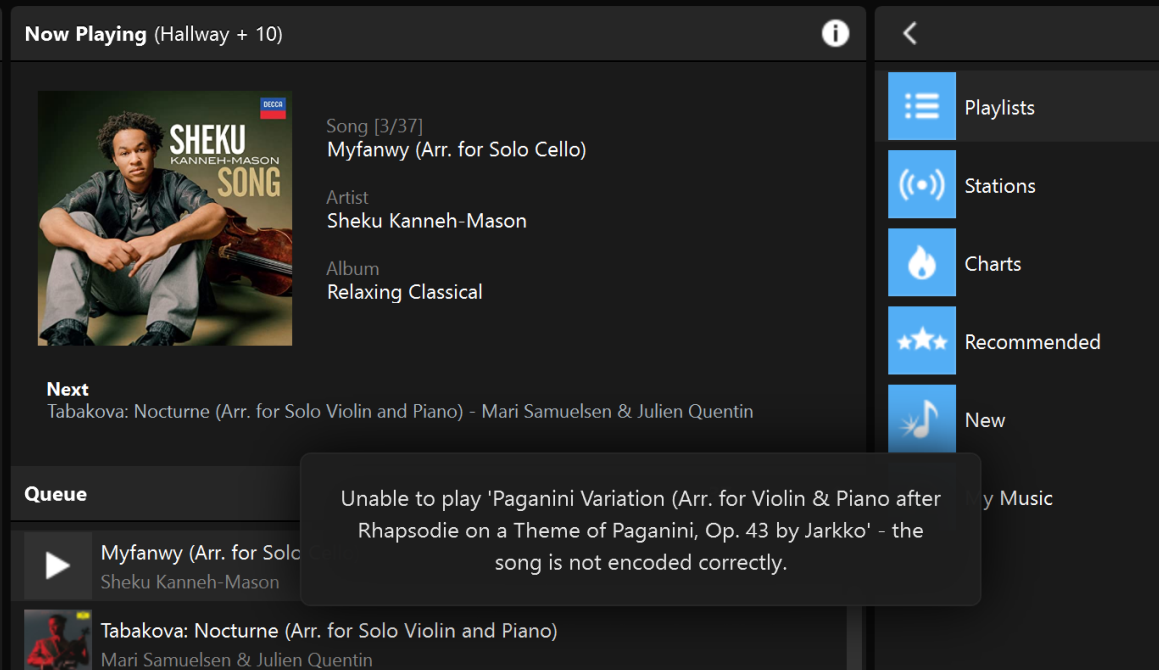
 

Couple of other interesting observations:

1. On my Ipad controller I can turn off compression of music -- did that (that option doesn’t seem to exist on my Windows 10 controller...). Seemed to help. Also on the Ipad controller but not the Windows controller is an option to Pair Airplay devices with the others; it was set as OFF, I turned it ON (I have one Airplay device).

2. I now get sort of random messages like the one above, where in mid-flight the message pops up and the next song starts… Very strange. I now have many messages in the Error log: Sunday, October 16, 2022 - 8:28 AM Central Time; Unable to play 'Duet for Flute and Clarinet, Op. 46 No. 1: I. Allegro' - the song is not encoded correctly. [or many other songs...]; never saw such messages or errors with Prime only.

3. Unlike my previous symptoms, I can play through all 11 stations.

4. Also noticed that the search in the Sonos S1 controller doesn’t work for Amazon (didn’t work for Prime either).

5. On Amazon Music I set playback to “Standard”, not HD.

Also found an option on Amazon Music Unlimited Player (Web UI) for Audio Quality, which I set to Standard and now also set Auto Adjust Quality to OFF; will report back if that helped any.

Finally, as of this writing: everything seems to be playing correctly, but will continue to watch for random issues as described. Those never happen when I listen to Pandora. Also, I went to Sonos Support and clicked on the email-the-CEO button to send an email to the CEO (presumably...) to describe the issue. Really would like to have this resolved! (Or will cancel Unlimited again next month)


PS: Final edit: Same weirdness, now set in Amazon Unlimited interface on Web the Audio Quality to Data Saver; will see if that does anything useful...

This topic has been closed for further comments. You can use the search bar to find a similar topic, or create a new one by clicking Create Topic at the top of the page.
Corry P
Corry PAnswer
Sonos Staff
October 17, 2022

Hi @THill182 

Thanks for your post!

“The song is not encoded correctly” most commonly occurs when there is a transmission error on your local network, usually due to electromagnetic interference.

It’s possible that Amazon is playing at a higher bitrate than your other sources and is therefore more susceptible to the interference.

I recommend you get in touch with our technical support team, who have tools at their disposal that will allow them to give you advice specific to your Sonos system and what it reports.

I hope this helps.

"Common sense is the collection of prejudices acquired by age eighteen." - Albert Einstein

16 replies

Corry P
Corry PAnswer
Sonos Staff
October 17, 2022

Hi @THill182 

Thanks for your post!

“The song is not encoded correctly” most commonly occurs when there is a transmission error on your local network, usually due to electromagnetic interference.

It’s possible that Amazon is playing at a higher bitrate than your other sources and is therefore more susceptible to the interference.

I recommend you get in touch with our technical support team, who have tools at their disposal that will allow them to give you advice specific to your Sonos system and what it reports.

I hope this helps.

"Common sense is the collection of prejudices acquired by age eighteen." - Albert Einstein
October 17, 2022

I was confused by your post. Are you playing using the Sonos app, the Amazon Music app or Airplay? If you are using the Sonos app then I think that  most of the settings changes you made are irrelevant. 

Your problems are classic local network interference. 

THill182Author
Trending Lyricist I
October 17, 2022

First, I am playing Amazon Unlimited (Stations, Playlists, doesn’t matter) through a Sonos S2 system. I have mostly S1 older amps/pre-amps(receivers), but also one Airplay node. Nothing I could find on the Sonos UX/UI seems to make a difference.

Thank you for feedback; the interference-root-cause might be it and I will explore further. It is consistent with what I see, e.g., :
 

  • When I play Amazon Unlimited through only a single node/station all works well
  • When I toggle more or all 11 stations in -- my Sonos controller on my laptop disconnects temporarily.
  • As I wrote before I have a lot of “stuff” in my office, including 3 Wifi routers pretty close together and close to the ethernet-connected Sonos node; I will try first to turn off the other wifi’s and move the Sonos node as far away as possible with a longer ethernet cable.

Will keep you’all posted. Really appreciate your advice.

PS: I still find it strange that I have determined with very-high certainty that Amazon Prime music worked well, but the second I re-enabled Amazon Ultimate the trouble started again. Whatever the difference is in the delivery mechanism of music between those two services must be one of the root-causes, or at least triggers….

Mr. T
October 17, 2022

PS: I still find it strange that I have determined with very-high certainty that Amazon Prime music worked well, but the second I re-enabled Amazon Ultimate the trouble started again. Whatever the difference is in the delivery mechanism of music between those two services must be one of the root-causes, or at least triggers….

Amazon Prime streams in compressed audio (up to 320 kbps). Amazon Music Unlimited (HD) is lossless, 16-bit CD quality. Your local network evidently has difficulty streaming lossless music.

October 17, 2022

I am even more confused now! Your thread title says you are on S1, but now you say it's S2.

You haven't clarified which app you are using (Sonos or Amazon) and I have no idea what an Airplay node is but it certainly isn't relevant.

You had 3 different WiFis running and you thought the problem was Sonos?

Still, it sounds like you are now headed in the right direction and I hope you resolve your issues.

THill182Author
Trending Lyricist I
October 19, 2022

My apologies about confusions:

  • I am running S1, NOT S2
  • “Airplay” is one of the products/nodes from Sonos; it shows up on the Ipad S1 controller as an option to “bundle Airplay nodes with all the others”; I set that; probably irrelevant; didn’t do anything.
  • Yes I had 3 different Wifi networks active; I took two of them down (one an old leftovers, and a new COX phone/internet/wifi modem). Anyway, now the Cox modem is wired to the Linksys Velop Mesch, which is the only Wifi I am running.
  • After those changes, I actually DO get an error saying “network connection speed insufficient to maintain playback buffer.” . This message shows up when I slowly toggle in Sonos nodes i.e., I play Amazon Unlimited to a single node -- works fine; two worked fine; after about 4 of them I get that error now. If that is actually an accurate message, I still don’t get why that happens. My apartment is small (2000 sqft), so how/why does that get “too slow”?
     

Will work with Sonos support next I suppose. Or just turn Amazon Unlimited off again….

THill182Author
Trending Lyricist I
October 22, 2022
  • Well, I think I just give up at this point, and cancel Amazon Unlimited again, to return to the Amazon Prime Music subscription, which worked fine…I spoke with Amazon support (via chat), and configured Amazon Music playback to the lowest possible delivery format and quality -- which didn’t help.
  • Amazon support also said they cannot think of any other difference between Unlimited and Prime -- but I KNOW (!) there must be because the moment I re-enabled Unlimited my playback started to break!
  • All suggestions I get from Sonos and from Amazon amount to “something is wrong with your network; start over and reconfigure it”. But I am no longer buying it because:
  • There are at least 2 other older threads reporting the same problem (here, and here); the suggestions there are the same, and none of them worked!

At this point my impression is that (1) Sonos is not in the business of investing any effort or engineering into the S1 system (which I get, from a business perspective; that is the price I paid for being an early supporter and adopter!), and (2) Amazon has competing music services and systems (the Alexa ecosystem and API’s). 


So bottom line is I will cancel Amazon Unlimited again.


But have one last question: What other music service(s) similar in breadth and depth to Amazon Unlimited can you’all recommend that that will work (is confirmed to work!) with large Sonos S1 systems. GREATLY appreciate guidance! And thank you for all your input!

Ken_Griffiths
October 22, 2022

I’m using Amazon Music Unlimited with Sonos S1 here and it’s working fine for me. So it’s likely a local network, or maybe an Amazon account issue, but maybe try Deezer Music instead


Mr. T
October 22, 2022
  • Well, I think I just give up at this point, and cancel Amazon Unlimited again, to return to the Amazon Prime Music subscription, which worked fine…I spoke with Amazon support (via chat), and configured Amazon Music playback to the lowest possible delivery format and quality -- which didn’t help.
  • Amazon support also said they cannot think of any other difference between Unlimited and Prime -- but I KNOW (!) there must be because the moment I re-enabled Unlimited my playback started to break!

Playback settings in the Amazon Music app have no effect when playback is initiated from the Sonos app.

THill182Author
Trending Lyricist I
October 22, 2022

I’m using Amazon Music Unlimited with Sonos S1 here and it’s working fine for me. So it’s likely a local network, or maybe an Amazon account issue, but maybe try Deezer Music instead


KEN: How many Sonos nodes do you have? And are they are mix of S2 and compatible and incompatible devces or S1 older devices only?

My system seems to work (almost 100%) reliably with up to 5 nodes grouped together playing the same Amazon Unlimited station/service, and slowly “deteriorates” when I toggle/group in more nodes into the same-Amazon-Station playback. At 11 nodes (that I have in my system; a mix of older S1-only and newer S2 compatible devices, but all running under S1) it just all falls down (music randomly shows up, and “cycles” randomly through the nodes). Pandora works great, and my local music server has no problem. Also, in the links I referenced, this is clearly an issue others experience….


So given my tests I would expect things to work OK with up to five nodes in the system.