

rosswells127
Prodigy I
July 16, 2024
Answered

Music Library Compilation Issue under new 16.3 Firmware

  • July 16, 2024
  • 240 replies
  • 12063 views

Today I successfully updated to the latest 16.3 Firmware and Windows Desktop Controller.
I subsequently performed an “Update Music Library Now” from the 16.3 Windows Desktop Controller.
Now any Sonos Controller (including SonoPhone, SonoPad) show multiple entries for each compilation album when viewing Albums.
Just an example shown below...
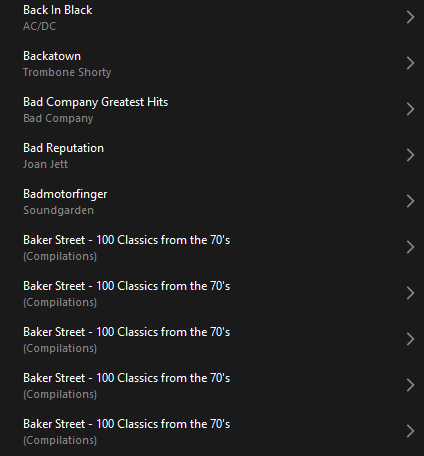
 

Does anyone else have this issue?
Ross.

This topic has been closed for further comments. You can use the search bar to find a similar topic, or create a new one by clicking Create Topic at the top of the page.
Best answer by Corry P

Hi ​@rosswells127 et al

I have an update regarding this behaviour.

It is (now) expected behaviour that if you have a compilation album with no Album Artist metadata tagged on an S2 system, it will appear in the album list multiple times. To resolve this issue, please tag all tracks in the album with an Album Artist - if there is no single artist, please tag each track in the album with “Various Artists”. Once an album has a Album Artist tag, it will no longer appear as duplicates in the Album container list.

I hope this helps.

Edit: This thread was automatically closed due to inactivity. I have reopened it.

240 replies

Renowned Enthusiast I
July 24, 2024

I will do that - can I test it after I have reinstalled the app on just one device (like my laptop), to see if it solves the problem by checking it on the laptop, or will I need to reinstall on all devices before seeing if it worked?  Thank you very much, Chris D

HI @cdiani I can confirm that Android V80.05.06 of 20240717 (the latest) works fine as long as, like me, you stay with Firmware V79.1-54060 on your speakers. 

By all means go with the controller upgrade - it lets you search your Library and other minor tweaks, which is good - but keep away from the Firmware upgrade until the compilation album problem gets fixed. 

Good luck

John


Enthusiast II
July 24, 2024

I will do that - can I test it after I have reinstalled the app on just one device (like my laptop), to see if it solves the problem by checking it on the laptop, or will I need to reinstall on all devices before seeing if it worked?  Thank you very much, Chris D

HI @cdiani I can confirm that Android V80.05.06 of 20240717 (the latest) works fine as long as, like me, you stay with Firmware V79.1-54060 on your speakers. 

By all means go with the controller upgrade - it lets you search your Library and other minor tweaks, which is good - but keep away from the Firmware upgrade until the compilation album problem gets fixed. 

Good luck

John


Pretty sure Sonos force the firmware upgrade if you want to use the latest app that allows library searching.

Prodigy III
July 24, 2024

I will do that - can I test it after I have reinstalled the app on just one device (like my laptop), to see if it solves the problem by checking it on the laptop, or will I need to reinstall on all devices before seeing if it worked?  Thank you very much, Chris D

HI @cdiani I can confirm that Android V80.05.06 of 20240717 (the latest) works fine as long as, like me, you stay with Firmware V79.1-54060 on your speakers. 

By all means go with the controller upgrade - it lets you search your Library and other minor tweaks, which is good - but keep away from the Firmware upgrade until the compilation album problem gets fixed. 

Good luck

John


Pretty sure Sonos force the firmware upgrade if you want to use the latest app that allows library searching.

I certainly would if I was Sonos. You can’t have two parallel systems for those who want to update their app and those who don’t.

Contributor I
July 24, 2024

Realise it’s not helpful just to say “I have the same issue” but … well, I do.

I would add that I added the music library back into my system using the Windows app, so I do not think it is anything to do with which mobile app you are using.

Many, but not all, albums split into tracks.  Even classical ones: Beethoven’s 9th Symphony split into 5, one for each movement.  Another album by “various artists” has a long list of tracks which, when selected, say “No selections are available”.

Prodigy III
July 24, 2024

Realise it’s not helpful just to say “I have the same issue” but … well, I do.

I would add that I added the music library back into my system using the Windows app, so I do not think it is anything to do with which mobile app you are using.

Many, but not all, albums split into tracks.  Even classical ones: Beethoven’s 9th Symphony split into 5, one for each movement.  Another album by “various artists” has a long list of tracks which, when selected, say “No selections are available”.

Did you update the mobile app to the latest version released on Monday. It provided some music library fixes - e.g. reindexing - that potentially could help when accessing via the Windows app?

(The issue around music library compilations had been acknowledged by Sonos.)

Contributor I
July 24, 2024


Did you update the mobile app to the latest version released on Monday. 

Yes, I’m running the most up-to-date app on all devices.

Prodigy III
July 24, 2024


Did you update the mobile app to the latest version released on Monday. 

Yes, I’m running the most up-to-date app on all devices.


Okay - I don’t have music libraries so will now defer to others who do!

Edit: Also a duplicate thread here, but with different comments, including comments from Sonos mods.

https://en.community.sonos.com/controllers-and-music-services-228995/music-library-compilations-issue-under-16-3-6899800

Contributor I
July 24, 2024

Are there other ways to let Sonos know this is important to users, that I should do (like chat or call support), in addition to posting ‘this is happening to me’ on this thread?  I appreciate all the replies above.  Chris

Airgetlam
July 24, 2024

I would highly recommend that you submit a system diagnostic, and call Sonos Support to discuss it.

There may be information included in the diagnostic that will help Sonos pinpoint the issue and help you find a solution, or certainly pass on hard data to the person fixing this issue.

When you speak directly to the phone folks, they have tools at their disposal that will allow them to give you advice specific to your network and Sonos system.

Bruce
Contributor I
July 24, 2024

Hello Corry P, is there a way to have a chat or phone call with someone like yourself who is a staff, and knows about the issue?  I appreciate your time.