

rosswells127
Prodigy I
July 16, 2024
Answered

Music Library Compilation Issue under new 16.3 Firmware

  • July 16, 2024
  • 240 replies
  • 12063 views

Today I successfully updated to the latest 16.3 Firmware and Windows Desktop Controller.
I subsequently performed an “Update Music Library Now” from the 16.3 Windows Desktop Controller.
Now any Sonos Controller (including SonoPhone, SonoPad) show multiple entries for each compilation album when viewing Albums.
Just an example shown below...
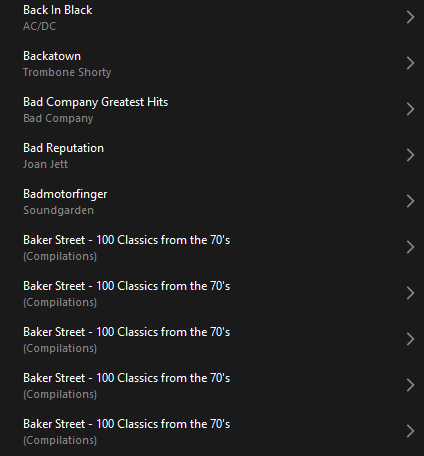
 

Does anyone else have this issue?
Ross.

This topic has been closed for further comments. You can use the search bar to find a similar topic, or create a new one by clicking Create Topic at the top of the page.
Best answer by Corry P

Hi ​@rosswells127 et al

I have an update regarding this behaviour.

It is (now) expected behaviour that if you have a compilation album with no Album Artist metadata tagged on an S2 system, it will appear in the album list multiple times. To resolve this issue, please tag all tracks in the album with an Album Artist - if there is no single artist, please tag each track in the album with “Various Artists”. Once an album has a Album Artist tag, it will no longer appear as duplicates in the Album container list.

I hope this helps.

Edit: This thread was automatically closed due to inactivity. I have reopened it.

240 replies

Lyricist III
December 23, 2024


If you do hold your library in iTunes, it’s a simple change - highlight/select all compilation folder tracks and goto the properties, where you can quickly populate the ‘Album Artist’ field (one time only) with ‘Various Artists’.

Hi Ken, a lot of my library is held in apple music. For those with many compilation albums it’s possible in apple music to make a smart playlist with the rule “compilation” “is true” to get them to show in one view without having to work your way through the compilations folder.


Airgetlam
December 23, 2024

But Apple hasn’t, to my knowledge, incorporated ‘smart lists’ into Sonos, although I haven’t tried in a while. Are you able to get them to work in Sonos?


Bruce
Lyricist III
December 23, 2024

But Apple hasn’t, to my knowledge, incorporated ‘smart lists’ into Sonos, although I haven’t tried in a while. Are you able to get them to work in Sonos?


No, this is just to help find all compilation albums in apple music on a desktop machine in order to edit the metadata.

Lyricist III
December 23, 2024

Ken Grifiths’ suggestion didn’t work. Crooners and Swooners still shows as individual tracks, not an album. Thanks, though. It’s fine in BlueSound.

Ken_Griffiths
December 23, 2024

Ken Grifiths’ suggestion didn’t work. Crooners and Swooners still shows as individual tracks, not an album. Thanks, though. It’s fine in BlueSound.

Did you change the ‘Group Albums’ to use ‘Album Artist’ as shown in the earlier screenshot from the S2 Desktop App and did you also re-index your library?

Lyricist III
December 23, 2024

Yes. It was set that way, then I changed it to the ITunes compilation setting and then back again to Album Artist. I just did the one album as a test. It all boils down to the a failure by a company that seems determined to fail. I suppose we are supposed to take solace in their October promise to set objectives and test changes. Is this a satire?

Ken_Griffiths
December 23, 2024

Yes. It was set that way, then I changed it to the ITunes compilation setting and then back again to Album Artist. I just did the one album as a test. It all boils down to the a failure by a company that seems determined to fail. I suppose we are supposed to take solace in their October promise to set objectives and test changes. Is this a satire?

It’s not satire - compilations group/work fine for the local library here, as shown earlier in this thread.

If not done already, you are perhaps best to speak to Sonos Support. Maybe they can discover why things are not working for your shared library.

Ken_Griffiths
December 24, 2024


If you do hold your library in iTunes, it’s a simple change - highlight/select all compilation folder tracks and goto the properties, where you can quickly populate the ‘Album Artist’ field (one time only) with ‘Various Artists’.

Hi Ken, a lot of my library is held in apple music. For those with many compilation albums it’s possible in apple music to make a smart playlist with the rule “compilation” “is true” to get them to show in one view without having to work your way through the compilations folder.

Yeah, good idea ​@BLD2 - that will work too to select/highlight ALL compilations to then change their ‘Album Artist’ tag, if needed, to ‘Various Artist’ - thanks for that suggestion.👍

Corry P
Sonos Staff
December 24, 2024

Hi Everyone

I’ve been given some information which sheds new light on why we made the change that we did: the old way of sorting compilation albums occasionally resulted in unrelated albums showing as the same album, and this is obviously less than ideal. For example, think of two Unplugged or Greatest Hits albums - when by two different artists (or set of artists), they are clearly unrelated, but with the old sort method would sometimes show as the same album. Using the new compilation sorting method, these similarly-titled albums will no longer show as being the same album.

I hope this helps, and clarifies things a little.

"Common sense is the collection of prejudices acquired by age eighteen." - Albert Einstein
Lyricist III
December 24, 2024

It worked before. It doesn’t now. Nice fix.