

rosswells127
Prodigy I
July 16, 2024
Answered

Music Library Compilation Issue under new 16.3 Firmware

  • July 16, 2024
  • 240 replies
  • 12063 views

Today I successfully updated to the latest 16.3 Firmware and Windows Desktop Controller.
I subsequently performed an “Update Music Library Now” from the 16.3 Windows Desktop Controller.
Now any Sonos Controller (including SonoPhone, SonoPad) show multiple entries for each compilation album when viewing Albums.
Just an example shown below...
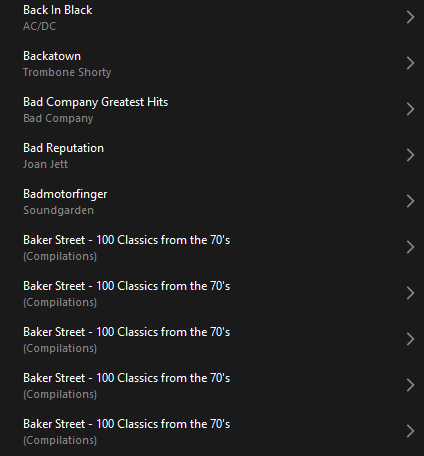
 

Does anyone else have this issue?
Ross.

This topic has been closed for further comments. You can use the search bar to find a similar topic, or create a new one by clicking Create Topic at the top of the page.
Best answer by Corry P

Hi ​@rosswells127 et al

I have an update regarding this behaviour.

It is (now) expected behaviour that if you have a compilation album with no Album Artist metadata tagged on an S2 system, it will appear in the album list multiple times. To resolve this issue, please tag all tracks in the album with an Album Artist - if there is no single artist, please tag each track in the album with “Various Artists”. Once an album has a Album Artist tag, it will no longer appear as duplicates in the Album container list.

I hope this helps.

Edit: This thread was automatically closed due to inactivity. I have reopened it.

240 replies

Lyricist III
December 23, 2024

Never, ever, will I miss an opportunity to shout about the incomprehensible screw up that is Sonos. There is(was) only one acceptable course for Sonos. That would have been to fix this issue within days of its appearance. I am not going to spend further hours tagging all the tracks on my albums. I am now a BlueSound customer with two Sonos soundbars remaining on two TV’s. We seldom listen to the music library on these units, or they, too, would have been replaced. 

Ken_Griffiths
December 23, 2024

Quite some time ago now, I set the MP3Tag App to update my local NAS library tracks ‘Album Artist’ tag field with the often-used ‘Various Artists’ tag - it took less than five minutes of my own time to actually setup, I just left it to do the tag update overnight.

It worked fine, post re-index.

Lyricist III
December 23, 2024

That may be, but I am a user who makes no pretense of expertise in these matters. . Sonos needed to have suggested this with thorough and easy to follow instructions months ago if it a suitable fix. My thanks to you, but I am gone.

Ken_Griffiths
December 23, 2024

That may be, but I am a user who makes no pretense of expertise in these matters. . Sonos needed to have suggested this with thorough and easy to follow instructions months ago if it a suitable fix. My thanks to you, but I am gone.

How did you tag your local library in the first place? - if using Windows, or iTunes, for example, you would just search/highlight all the library tracks and select the properties TAB and update the ‘Album Artist’ field with the words ‘Various Artists’ and wait whilst they (batch) update/complete - and then go onto re-index the library in the Sonos App.

I’d describe it as a similar process to renaming a file, except it’s a tag inside the selected track files and it will update the chosen ‘Album Artist’ field for all the selected tracks as a batch operation. 

Maybe checkout YouTube - there’s probably a video showing how to do these things, depending on what you use to hold your library files.

Trending Lyricist I
December 23, 2024

Agreed Ken, doesn't look difficult to do but I agree with HJ also, th attitude of Sonos is utterly appalling. Updating the app with known missing features and changes that break existing users’ experience and doing nothing about it for months. They cannot be trusted anymore. It's a dead platform to me, which is such a shame but follows the path of many companies these days who long ago stopped caring (Microsoft and Adobe immediately spring to mind but you can add ubisoft and electronic arts to that list if you play video games). I switched to Linux because windows became gradually worse, then to open source Linux apps to replace Photoshop etc. when Adobe became the scummiest company on the planet and now I've had to roll my own music server setup thanks to Sonos (which also caused me to cancel apple music because that became almost worthless to me). I'll stick around here in case Sonos ever seen the light and start caring about customers again and I haven't sold any of my Sonos gear.

Lyricist III
December 23, 2024

Dismal….. 

It worked, picking up the compilation album metadata without issue.

Then it didn’t.

Now it only works (apparently) if customers edit all their album artist metadata for all affected albums.

When will Sonos learn?


And can anyone suggest a nice alternative for Sonos Amps / Ports / Connects ?


Belly M
December 23, 2024

​@BLD2 


Have a look at WiiM and Bluesound, Bluesound has more similar hardware to Sonos.

Ken_Griffiths
December 23, 2024

Dismal….. 

It worked, picking up the compilation album metadata without issue.

Then it didn’t.

Now it only works (apparently) if customers edit all their album artist metadata for all affected albums.

When will Sonos learn?

In the previous Sonos S2 and Desktop Apps, there were three options to group albums, as shown in the screenshot below (one option includes no grouping of an album/compilation)…

In the new (current) Sonos App - it seems Sonos have chosen the "default option” of ‘Album Artists” only - Note: this was always the default option anyway, but I suspect that some users switched the setting to using ‘iTunes ® Compilations’ instead - it means the ‘Album Artist’ tag field needs to be populated in a compilation album for it to group - it’s not something Sonos have changed, but something a user likely did, to switch away from the default option when they were using the S2, or Desktop, App…

The answer is to switch it back to group albums using ‘Album Artist’ and ensure that tag is populated - it may already be populated anyway. Common practice is to use ‘Various Artists’ in that field - so I maybe would not entirely put all the blame on Sonos in this instance - they’ve just decided to go with the most popular/common option only.

Lyricist III
December 23, 2024

No idea why iTunes compilations can’t still be used, it worked fine here for many years. So it’a another unwanted ‘change’ introduced without advising the user base. For months there has been no way to tell if this is a bug or intended behaviour, whether it will be fixed or needs to be mitigated by the user etc.

It’s taken an age to get a clarification on what has happened, and the workarounds that will get you back to it working how you like. 

The metadata isn’t populated on my library here and it’s an annoying job to do it for all compilations given the size of my library. I guess that’s what I will end up doing but the trust is ebbing away and I am looking to migrate away from Sonos over time despite having a medium sized system here. 😫


Ken_Griffiths
December 23, 2024

No idea why iTunes compilations can’t still be used, it worked fine here for many years. So it’a another unwanted ‘change’ introduced without advising the user base. For months there has been no way to tell if this is a bug or intended behaviour, whether it will be fixed or needs to be mitigated by the user etc.

It’s taken an age to get a clarification on what has happened, and the workarounds that will get you back to it working how you like. 

The metadata isn’t populated on my library here and it’s an annoying job to do it for all compilations given the size of my library. I guess that’s what I will end up doing but the trust is ebbing away and I am looking to migrate away from Sonos over time despite having a medium sized system here. 😫

If you do hold your library in iTunes, it’s a simple change - highlight/select all compilation folder tracks and goto the properties, where you can quickly populate the ‘Album Artist’ field (one time only) with ‘Various Artists’. Then walk away and wait till the changes are complete and go onto re-index the library in the Sonos App - even Apple mention this sort of tag update/change on their website. Here’s one example I found…

https://support.apple.com/en-gb/guide/music-windows/mus2561f46f8/windows