

rosswells127
Prodigy I
July 16, 2024
Answered

Music Library Compilation Issue under new 16.3 Firmware

  • July 16, 2024
  • 240 replies
  • 12063 views

Today I successfully updated to the latest 16.3 Firmware and Windows Desktop Controller.
I subsequently performed an “Update Music Library Now” from the 16.3 Windows Desktop Controller.
Now any Sonos Controller (including SonoPhone, SonoPad) show multiple entries for each compilation album when viewing Albums.
Just an example shown below...
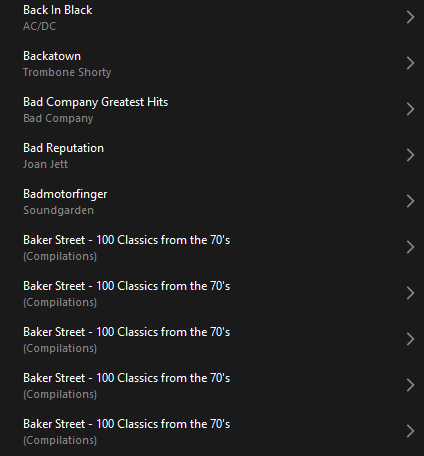
 

Does anyone else have this issue?
Ross.

This topic has been closed for further comments. You can use the search bar to find a similar topic, or create a new one by clicking Create Topic at the top of the page.
Best answer by Corry P

Hi ​@rosswells127 et al

I have an update regarding this behaviour.

It is (now) expected behaviour that if you have a compilation album with no Album Artist metadata tagged on an S2 system, it will appear in the album list multiple times. To resolve this issue, please tag all tracks in the album with an Album Artist - if there is no single artist, please tag each track in the album with “Various Artists”. Once an album has a Album Artist tag, it will no longer appear as duplicates in the Album container list.

I hope this helps.

Edit: This thread was automatically closed due to inactivity. I have reopened it.

240 replies

Schlumpf
Virtuoso
October 6, 2024

@mhd 

What exactly does „Once added everything is empty.“ mean?

Can you see an added share / music library in Sonos settings but there is no content visible under library source?

Or does it mean there isn’t any library in settings at all?


Ralf
Corry P
Corry PAnswer
Sonos Staff
December 23, 2024

Hi ​@rosswells127 et al

I have an update regarding this behaviour.

It is (now) expected behaviour that if you have a compilation album with no Album Artist metadata tagged on an S2 system, it will appear in the album list multiple times. To resolve this issue, please tag all tracks in the album with an Album Artist - if there is no single artist, please tag each track in the album with “Various Artists”. Once an album has a Album Artist tag, it will no longer appear as duplicates in the Album container list.

I hope this helps.

Edit: This thread was automatically closed due to inactivity. I have reopened it.

"Common sense is the collection of prejudices acquired by age eighteen." - Albert Einstein
controlav
Lead Maestro
December 23, 2024

While its good to get some clarity here, thank you Corry, I am wondering WHY this was changed in the first place? I don’t recall anyone complaining about how tags where interpreted in the “before times”.

Author of the leading independent Sonos apps for Android, MacOS, iOS, Windows and Xbox.
Corry P
Sonos Staff
December 23, 2024

Hi ​@controlav 

I have no idea. I will try to see if I can get an answer though.

I was up until now thinking that it had something to do with classical music and how it tends to get tagged, but that does not make much sense as - as far as I am aware - classical music tends not to get released with multiple contributing artists.

Due to the timing, I think it could be related to however it was that we got Music Library working with the new cloud-based Search method, but that is just a guess.

"Common sense is the collection of prejudices acquired by age eighteen." - Albert Einstein
Corry P
Sonos Staff
December 23, 2024

Hi ​@controlav 

Was that a Cloud Atlas reference?!

"Common sense is the collection of prejudices acquired by age eighteen." - Albert Einstein
Collaborator II
December 23, 2024

Hi ​@rosswells127 et al

I have an update regarding this behaviour.

It is (now) expected behaviour that if you have a compilation album with no Album Artist metadata tagged on an S2 system, it will appear in the album list multiple times. To resolve this issue, please tag all tracks in the album with an Album Artist - if there is no single artist, please tag each track in the album with “Various Artists”. Once an album has a Album Artist tag, it will no longer appear as duplicates in the Album container list.

I hope this helps.

Edit: This thread was automatically closed due to inactivity. I have reopened it.

Thanks, I've already updated my library, so no more multiple albums😀

Anthony
controlav
Lead Maestro
December 23, 2024

Hi ​@controlav 

Was that a Cloud Atlas reference?!

I don’t know what that is, so no :-)

Author of the leading independent Sonos apps for Android, MacOS, iOS, Windows and Xbox.
Lyricist II
December 23, 2024

This is fixed now. It was broken. And now it isn't. My library required no changes (album artist always set).


Corry P
Sonos Staff
December 23, 2024

Hi ​@Fynoderee 

That is the experience most people had, including myself. To be clear, there was an issue that we did fix, but some people were reporting still seeing it - they will need to re-tag the affected tracks.


@controlav - it’s a movie by the Wachowski siblings. Not bad, not great, but somewhat confusing.

"Common sense is the collection of prejudices acquired by age eighteen." - Albert Einstein
Trending Lyricist I
December 23, 2024

This is poor and very disappointing. What a colossal fall from grace. I'm not going to tag all my stuff to work around this. I've relegated my Sonos usage to the beam and surrounds for TV usage (this works really well I have to say) and set up a subsonic server for my music instead. The end of an era.