

rosswells127
Prodigy I
July 16, 2024
Answered

Music Library Compilation Issue under new 16.3 Firmware

  • July 16, 2024
  • 240 replies
  • 12063 views

Today I successfully updated to the latest 16.3 Firmware and Windows Desktop Controller.
I subsequently performed an “Update Music Library Now” from the 16.3 Windows Desktop Controller.
Now any Sonos Controller (including SonoPhone, SonoPad) show multiple entries for each compilation album when viewing Albums.
Just an example shown below...
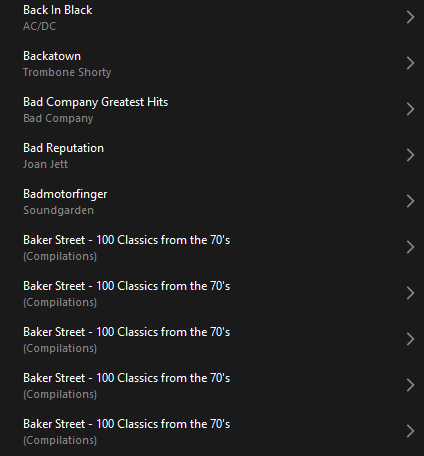
 

Does anyone else have this issue?
Ross.

This topic has been closed for further comments. You can use the search bar to find a similar topic, or create a new one by clicking Create Topic at the top of the page.
Best answer by Corry P

Hi ​@rosswells127 et al

I have an update regarding this behaviour.

It is (now) expected behaviour that if you have a compilation album with no Album Artist metadata tagged on an S2 system, it will appear in the album list multiple times. To resolve this issue, please tag all tracks in the album with an Album Artist - if there is no single artist, please tag each track in the album with “Various Artists”. Once an album has a Album Artist tag, it will no longer appear as duplicates in the Album container list.

I hope this helps.

Edit: This thread was automatically closed due to inactivity. I have reopened it.

240 replies

Enthusiast II
October 4, 2024

Hi @MoPac 

I don’t know. In addition, I have been declaring this issue to be one of the biggest issues currently standing to anyone who will listen to me - I have been trying!

Note that the majority of updates so far have been to the app - this particular issue will require a speaker firmware update to fix. For all I know, a fix might already be in place for the next firmware update that is being made available - I certainly hope so, anyway.

Personally, I have managed to entirely bypass this issue by having .m3u playlists for each album I have (my library practices pre-date any kind of music library scanning that I think started with Windows Media Player (or maybe iTunes, I suppose)). So, instead of going to Albums and seeing all the duplicates, I go to Playlists and see a playlist for each Album, with no repetition:

Still no album art, unfortunately.

I hope this helps.

I have thousands of albums in my library. make a playlist for each one? That doesn’t sound like a good idea… It would probably save me time and money to quit my current programming job and see if I can get a temp job fixing this one bug for Sonos. I suspect if this were the top bug with customers that Sonos would have at least one person working on it full time, and even better more than one person. I’ve never heard of a high priority bug anywhere that took a team multiple months to fix.

I’m all for letting Sonos do their thing and release a fix when it’s ready, but it’s hard to trust anything at this point.

MoPac
Headliner III
October 4, 2024

 For all you classical music lovers, there are a few of you left, make all your Artist & Album Artist  tags ( or whatever your tagging software chooses to call them ) the last name of the composer.  You’ll never have search issues again.

 Use the album cover to see who else was involved in the performance.  Of course Sonos needs to give us those album covers back.


Yeah that’s great, but:

I use album artist “Classical” and track artist for whatever. I may be dumb, but I have hundreds of classical albums carefully tagged this way. Just for sonos!

Also, if I have an compilate where every track is really by a different artist, I can’t do this. So a 10 CD set of hits from the 70’s may show as hundreds of “albums”. It’s not a solution to erase all artist names and replace them with “a bunch of people on a compilation all named the same thing to work around a new sonos bug”.

It’s a good tip, but it won’t work for everyone.

 I’m only suggesting this for classical music.  I’ll leave compilations alone and wait for Sonos to fix the firmware.

  For all classical albums I make the Genre tag “Classical”.  When I search for Brahms I want the list of all the compositions I have that Brahms penned presented as separate albums.  The Artist tag is Brahms & the Album Artist tag is Brahms.  The screenshot is from a search for Brahms using the Artist category.


Enthusiast II
October 4, 2024

One other minor annoyance:  before this disastrous update at the root of all this, whenever I would display the queue, the list would come up with the currently playing track on the screen - maybe the second one down.  Now displaying the queue just shows the list starting with track one, and I have to scroll down to find the currently playing track and see what’s coming.  Low priority obviously, but a change for which there was probably no requirement.

Prodigy III
October 4, 2024

One other minor annoyance:  before this disastrous update at the root of all this, whenever I would display the queue, the list would come up with the currently playing track on the screen - maybe the second one down.  Now displaying the queue just shows the list starting with track one, and I have to scroll down to find the currently playing track and see what’s coming.  Low priority obviously, but a change for which there was probably no requirement.

Really not that low priority… it’s a basic UI requirement of a music player, show the playing track and what’s coming next. 

Prodigy III
October 4, 2024

Hi @Barry McCockinner 

Regardless...there has been ZERO communication about status for months.

The opening post on the following page has been updated with each and every release:

https://en.community.sonos.com/productUpdates/show?id=6896801&title=new-sonos-app-update

In addition:

You are correct if you are saying that we have not been bombarding people with emails - not everyone is affected negatively by the new app, and these would be rather unwelcome, I feel.

I've got a lot of money invested in my sonos system, but they are sending a very clear signal that they don't care about their customers.

You could not be more wrong - we (plural, the staff) care very much. But, I doubt I’m going to convince you of this in a couple of sentences.

The new app update thread is just a copy and paste of the patchy release notes and easily missed. (No firmware release notes so not exactly complete or comprehensive.) The quality stuff is meaningless corporate speak that is yet to be backed up by anything of substance, and the Trello board is an insult. If that Trello board is accurate then the music library issue doesn’t exist and Sonos think they’ve done queue management on iOS which is a joke frankly. We don’t need threads trying to spin the glacial return of features we already had as progress. 

FIVE months and we are still a long way off where we were. @controlav has provided a much more accurate list of outstanding issues. If Sonos really cared, they’d engage with their own user base on their own board and would take on that list and promise to fix it without any caveats instead of trying to control the ‘narrative’ and pretend they’ve fixed stuff they clearly haven't. And that’s without discussing the hopeless mess that is the new app on a tablet in landscape mode. Lazy doesn’t even come into it. 

I’m not going to have a go at you @Corry P as you clearly try your best to help around here, but the corporate BS needs to stop if Sonos want users to start believing what they say. The lack of direct engagement here, on their own board says much, much more and it’s not good. 

Goodwill and patience, especially on this issue are gone. FIVE MONTHS is beyond unreasonable. 

Trending Lyricist I
October 4, 2024

You have to assume there will be an extensive post mortem after all this. What is wrong with Sonos’ processes, testing and QA that allowed this update to go out? Testing and QA should have prevented this release from getting out the door.

rosswells127
Prodigy I
October 4, 2024

From my perspective @Corry P is the Forums equivalent to @KeithFromSonos on Reddit. Sonos have some amazing people working hard for them to try to assist customers through these trying times. Hats off to them i reckon!

Ross.

Schlumpf
Virtuoso
October 4, 2024

@RogerWF

Thanks for reporting about the queue / now playing issue… but it already was mentioned for several times on different threads. And as far as I know that will be part of the next queue/ playlist fix updates. So maybe @Corry P will confirm that Sonos also is aware of this „bug“.


Ralf
Enthusiast I
October 6, 2024

Still cannot add my library. Once added everything is empty. Problem persists. Sonos sucks, sorry. Who has all the time to read through all these posts to just learn that there is still no solution to properly adding a library? Or spend hours with their support stuff by resetting the speakers only to then have to live with work arounds that in the end are broken with the next update? Once I find time I will downgrade to S1. Done forever with S2.

Ken_Griffiths
October 6, 2024

Still cannot add my library. Once added everything is empty. Problem persists. Sonos sucks, sorry. Who has all the time to read through all these posts to just learn that there is still no solution to properly adding a library? Or spend hours with their support stuff by resetting the speakers only to then have to live with work arounds that in the end are broken with the next update? Once I find time I will downgrade to S1. Done forever with S2.

Did you try adding the library by following the Sonos instructions here… 

https://support.sonos.com/en-gb/article/add-your-music-library-to-sonos

The library share needs to use the SMBv2 (or higher) protocol. I suggest setting up the the chosen user/credentials on the share with just read-only access.