

rosswells127
Prodigy I
July 16, 2024
Answered

Music Library Compilation Issue under new 16.3 Firmware

  • July 16, 2024
  • 240 replies
  • 12063 views

Today I successfully updated to the latest 16.3 Firmware and Windows Desktop Controller.
I subsequently performed an “Update Music Library Now” from the 16.3 Windows Desktop Controller.
Now any Sonos Controller (including SonoPhone, SonoPad) show multiple entries for each compilation album when viewing Albums.
Just an example shown below...
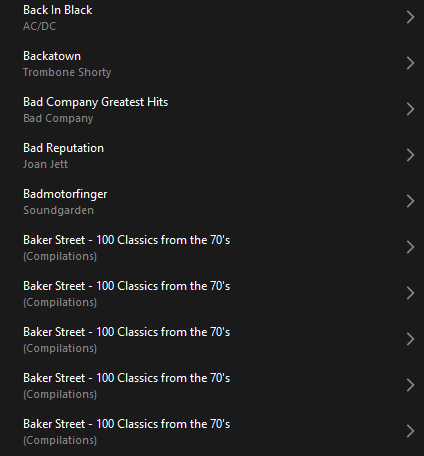
 

Does anyone else have this issue?
Ross.

This topic has been closed for further comments. You can use the search bar to find a similar topic, or create a new one by clicking Create Topic at the top of the page.
Best answer by Corry P

Hi ​@rosswells127 et al

I have an update regarding this behaviour.

It is (now) expected behaviour that if you have a compilation album with no Album Artist metadata tagged on an S2 system, it will appear in the album list multiple times. To resolve this issue, please tag all tracks in the album with an Album Artist - if there is no single artist, please tag each track in the album with “Various Artists”. Once an album has a Album Artist tag, it will no longer appear as duplicates in the Album container list.

I hope this helps.

Edit: This thread was automatically closed due to inactivity. I have reopened it.

240 replies

Prodigy III
October 3, 2024

Can we have a ‘least worst answer’ tag? 

Enthusiast II
October 3, 2024

Hi @robokitty 

No. As it stands, that is currently the Best Answer (note that it does not say “solution”) out of all those given here. There are no steps you can take to resolve this (short of altering all of your metadata, but I would not consider that a resolution), so there will be no better answers until this is resolved.

Consider - If I did as you asked, anyone new to this thread would not necessarily see my announcement that we are aware of the issue and assume that it is something that they might be able to work around, thus wasting their time and causing frustration - probably more frustration that you get while looking at that Best Answer that you’re not happy with.

When the issue is resolved, the announcement posted here saying as much will become the new Best Answer.

I hope this helps.

 Why is this so difficult when the older firmware handled compilations correctly?  This from a guy that never listens to compilations.

Keep in mind that it is not just ‘compilations’.  Single-artist albums with different guest performers (‘contributing artists’) are also ripped apart.  But, yeah:  just put everything within the same album title/album artist together in one ‘album’, where the ‘album artist’ for ‘compilations’ would be ‘Various Artists’. while the ‘contributing artist’ acknowledges each track performer.  Agreed:  why is this so difficult?

Corry P
Sonos Staff
October 3, 2024

Hi @MoPac 

I don’t know. In addition, I have been declaring this issue to be one of the biggest issues currently standing to anyone who will listen to me - I have been trying!

Note that the majority of updates so far have been to the app - this particular issue will require a speaker firmware update to fix. For all I know, a fix might already be in place for the next firmware update that is being made available - I certainly hope so, anyway.

Personally, I have managed to entirely bypass this issue by having .m3u playlists for each album I have (my library practices pre-date any kind of music library scanning that I think started with Windows Media Player (or maybe iTunes, I suppose)). So, instead of going to Albums and seeing all the duplicates, I go to Playlists and see a playlist for each Album, with no repetition:

Still no album art, unfortunately.

I hope this helps.

"Common sense is the collection of prejudices acquired by age eighteen." - Albert Einstein
Trending Lyricist I
October 3, 2024

Bottom line is this....Sonos continues to suck.  They rushed to get a new app out which destroyed a lot of functionality.  Now it seems the pendulum has swung in the opposite direction where they are being overly cautious before rolling out updates.  Regardless...there has been ZERO communication about status for months.  I've got a lot of money invested in my sonos system, but they are sending a very clear signal that they don't care about their customers.  Time to start looking for a new system.

Corry P
Sonos Staff
October 3, 2024

Hi @Barry McCockinner 

Regardless...there has been ZERO communication about status for months.

The opening post on the following page has been updated with each and every release:

https://en.community.sonos.com/productUpdates/show?id=6896801&title=new-sonos-app-update

In addition:

You are correct if you are saying that we have not been bombarding people with emails - not everyone is affected negatively by the new app, and these would be rather unwelcome, I feel.

I've got a lot of money invested in my sonos system, but they are sending a very clear signal that they don't care about their customers.

You could not be more wrong - we (plural, the staff) care very much. But, I doubt I’m going to convince you of this in a couple of sentences.

"Common sense is the collection of prejudices acquired by age eighteen." - Albert Einstein
Contributor I
October 3, 2024

Corry:  Is there a way those of us are waiting for a legit fix to the “compilations problem” could put our name on a list to get an email letting us know when the fix has happened?  Thanks.

MoPac
Headliner III
October 3, 2024

 For all you classical music lovers, there are a few of you left, make all your Artist & Album Artist  tags ( or whatever your tagging software chooses to call them ) the last name of the composer.  You’ll never have search issues again.

 Use the album cover to see who else was involved in the performance.  Of course Sonos needs to give us those album covers back.


Trending Lyricist I
October 3, 2024

I'm not looking for high level communications from execs about not taking a bonus. That's typical damage control communications. The tutorial and faq are also not a real comm.  The trello board is probably the only useful thing there, so I'll take a look at that.


And.no need to try and convince me that that staff cares...I'm sure you do for a number of reasons, including the loss of revenue that eventually translates into loss of jobs.  You guys care...it's the execs that are questionable.

Corry P
Sonos Staff
October 3, 2024

Hi @RayBob 

If you subscribe to this thread, that will suffice (assuming you have notifications for when a thread you are subscribed to is marked with a Best Answer on).

Click your user icon on the black bar at the top of this page, then Settings, then Notifications to see these notifications settings.

I hope this helps.

"Common sense is the collection of prejudices acquired by age eighteen." - Albert Einstein
Enthusiast II
October 4, 2024

 For all you classical music lovers, there are a few of you left, make all your Artist & Album Artist  tags ( or whatever your tagging software chooses to call them ) the last name of the composer.  You’ll never have search issues again.

 Use the album cover to see who else was involved in the performance.  Of course Sonos needs to give us those album covers back.


Yeah that’s great, but:

I use album artist “Classical” and track artist for whatever. I may be dumb, but I have hundreds of classical albums carefully tagged this way. Just for sonos!

Also, if I have an compilate where every track is really by a different artist, I can’t do this. So a 10 CD set of hits from the 70’s may show as hundreds of “albums”. It’s not a solution to erase all artist names and replace them with “a bunch of people on a compilation all named the same thing to work around a new sonos bug”.

It’s a good tip, but it won’t work for everyone.