

rosswells127
Prodigy I
July 16, 2024
Answered

Music Library Compilation Issue under new 16.3 Firmware

  • July 16, 2024
  • 240 replies
  • 12063 views

Today I successfully updated to the latest 16.3 Firmware and Windows Desktop Controller.
I subsequently performed an “Update Music Library Now” from the 16.3 Windows Desktop Controller.
Now any Sonos Controller (including SonoPhone, SonoPad) show multiple entries for each compilation album when viewing Albums.
Just an example shown below...
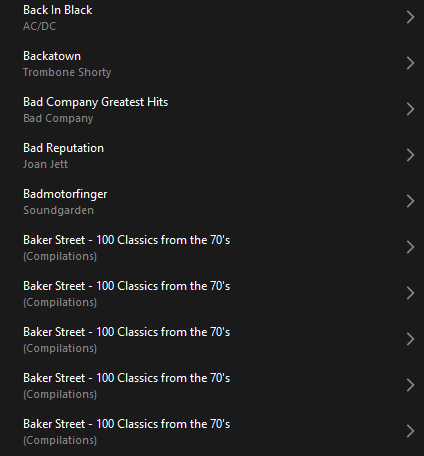
 

Does anyone else have this issue?
Ross.

This topic has been closed for further comments. You can use the search bar to find a similar topic, or create a new one by clicking Create Topic at the top of the page.
Best answer by Corry P

Hi ​@rosswells127 et al

I have an update regarding this behaviour.

It is (now) expected behaviour that if you have a compilation album with no Album Artist metadata tagged on an S2 system, it will appear in the album list multiple times. To resolve this issue, please tag all tracks in the album with an Album Artist - if there is no single artist, please tag each track in the album with “Various Artists”. Once an album has a Album Artist tag, it will no longer appear as duplicates in the Album container list.

I hope this helps.

Edit: This thread was automatically closed due to inactivity. I have reopened it.

240 replies

Lyricist III
September 2, 2024

Aside from the compilation album problem (which basically means that I have to spend many minutes to find anything in my music library), there is also a dire need for an alphabetical index on the right side fo the screen like the one we had before the update, which lets you jump to albums (or artists, or genres, etc.) that start with a certain letter.  This is enormously useful for those of us who have extensive music libraries.  I can’t imagine that this is complicated to add to the app, since it’s just a minor indexing feature.  There seems to be no assurance that we will ever get this feature back.  Unless we do, eventually I’ll just junk my whole system and try something else (at the cost of a small fortune that I’ve spent over the years buying Sonos equipment). 

Corry P
Sonos Staff
September 3, 2024

Hi @Vanallen 

Thanks for the feedback - the alphabet shortcut has been asked for so much since the introduction of the new app that I would be shocked if it was not added back in.

"Common sense is the collection of prejudices acquired by age eighteen." - Albert Einstein
Prodigy III
September 3, 2024

Is the compilation indexing issue a bigger problem than we originally thought? 

If I look at my library, I have 77 compilation albums (I don’t include greatest hits for an artist in these) that I have the album artist set to ‘Various Artists’ for. If I do a find into a line count, I appear to have about 2255 tracks, so an average of around 30 tracks per compilation. Some will be more (2+CD’s) some less, single CD’s. I’m sure occasionally you’ll get 2 tracks on one compilation by the same artist. 

If I use the desktop Sonos controller to look under Various Artists, the list is huge, and randomly selecting a fake album entry it appears to include most if not all the compilation It came from but in an odd track order. 

So the worst case scenario is 77 albums X 30 tracks X 30 tracks again, which is a colossal 69300 index entries. 

As I understand it, the local library index max as limited to 65000. So with around 11,000 ‘proper’ tracks in addition to the broken compilations, I must presumably be under 65,000 which I’d think is quite likely as I’m sure it’s not as bad as the worst case, but I have no way to easily traverse my Sonos index to get actual figures. 

So, I’m curious how many compilation albums others have on here compared to overall library size. 

I used this command on my Mac to get the info I wanted… from the Compilations directory created by Apple Music (was iTunes...)

find . -type f -name “*.m??” | wc -l

And I used m?? as I have either m4a or mp3 files, so that finds those. If you use wav or flac, you may need to use multiple finds and add the results or a more esoteric search param. 

Ease of finding depends how you arrange your local library of course. 

I do have non-compilations that suffer from the broken index, but they’re rarely as extreme as a proper compilation album, so I’m assuming I can ignore them. However, if you have lots of jazz/classical with many artists that also may start significantly bloating your indexes. 

My final question I suppose here would be is the 65,000 an actual list limit and the amount of memory used will depend on the metadata associated with each of a max of 65,000 entries, or is there a fixed memory limit and 65,000 is a rough estimate of the maximum based on that? So will speakers with more memory handle this better than those with much less? Or does it make no difference as the memory area for an index is fixed across all speakers? 

Schlumpf
Virtuoso
September 3, 2024

I won‘t get too deep into that and stress my mind as Sonos is aware of the issue and probably it will be fixed by one of the next firmware updates. 

Ralf
Lyricist I
September 3, 2024

Yep. I also found this when I updated the Android app on my phone, so I went to my PC to use the software on that, had to do an update and exactly the same. All ‘Various Artist’ compilation albums are now listed as single track albums using the artistes names.


I’ve using the workaround by lists the albums using the ‘Folders’ option in ‘Music Library’; I’ve also resurrected an old Windows tablet that I’m now using as my ‘portable’ controller, as the app on this is the same as the PC app.


I’ve deleted the Android app as it was just taking up storage capacity on my phone.


Will I recommend Sonos to anyone else at the moment ? No, I wouldn’t inflict this product range on my worst enemy, and it breaks my heart to say that, because, up to a few months ago, I LOVED this product range.

sigh
Prodigy II
September 4, 2024

Is the compilation indexing issue a bigger problem than we originally thought?


If it has been implemented in a similar way to upnp content directory services then probably not.

The metadata extraction which will be stored in data files and is used to return data to the queries. The app then uses the returned data to organise into a display. I’d expect the backing data store like almost every lightweight upnp/dlna server is SQLite based.

The upnp content directory service has a defined schema and api for browse, search, pagination, metadata to return etc. Sonos have extended it I think as the old app has the option to choose an album artist display mode, which I don’t  think is part of the upnp spec.

There only needs to be the single data store for any view, query/search the app implements. There are examples of the SonosApi automatically exported from the devices floating around the Internet.

This view from my AssetUpnp server of album by release is just a query to the same data files used to provide the album artist, album, artist views, it will request the year and album title metadata and probably a sort order as part of the query.


My final question I suppose here would be is the 65,000 an actual list limit and the amount of memory used will depend on the metadata associated with each of a max of 65,000 entries, or is there a fixed memory limit and 65,000 is a rough estimate of the maximum based on that? So will speakers with more memory handle this better than those with much less? Or does it make no difference as the memory area for an index is fixed across all speakers? 

Hard track limit, but could be less based on memory required for metadata according to Sonos.

https://support.sonos.com/en-gb/article/missing-tracks-or-albums-in-sonos-music-library

A Sonos music library has a 65,000 track limit. The limit can be reached by either track count, or by memory usage. The memory limit can be reached prior to 65,000 tracks if there is a large amount of metadata. For example, classical music tracks tend to have a large amount of metadata and can use up the available memory before the 65,000 track limit is reached.

Suggests it’s a fixed memory limit to me as there is no mention of different memory limits for different groups of devices like there is with say WiFi.

MoPac
Headliner III
September 4, 2024

Ian_S:

 Is it true that when the metadata in my library is read it looks at the at the metadata as I structured it using tagging software?  The reason I ask is because most of my library is classical music which you stated has a large amount of metadata.  The way I tag classical music is with the following tags:  Artist, Album, Track No., Date, Album Artist.  That’s it.  So would that help to minimize the memory used when the library is read?

Prodigy III
September 4, 2024

Ian_S:

 Is it true that when the metadata in my library is read it looks at the at the metadata as I structured it using tagging software?  The reason I ask is because most of my library is classical music which you stated has a large amount of metadata.  The way I tag classical music is with the following tags:  Artist, Album, Track No., Date, Album Artist.  That’s it.  So would that help to minimize the memory used when the library is read?

Depends ow much data you put in those fields! If you have the whole orchestra listed under artist, then it could be large. I’m guessing you don’t though. 

The other thing that seems to impact on it is the overall file path for each track which appears to be stored. There’s another thread where reducing that helped someone keep their library within limits. There may well be Sonos specific stuff generated too that we have no control over. 

Prodigy III
September 4, 2024

The metadata extraction which will be stored in data files and is used to return data to the queries. The app then uses the returned data to organise into a display. I’d expect the backing data store like almost every lightweight upnp/dlna server is SQLite based.

I guess we can only hope that that is how they are storing the metadata they need in the format they require. On the flip side, if they haven’t screwed the data, why is it taking so long to fix what would then just be some poorly written queries? Which if they are returning 1000’s of rows when it should be 10’s won’t be helping with CPU or RAM usage on speakers, esp. older ones. 

I do think they could do with re-instating the metric for how much memory your metadata is using either absolute or as a % of what’s available in the About your system output. Would certainly help. 


MoPac
Headliner III
September 4, 2024

Ian_S:

 My Artist & Album Artist tags are the last name of the composer.  All other tags in purchased downloads, other than the ones I use, are removed.  I use DbPoweramp for tagging.