

rosswells127
Prodigy I
July 16, 2024
Answered

Music Library Compilation Issue under new 16.3 Firmware

  • July 16, 2024
  • 240 replies
  • 12063 views

Today I successfully updated to the latest 16.3 Firmware and Windows Desktop Controller.
I subsequently performed an “Update Music Library Now” from the 16.3 Windows Desktop Controller.
Now any Sonos Controller (including SonoPhone, SonoPad) show multiple entries for each compilation album when viewing Albums.
Just an example shown below...
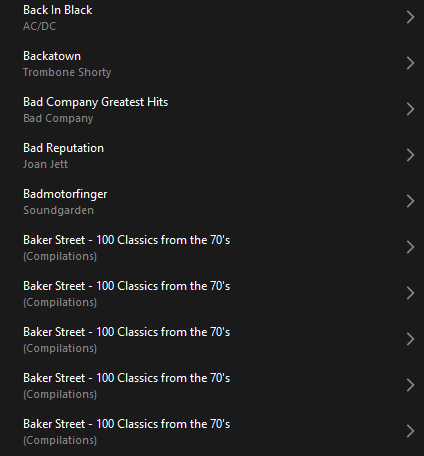
 

Does anyone else have this issue?
Ross.

This topic has been closed for further comments. You can use the search bar to find a similar topic, or create a new one by clicking Create Topic at the top of the page.
Best answer by Corry P

Hi ​@rosswells127 et al

I have an update regarding this behaviour.

It is (now) expected behaviour that if you have a compilation album with no Album Artist metadata tagged on an S2 system, it will appear in the album list multiple times. To resolve this issue, please tag all tracks in the album with an Album Artist - if there is no single artist, please tag each track in the album with “Various Artists”. Once an album has a Album Artist tag, it will no longer appear as duplicates in the Album container list.

I hope this helps.

Edit: This thread was automatically closed due to inactivity. I have reopened it.

240 replies

Contributor I
August 27, 2024

I posted this on another thread as well:

Anyone from Sonos - or not - feel free to answer this:
I’d be willing to forego using an NAS (in my case two SSD USB drives plugged into my iMacs) if someone could answer this:  If one were to move ALL music files in our libraries into a folder on the main internal hard drive of a iMac and/or Windows computer, would THAT negate the issues plaguing the huddle masses who are using external NAS drives?  Or, are those too considered Network Attached Storage devices?

Brad

Don’t bother. I literally have to pretend that the music folder on my Mac is on a NAS and give it the full file address so that the newly fouled up SONOS app can find it. 

Prodigy III
August 27, 2024

Don’t bother. I literally have to pretend that the music folder on my Mac is on a NAS and give it the full file address so that the newly fouled up SONOS app can find it. 

Sadly, for reasons best known to Sonos, the desktop apps have become extremely confusing around sharing your music library from a PC or Mac. The way that the desktop app sets up the library sharing for the ‘My Music’ or ‘Another folder or drive’ NO LONGER WORKS because the method it sets up has been deemed insecure and removed from the speaker firmware. 

What Sonos should have done when they did this was amended the desktop apps to ONLY have the Network Drive option as this is now all that the speakers support. So it’s not pretending to be a network share, you MUST share folders on your PC/Mac now over the network for any updated Sonos speaker to be able to see it. 

And yes, it’s a really good question why Sonos couldn’t help reduce the confusion this generates by simply removing the defunct options from the desktop controllers …

Trending Lyricist I
August 27, 2024

I think Sonos is so completely lost themselves - they are introducing bugs quicker than they can patch them. At least for the 16.3.1 Desktop App, it was forced released onto me. So now another problem. Library relational database cannot be read correctly. What sort of company would do that non-stop on their mission to cease to exist? I don’t have a problem throwing away my lousy $139 Roam and a few pieces of out-of-date old equipment. I just want something that works.

The file sharing problem was introduced by the Mobile App or the Desktop App or both about 2 months ago. If you follow the fixes under “Error 913” topics, at least for me, whether the music is in “My Music”, another folder within the PC or NAS, works. But updating your music library may mean you have to re-do the whole file sharing exercise again -- that happened to me.

My earlier problem with 16.3.1 of not being able to add to the playlist more than one track at a time after the music library has been amended seems to be “solved” by closing and re-opening the Desktop App. Or maybe I speak too soon. Or until another forced update comes along. That’s completely unprofessional.

Why do they have to call the Mobile App Version 80.06.03 and the Desktop App 80.1-55014 (80.1-55240 on their screen, why?) as if it was not confusing enough?

Lyricist II
August 27, 2024

In sheer frustration I have given up, apart from my Sonos Beam, which we use on our TV, I’ve switched everything else off, I’m not wasting electric on Sonos rubbish while it’s like this.

Just by chance my hi-fi amplifier failed, so I took the opportunity to by a Marantz PM7000N which happily streams radio and plays my music collection from my NAS drive. The apps a bit clunky, but it works. 

Not sure I’ll ever trust Sonos again after this debacle.

Contributor I
August 27, 2024
Sonos SNAFU number 1,298
 

Came here to say “me too”, but I guess I am here to say “me 158”… and how can this thread be marked as “ANSWERED”. Is the answer “Yeah, it’s stuffed up, but it is 1,298th on our list of priorities right now. Sorry we broke it. Can I send you a copy of my resume? I hate working here since the new app came out.”

Lyricist III
August 27, 2024

Still no timeframe for a fix to this @Corry P ? It has been a very long time coming

Corry P
Sonos Staff
August 28, 2024

Hi @Eejay60 

We are making progress on that, but I don’t have an ETA that I can share with you.

"Common sense is the collection of prejudices acquired by age eighteen." - Albert Einstein
Lyricist III
August 28, 2024

We are making progress on that, but I don’t have an ETA that I can share with you. 
 

Thank you@Corry P , that’s good, there is progress 👍🏻

Renowned Enthusiast II
August 28, 2024

I posted this on another thread as well:

Anyone from Sonos - or not - feel free to answer this:
I’d be willing to forego using an NAS (in my case two SSD USB drives plugged into my iMacs) if someone could answer this:  If one were to move ALL music files in our libraries into a folder on the main internal hard drive of a iMac and/or Windows computer, would THAT negate the issues plaguing the huddle masses who are using external NAS drives?  Or, are those too considered Network Attached Storage devices?

Brad

Don’t bother. I literally have to pretend that the music folder on my Mac is on a NAS and give it the full file address so that the newly fouled up SONOS app can find it. 

Thanks, Stephen… Since I posted that, I’ve been told that Network Attached Storage can even be the internal drive on the host computer.  So, I tried a test run by putting a folder of Aerosmith music on the internal drive of our relatively new iMac - running a relatively new OS - and then added that to my Sonos Library via the S2 app.  No luck. I use Sonophone now to play my music in my Family Room from the external drive housing the Library.  Sonophone has NO problem locating and accessing my music.  The creator informed me that their app can only do what the internal Sonos hardware/app allows it to do so, I’m assuming, one of those things is finding and accessing AND playing my music on the NAS. My question to Sonos is: Why can’t you guys do that any longer? No, it’s not an S1 or SMBv problem on my end.

Renowned Enthusiast II
August 28, 2024

In sheer frustration I have given up, apart from my Sonos Beam, which we use on our TV, I’ve switched everything else off, I’m not wasting electric on Sonos rubbish while it’s like this.

Just by chance my hi-fi amplifier failed, so I took the opportunity to by a Marantz PM7000N which happily streams radio and plays my music collection from my NAS drive. The apps a bit clunky, but it works. 

Not sure I’ll ever trust Sonos again after this debacle.

I’m pretty much resigned to using my Fives, Playbar and Sub as a pimped out home theater setup. Talk about overkill. To play music off of my NAS drive, I use Sonophone. Aside from not having the bells and whistles, it does what it’s intended to do.

I’ve been looking at a Marantz setup in the event Sonos frustrates me into 2025. In the 70s and 80s I used to drool over having a Marantz sound system. I suppose better late than never at this point as everything but my Fives were purchased in 2014. That Playbar and Sub are still great and I had no incentive of selling or gifting them… until the ill-fated app was foisted upon us.