
Enthusiast II
May 24, 2024

Fixing the library error code 913 for Windows users!

  • May 24, 2024
  • 91 replies
  • 18115 views

So a big thanks also to “helpingiskind” @HelpingIsKind 

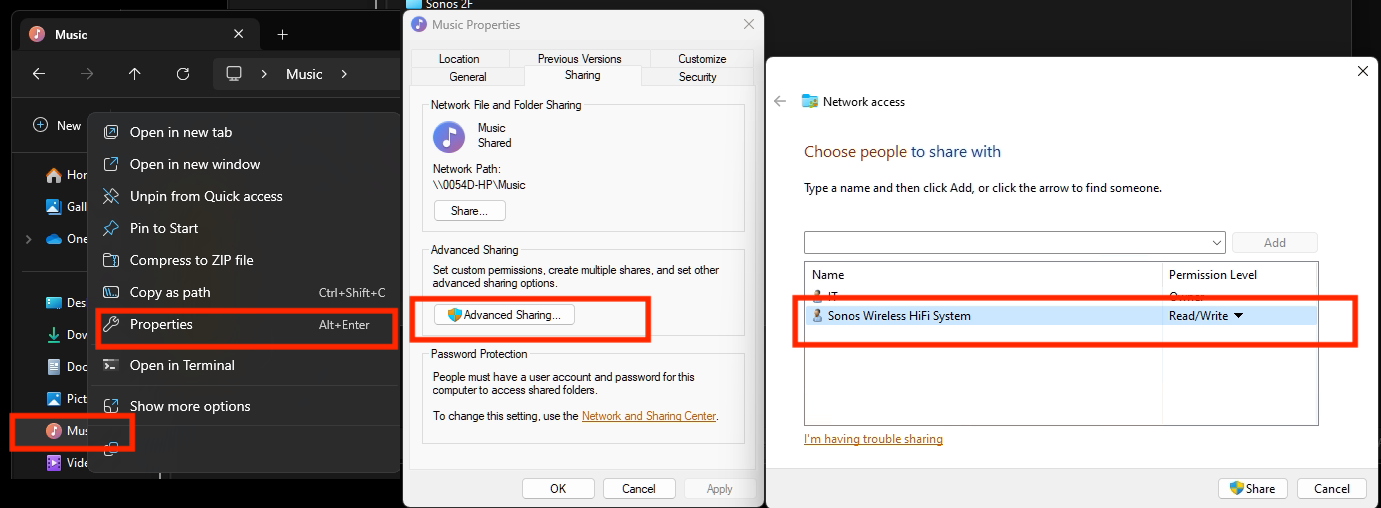
So as far as windows users go, sorry not sure about iOS users here, but the crucial things after updating the windows app for W10+, you need to turn on “Advanced Sharing” in windows, and make sure that your music library whether it’s stored on a NAS or just an ext usb drive, or internal drive is added to your library. So this is the example that helpingiskind gave:

Please right-click on the Music Folder > Properties > Advanced Sharing > Add Sonos Wireless HiFi System to Read/Write:
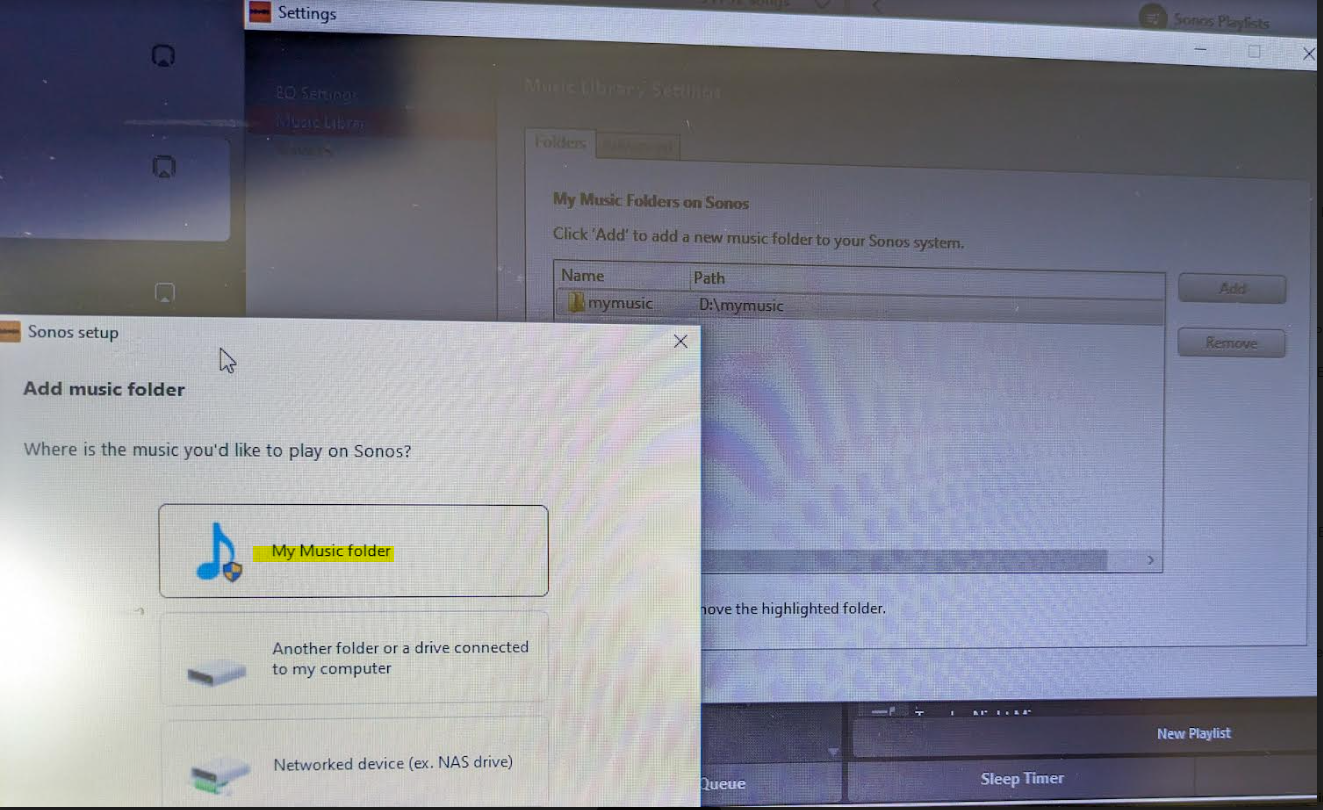
Then go to Sonos settings on your laptop and add “My Music folder” and it will sync.


Because the android app is terrible, I rolled back to the version 78 and found the .apk for that and then the app works like it’s used to and marries to the W10 controller app nicely….which has also caused the update issues along with the apps for android/apple to be very annoying!


Good luck and lets hope the next update from Sonos makes things nice n easy for everyone..

Hope this helps everyone and thanks to everyone elses ideas across this forum!


This topic has been closed for further comments. You can use the search bar to find a similar topic, or create a new one by clicking Create Topic at the top of the page.

91 replies

Contributor I
June 11, 2024

This solution worked for me. I can now, for the first time in 4 weeks, access my stored library.

Lyricist I
June 11, 2024

No solutions work for me. I have a business which requires background music. I curse the day I choose Sonos...

Lyricist I
June 12, 2024

So a big thanks also to “helpingiskind” @HelpingIsKind 

So as far as windows users go, sorry not sure about iOS users here, but the crucial things after updating the windows app for W10+, you need to turn on “Advanced Sharing” in windows, and make sure that your music library whether it’s stored on a NAS or just an ext usb drive, or internal drive is added to your library. So this is the example that helpingiskind gave:

Please right-click on the Music Folder > Properties > Advanced Sharing > Add Sonos Wireless HiFi System to Read/Write:

Then go to Sonos settings on your laptop and add “My Music folder” and it will sync.


Because the android app is terrible, I rolled back to the version 78 and found the .apk for that and then the app works like it’s used to and marries to the W10 controller app nicely….which has also caused the update issues along with the apps for android/apple to be very annoying!


Good luck and lets hope the next update from Sonos makes things nice n easy for everyone..

Hope this helps everyone and thanks to everyone elses ideas across this forum!


For me this worked only up to a point. It did finally allow me to re-add my music location to the music library settings. There was no 913 error code this time. It appeared to have worked. However, no music actually shows up under my music library. Updating my music library makes no difference. It flashes ‘indexing’ for about 2 secs then that disappears and nothing is there. Any thoughts on what is going on here? My music is stored on my main Windows laptop drive, in my OneDrive music folder as I like to back it up. It all used to work fine (most of the time anyway - I’ve always found Sonos temperamental) until the recent update.

Trending Lyricist I
June 12, 2024

THAT was exactly my issue.

I could not get it to work if the music folder is in C:\user\XXX\OneDrive\music folder

It only works if I switch to C:\user\xxx\music folder. I then back it all up using NAS.

In the Sonos S2 Controller Music Library Setting, continue to check “Another folder or drive connected to my computer”


Lyricist I
June 12, 2024

THAT was exactly my issue.

I could not get it to work if the music folder is in C:\user\XXX\OneDrive\music folder

It only works if I switch to C:\user\xxx\music folder. I then back it all up using NAS.

In the Sonos S2 Controller Music Library Setting, continue to check “Another folder or drive connected to my computer”


I do hope they fix it so I can carry on using OneDrive for my music. I don't want the effort of setting up a different back up - I'll never prioritise anything manual. If they don't, I'd probably rather rethink my speakers and try to get something more compatible! I've come across other compatibility issues with Sonos.

Trending Lyricist I
June 12, 2024

As of right now, they do not know any definitive “fix”, or more precisely why this workaround seems to solve the problem for some but not all. I suspect Level 2 wouldn’t call me back for the same reason - they don’t know how. 

Someone wrote the CEO an email. Well good luck. He is too busy flogging a new pair of headphones as the Sonos Mobile App is blowing up in his face. For a good part of the customer base, we do not just toggle between music services that the Mobile App claims it is good at doing. In Jazz and Classical music, we spend years getting hard to find recordings and stream them off our hard drives. I am not surfing Spotify while flipping a burger off the swimming pool. Simple as that. Can we not just keep valid the original reason why we purchased Sonos? Good speakers. Sonos does not nearly have the kind of profit margin that a Microsoft or Apple has so their software will always suck and have teething problems. Helpdesk wait time can be more than 100 minutes (and with no solutions). I am looking out for alternatives as well as this is not sustainable. A killer app that kills Sonos.


Lyricist III
June 13, 2024

Ni la solución de helpingiskind" @HelpingIsKind como tampoco la solución de Jeff Banks Música funcionaron. ES deber de lealtad comercial de SONOS solucionar de inmediato este problema que impide el uso de la música propia en SONOS, de lo contrario lo que hace SONOS es ilegal al obligar a sus usuarios a comprar servicios de música para poder utilizar los altavoces SONOS. Eso es una venta atada, y está prohibido por la ley.


Ni la solución de Helpingiskind" @HelpingIsKind ni la solución de Jeff Banks Music funcionaron. Es deber de lealtad comercial de SONOS solucionar de inmediato este problema que impide el uso de su propia música en SONOS, de lo contrario lo que hace SONOS es ilegal al obligar a sus usuarios a comprar servicios de música para poder utilizar los altavoces SONOS. Esa es una venta empatada y está prohibida por la ley.

Lyricist I
June 18, 2024

So a big thanks also to “helpingiskind” @HelpingIsKind 

So as far as windows users go, sorry not sure about iOS users here, but the crucial things after updating the windows app for W10+, you need to turn on “Advanced Sharing” in windows, and make sure that your music library whether it’s stored on a NAS or just an ext usb drive, or internal drive is added to your library. So this is the example that helpingiskind gave:

Please right-click on the Music Folder > Properties > Advanced Sharing > Add Sonos Wireless HiFi System to Read/Write:

Then go to Sonos settings on your laptop and add “My Music folder” and it will sync.


Because the android app is terrible, I rolled back to the version 78 and found the .apk for that and then the app works like it’s used to and marries to the W10 controller app nicely….which has also caused the update issues along with the apps for android/apple to be very annoying!


Good luck and lets hope the next update from Sonos makes things nice n easy for everyone..

Hope this helps everyone and thanks to everyone elses ideas across this forum!


I spent an hour on the phone with Sonos with no solution. How come Sonos doesn’t knopw this?

Lyricist I
June 21, 2024

Thank you!  This allowed me to connect my music library to the Controller after ISPs and having to rebuild my entire Sonos network.

Avid Contributor I
June 21, 2024

Did not work for me. I don’t understand why Sonos did this, I purchased the Sonos system, Generation 1 amp, play 5 and connect to be able to listen to my CD’s ripped to a network drive.  Worked fine until the S2 fiasco where I had 2 separate apps to use my growing system, Play 1’s, beam, S2 amp, worked ok, although trying to explain to my family 2 apps were needed made some listen less to the system.  Now we cannot listen to the library at all.