
Enthusiast II
May 24, 2024

Fixing the library error code 913 for Windows users!

  • May 24, 2024
  • 91 replies
  • 18115 views

So a big thanks also to “helpingiskind” @HelpingIsKind 

So as far as windows users go, sorry not sure about iOS users here, but the crucial things after updating the windows app for W10+, you need to turn on “Advanced Sharing” in windows, and make sure that your music library whether it’s stored on a NAS or just an ext usb drive, or internal drive is added to your library. So this is the example that helpingiskind gave:

Please right-click on the Music Folder > Properties > Advanced Sharing > Add Sonos Wireless HiFi System to Read/Write:
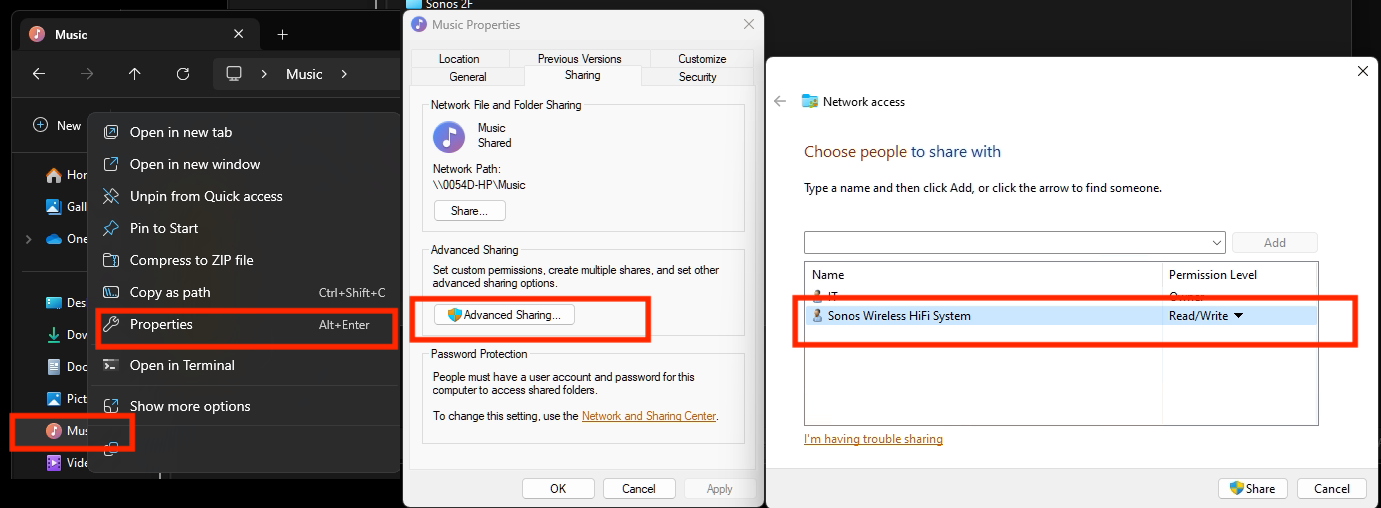
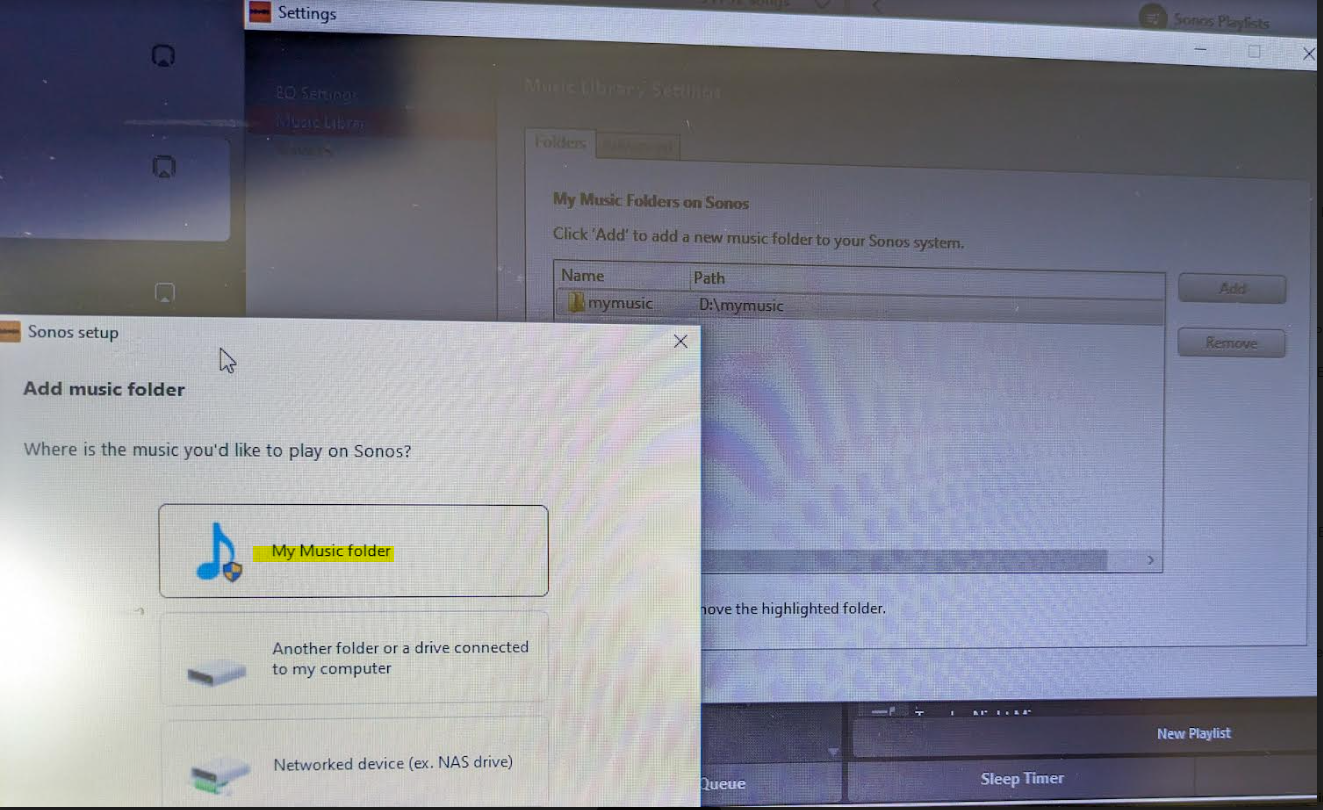
Then go to Sonos settings on your laptop and add “My Music folder” and it will sync.


Because the android app is terrible, I rolled back to the version 78 and found the .apk for that and then the app works like it’s used to and marries to the W10 controller app nicely….which has also caused the update issues along with the apps for android/apple to be very annoying!


Good luck and lets hope the next update from Sonos makes things nice n easy for everyone..

Hope this helps everyone and thanks to everyone elses ideas across this forum!


This topic has been closed for further comments. You can use the search bar to find a similar topic, or create a new one by clicking Create Topic at the top of the page.

91 replies

Lyricist III
June 3, 2024

@Lee M - I phrased it badly - I was trying to say I have albums stored in folders for each band/artist and I added one band at a time to my ext drive to see how much can be transferred into it before the 913 appeared. For my drive it seems to be around  the 50GB mark when it falls over. Good to know your drive is a powered one - that means I am not going to waste my time digging out a powered drive to test.

This update has been rough for both Windows and IOS users. We can only hope they fix this before we start ditching them for some other system. Good luck.

TiJay13
Lyricist III
June 4, 2024

This worked for me. Thanks @HiRESrules and @HelpingIsKind - Appreciated!

Enthusiast II
June 4, 2024

Good news..... Enjoy

Also the new app for Android does now show the shared library, but doesn't give you the full functionality and artwork prior to the app update from early May when all these problems started!

Lyricist III
June 5, 2024

Thanks tidepooler - your directions were spot on

Contributor II
June 6, 2024

So a big thanks also to “helpingiskind” @HelpingIsKind 

So as far as windows users go, sorry not sure about iOS users here, but the crucial things after updating the windows app for W10+, you need to turn on “Advanced Sharing” in windows, and make sure that your music library whether it’s stored on a NAS or just an ext usb drive, or internal drive is added to your library. So this is the example that helpingiskind gave:

Please right-click on the Music Folder > Properties > Advanced Sharing > Add Sonos Wireless HiFi System to Read/Write:

Then go to Sonos settings on your laptop and add “My Music folder” and it will sync.


I just got this to work. A million blessings on your house! Mine looked a little different in spots, but in the end I’m back up and listening to my music! [FYI: Windows 11 Home, SONOS desktop controller, and my music library is an internal data drive on my PC (data drive)]


Lyricist I
June 7, 2024

Worked well for me on my Windows 11 machine. Thank you for figuring it out.

Step by step it was right click on the Music folder to get Properties, then Advanced Sharing, tick the “share the folder” choice, then click “permissions” where you’ll see “Everyone” . .Below that click  “Add” . In the window that pops up, Where it says “Enter the object names to select” , type in “Sonos” and choose “Check names” button.   It should come back with an entry looking like “your-machine\Sonos” . Click OK to close the window. Now you’ll see the full “Sonos Wireless HiFi System” in the sharing window as the original poster noted - where you saw “Everyone” previously.   Ensure “Read” permission is checked for the Sonos. It may also need write but I’ve not found that so far. I had to go back to the Sonos app to add Music folder after this but no 913 error .


A week. Fingers crossed. 

YMMV.

Trending Lyricist I
June 9, 2024

I narrowed it down to having to use the now infamous Sonos Mobile App (no other choice now, thanks Sonos) to add one of my speakers back to the private network due to it losing wifi connection and kicked off the network. That triggered the whole 913 file sharing issue.

I had to do one more step: move my music folder from C:\user\xxx\OneDrive\music folder to C:\user\xxx\music folder. Why!!!!  What’s the difference? Sonos didn’t think about this before they rolled out the Sonos Mobile App? Among many, many shortcomings and bugs?

Barely a month ago - such is the wonderful price you have to pay to have the privilege of using Sonos - the Helpdesk somehow made it work (on a different issue) if I chose “NAS” instead of “Another folder or drive in connected to my computer” when saving the path in the Sonos 2 Controller Music Library Settings, even though my music folder was NOT on NAS!

I stumbled on this last step I had to complete to make it work. Because Sonos 2 Controller Music Library Settings used to have three options: the above two and C:\user\xxx\music folder - a pink CD or pink folder would appear. Now the third choice is not even visible!!

As of last Friday, Sonos Helpdesk did not know anything about this fix and, for me, where EXACTLY to put my music folder (for no rhyme or reason). I even got a Level 2 appointment -- except the guy sent me his calendar with no foreseeable time slot in the next year and a half! They re-escalated it to get another appointment but what do I need them for now? I haven’t heard from them yet.

Reminds me of when Microsoft first rolled out Windows 10 -- I was scared to even turn on the PC each day. To add insult to injury, I was adding back a Play 3 to my network. Of course, using the Sonos Mobile App to do the task is a little different from using the older and better S2 Mobile App. That was another day of my life. May be Sonos stands for So many No’s.


Thanks

Lyricist III
June 10, 2024

None of the fixes work for me on Windows I’m afraid.  Just keep getting the 913 error whatever I do.  When I go back to Advanced Sharing the “Wireless Sonos HiFi System” user I added has disappeared again.

Trending Lyricist I
June 10, 2024

This worked for me, after trying similar fixes in other threads in this forum. Thank you!

Only one difference in my Windows 11 Home setup: the Sonos network was under “Share” not “Advanced sharing.”

Lyricist III
June 11, 2024

No fixes mentioned here have worked for me.  So spent several hours trying to get chat help again today on this 913 issue.  Had 2 sessions.  Both asked me to try fixes which are mentioned in this chat session but again nothing worked and 913 error persists.

After first chat session I was asked to get back in touch after rebooting my PC if it did not work which it did not (thanks Sonos for essentially disconnecting the chat).  After 2nd chat session and nothing still working I am told they have to escalate to Sonos phone support.  But what they really mean is we are disconnecting you from chat and you have to make all the effort again to get in touch and escalate the issue.

I then rang the support line and it said there was an 80 minute wait time. Who has time for this s**t.  Really pathetic company for support.