
Enthusiast II
May 24, 2024

Fixing the library error code 913 for Windows users!

  • May 24, 2024
  • 91 replies
  • 18115 views

So a big thanks also to “helpingiskind” @HelpingIsKind 

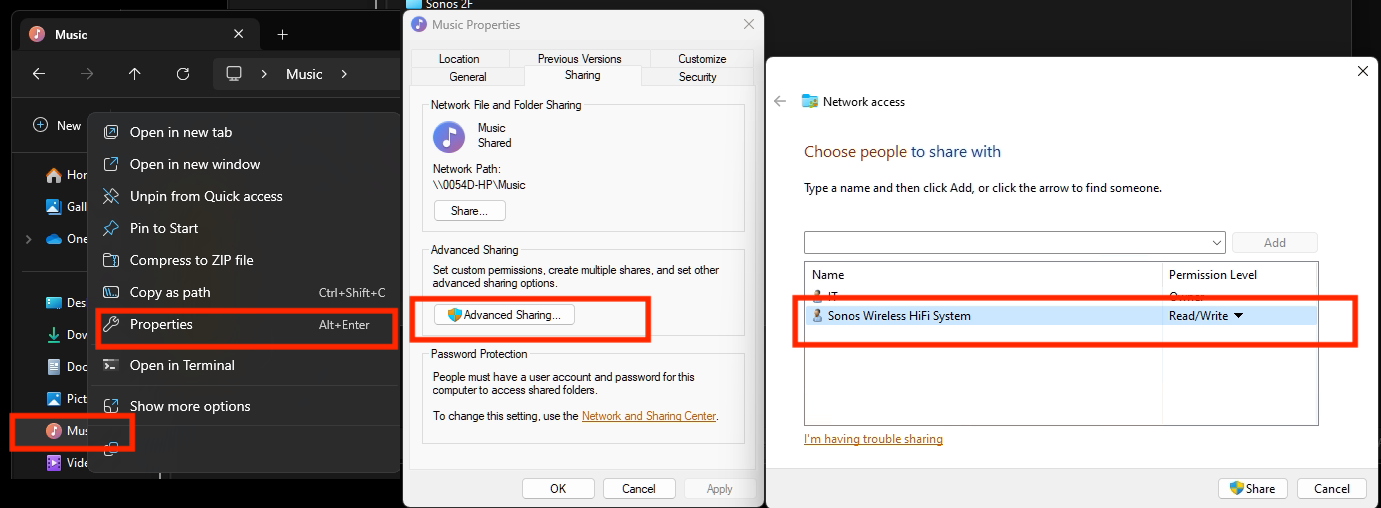
So as far as windows users go, sorry not sure about iOS users here, but the crucial things after updating the windows app for W10+, you need to turn on “Advanced Sharing” in windows, and make sure that your music library whether it’s stored on a NAS or just an ext usb drive, or internal drive is added to your library. So this is the example that helpingiskind gave:

Please right-click on the Music Folder > Properties > Advanced Sharing > Add Sonos Wireless HiFi System to Read/Write:
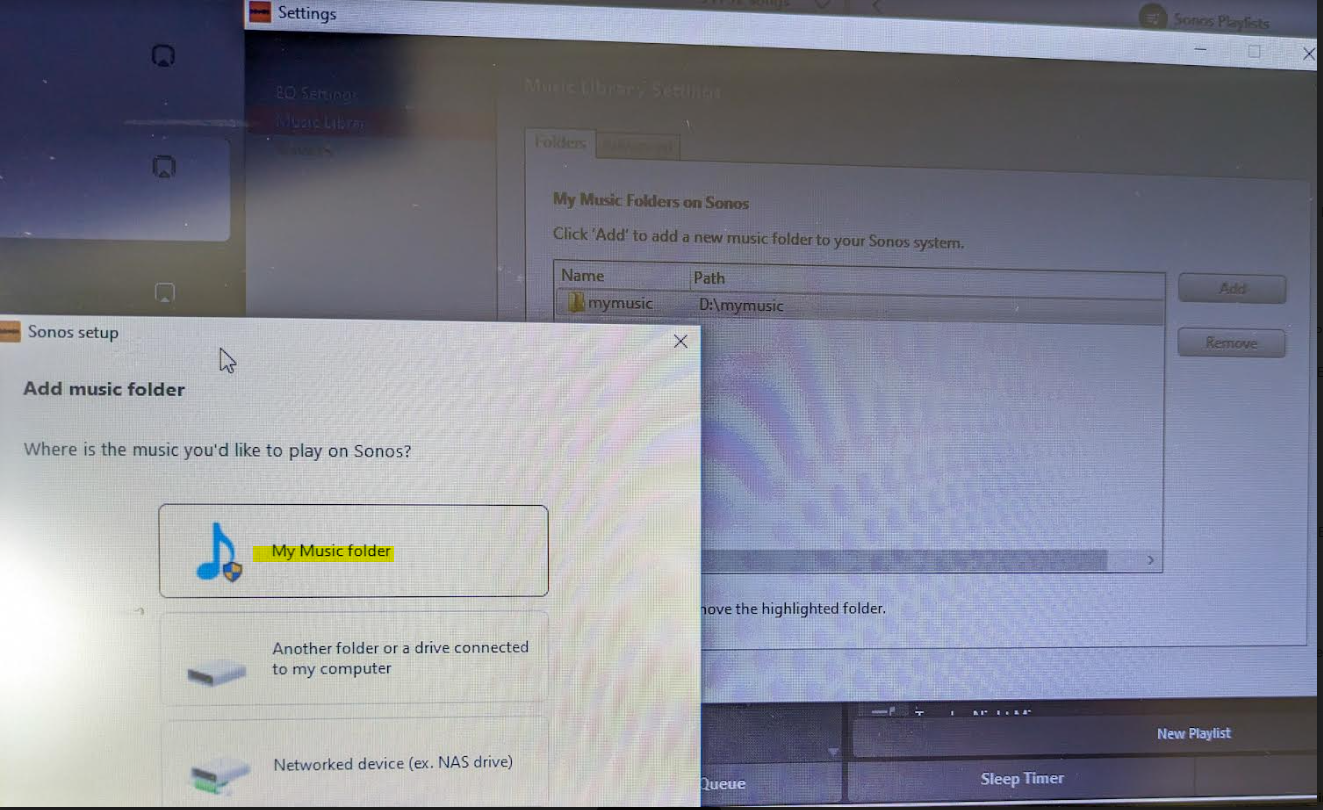
Then go to Sonos settings on your laptop and add “My Music folder” and it will sync.


Because the android app is terrible, I rolled back to the version 78 and found the .apk for that and then the app works like it’s used to and marries to the W10 controller app nicely….which has also caused the update issues along with the apps for android/apple to be very annoying!


Good luck and lets hope the next update from Sonos makes things nice n easy for everyone..

Hope this helps everyone and thanks to everyone elses ideas across this forum!


This topic has been closed for further comments. You can use the search bar to find a similar topic, or create a new one by clicking Create Topic at the top of the page.

91 replies

Contributor I
May 27, 2024

Every “solution” to the 913 error code that has been posted here doesn’t work. IMO Sonos should be named in a class action lawsuit for causing so much pain among so many people. They’ve obviously screwed up the software that has made their equipment “unuseable” and there should be compensation. Even solutions that they provide in their chat and phone communications leave you frustrated. This company has been in business for enough years to afford them the ability to write a code that’ll solve this exacerbating issue quickly. It’s just a matter of paying the right people to do it..

Lyricist I
May 27, 2024

I tried this solution on 05/27/24 and it worked for me with a Port and Windows11 on an old desktop. I am not computer savvy, just follow the instructions as stated.

Thank you for the solution.

Contributor I
May 27, 2024

I tried the posted solution again and this time it worked. WTF!!

Lyricist I
May 30, 2024

Very much doubt this helps (seems far too simple given the issues people are experiencing), but I’ll add anyway.

Had the 913 error (unable to access chosen music library folders, including external drive) after the update, and viewing the message boards just made my brain bleed. I have a certain level of ‘expertise’, or so I thought, however the steps required (in hope of a possible solution) were beyond my patience threshold.

The solution, for my ‘set-up’ (Windows 10, I’m not having 11!) was Folder Properties>Sharing>Advanced Sharing, and tick ‘Share this folder’. Bingo.

Apologies if, as I suspect, this is obvious (and therefore of no help) to some, perhaps most, but hopefully will work for some of the relativiely uninitiated, such as me. Likely has been suggested previously.

Trending Lyricist I
May 31, 2024

ACBundy--Your solution didn’t work for me because the Sonos app gives me the 913 error when I go to add it.

Lyricist I
June 2, 2024

I am streaming from a Window10 PC, and this fix really worked well in my case !

I also had to right-click on the Music folder, > Give access to > Specific User , and select the Sonos Wireless Hifi system .

After this, adding the music library in the Sonos application worked !

Streaming the libary (on the PC) from the Sonos app on my Android tablet is  now also working again, but I am still missing the small icon pictures of the albums … They do show up on my PC, but I only get the text names of the albums and songs on the Android tablet.

But I now can select and stream the music to my Sonos system !

Happy with that ( at least for now  😊).


Contributor I
June 2, 2024

So a big thanks also to “helpingiskind” @HelpingIsKind 

So as far as windows users go, sorry not sure about iOS users here, but the crucial things after updating the windows app for W10+, you need to turn on “Advanced Sharing” in windows, and make sure that your music library whether it’s stored on a NAS or just an ext usb drive, or internal drive is added to your library. So this is the example that helpingiskind gave:

Please right-click on the Music Folder > Properties > Advanced Sharing > Add Sonos Wireless HiFi System to Read/Write:

Then go to Sonos settings on your laptop and add “My Music folder” and it will sync.


Because the android app is terrible, I rolled back to the version 78 and found the .apk for that and then the app works like it’s used to and marries to the W10 controller app nicely….which has also caused the update issues along with the apps for android/apple to be very annoying!


Good luck and lets hope the next update from Sonos makes things nice n easy for everyone..

Hope this helps everyone and thanks to everyone elses ideas across this forum!


It did. Thank you. I've been trying everything under the sun for weeks now with absolutely no luck regarding this 913 error code, and updating my music folder….until now. I followed the above instructions step be step, and it worked perfectly for me. I had my Windows music folder shared the whole time, but it appears that my fix was as simple as clicking from read only, to read/write. There's no doubt that Sonos probably should've tried better to make this an easier transition, but users should also read things too before jumping off the deep end. And yes, Sonos should have spelled things out and clearly communicated better than what they have. Unfortunately, they've pissed off a lot of people. I've invested over 5K in my Sonos system, and have been very happy with them. This last update frustrated me to no end, but i just kept reading and trying. Its software, and there's always a work through. Hope everyone who jumped overboard can climb back on the ship and try this simple fix.

Trending Lyricist I
June 2, 2024

Emjee-- Thank you for this.  It partially worked for me.  By that I mean, I was able to add one of two music folders that I have on an external drive.  When I tried to add the second one, I received the dreaded 913 error.  I can’t understand why this is the case, as both folders reside on the same external drive.  I’m tempted to merge the “bad” one in with the “good (e.g. recognized)” folder, but if I do that I’ll lose a lot of the way I’ve organizes the files.

Lyricist III
June 3, 2024

@Lee M - that was a similar issue I encountered - I can add only so many folders in my ext drive before 913 appeared, seems to be volume related and could be drive type related. Mine is an unpowered USB ext drive, I have not tried a powered ext drive to see if that works yet.

I am playing my music from a music library folder on my PC internal hard drive now and that works with no issues - no offline music controlled by my phone with the PC off for the moment.

Trending Lyricist I
June 3, 2024

Aikgrl--I don’t think it’s related to the number of folders; I’m only trying to add a second.  Both are on the same powered external drive.  But that aside, the new iOS app is a nightmare.  Half the time it says my Sonos devices are not connected (my WiFi is very strong -- no trouble with other devices ever); even when connected, changing rooms or finding things are so much harder than before the update. Ugh!