
Enthusiast II
May 24, 2024

Fixing the library error code 913 for Windows users!

  • May 24, 2024
  • 91 replies
  • 18115 views

So a big thanks also to “helpingiskind” @HelpingIsKind 

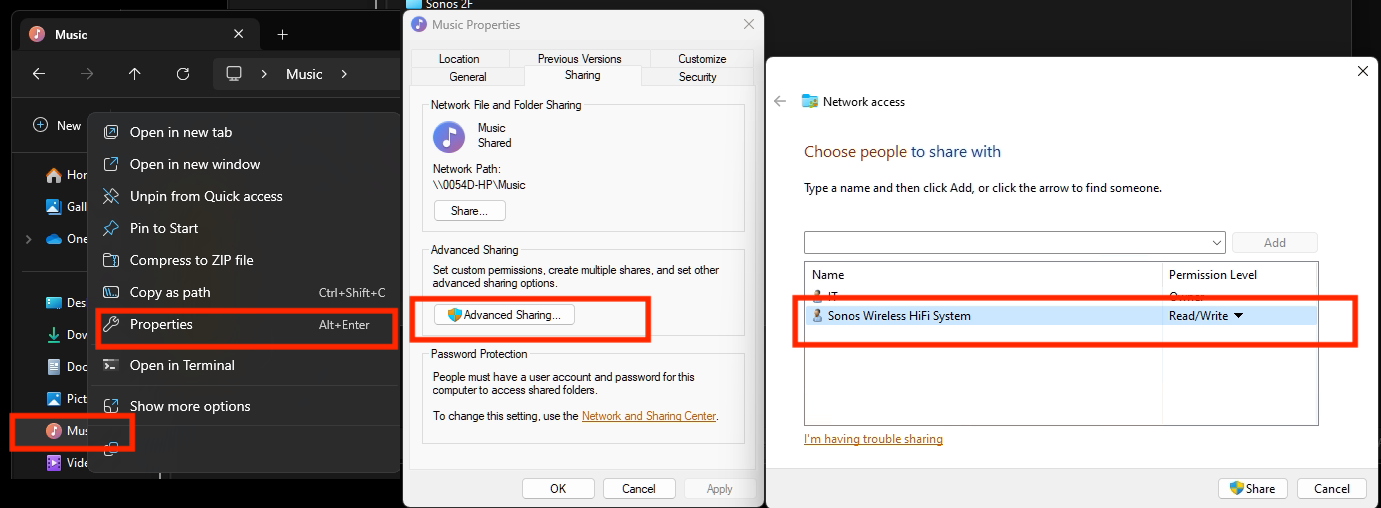
So as far as windows users go, sorry not sure about iOS users here, but the crucial things after updating the windows app for W10+, you need to turn on “Advanced Sharing” in windows, and make sure that your music library whether it’s stored on a NAS or just an ext usb drive, or internal drive is added to your library. So this is the example that helpingiskind gave:

Please right-click on the Music Folder > Properties > Advanced Sharing > Add Sonos Wireless HiFi System to Read/Write:
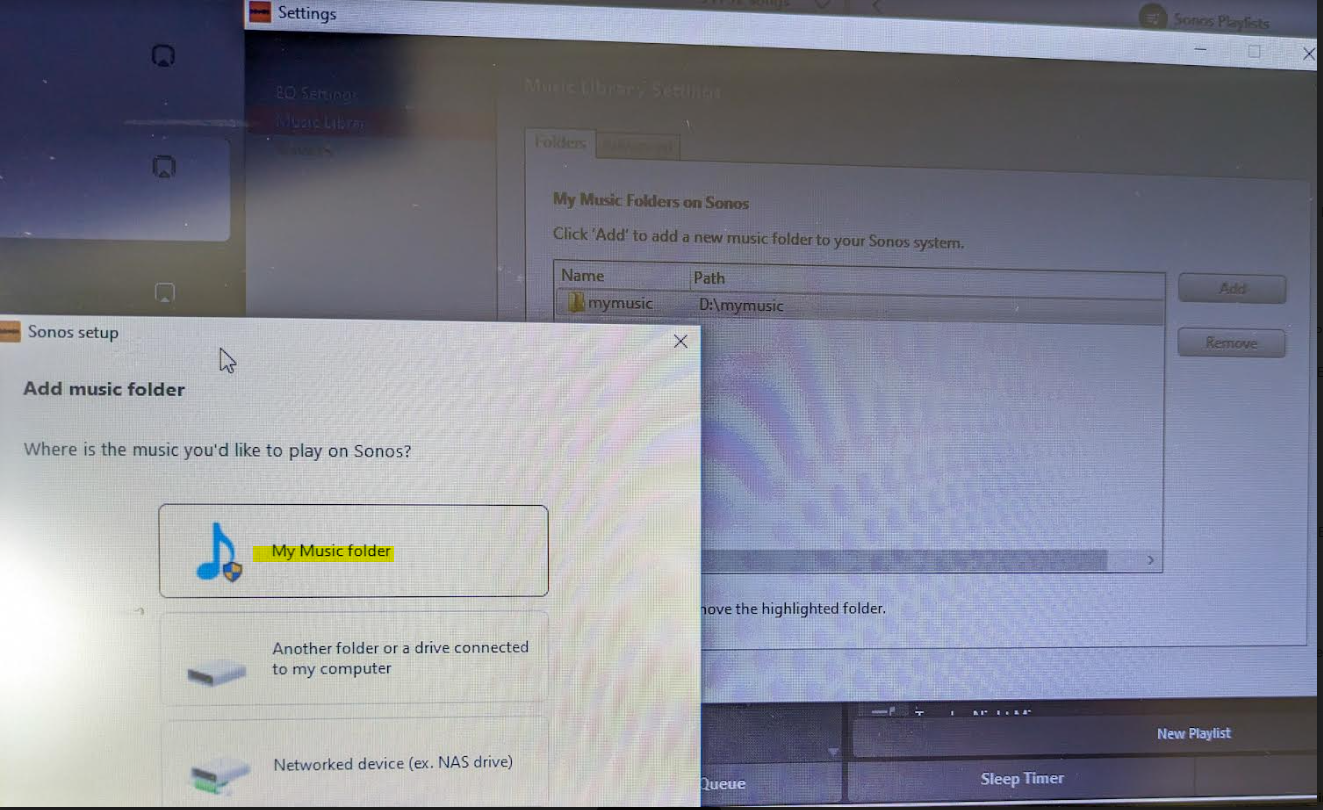
Then go to Sonos settings on your laptop and add “My Music folder” and it will sync.


Because the android app is terrible, I rolled back to the version 78 and found the .apk for that and then the app works like it’s used to and marries to the W10 controller app nicely….which has also caused the update issues along with the apps for android/apple to be very annoying!


Good luck and lets hope the next update from Sonos makes things nice n easy for everyone..

Hope this helps everyone and thanks to everyone elses ideas across this forum!


This topic has been closed for further comments. You can use the search bar to find a similar topic, or create a new one by clicking Create Topic at the top of the page.

91 replies

Lyricist III
May 26, 2024

@Chlorine Thanks for the advice. Looks like either Sonos has a cap on how much it can read off an external drive ( which was not a problem a couple of weeks ago ) or the software is borked.

Even with my new seagate, Sonos won’t read the entire library off my network router - will complain that the router is not powered on - but not a problem if it is just something like 5GB of files only. Not a problem if the drive is set up as a local shared drive on my PC but defeats the purpose of an offline library, Will stop testing now before I throw my entire system off my 3rd floor balcony...

I am going to wait to see if the next patch will fix it and will play music from my PC hard drives instead. Sadly choices for good external hard drives that do not cost a bomb is a bit limited in Au. ( Hello, Amazon US! )

Lyricist I
May 26, 2024

Thanks. This worked for me on Windows 10. My Music Library is back.

Trending Lyricist I
May 26, 2024

Was able to finesse my music library from a NAS to a local portable HD. For some reason, I could not get it to work on a folder on my desktop, same error message. I ran out of space on the portable HD, so it looks like I will be buying a bigger one!

I just don’t like leaving my laptop on all the time for music,  but it doesnt seem to be an option at his point...

Lyricist III
May 26, 2024

@makinsellajr Did the portable work? What’s the capacity? I found that the controller was fine with something below ~10-20GB, but at some magical point it comes back with an error and refuses to read even though the drive is recognised.

I am holding off buying a new one until/if a patch comes out to see if anything is fixed and keeping an eye out on what the smarter techie guys in the community find with their testing.

Trending Lyricist I
May 26, 2024

@Aikigrl 

The portable worked and it's 500 GB. It's also not very "new" I used it originally for my old fives before I got the NAS. 

It's setup as my d: drive. For now at least I have most of my library. We will see what happens! 

Lyricist III
May 26, 2024

@makinsellajr Thanks for that - that method also worked for me but I chose to use the full library backup on my PC instead since it is already there and I don’t want too many peripherals hanging off my PC.

Good luck - think we’re all going to need it the way things are going with the updates. Maybe it’s time to consider either updating the setup with newer gear or go elsewhere.

press250
Prodigy III
May 26, 2024

Already did that - yes local file folders work and currently playing music off my internal SSD.

Sonos just not reading off my WD mypassport, permissioned to death, whether shared locally or hanging off my SMBv2 enabled router. Just tried sharing locally using my new Seagate and the shared album got read in, about to try it off the router.

Wish me luck. and dammit - I don’t want to buy *ANOTHER* ext drive!!!

I feel your pain and admire your diligence! A couple of thoughts for you:

  • Have you tried formatting the ext drive with a different file system? I can imagine how the ‘wrong’ filesystem might limit the usable size of the drive, specifically when it is connected to your router. I might give exFAT a try, as it is simpler and generally more compatible than NTFS more capable than FAT32. (At the risk of stating the obvious, re-formatting the ext drive will totally erase its contents.)
  • When you connect your ext drive to your Windows machine, I am hard pressed to imagine how Sonos would ‘know’ the difference between an external drive and your ‘native’ internal drive. An SMBv2 shared directory on your internal drive and an SMBv2 shared directory on your ext drive look identical to “the outside world” as Windows will abstract away the differences between the ext drive and an internal drive. I’m not suggesting you are wrong, I’m simply saying it is a real conundrum.
Lyricist III
May 26, 2024

@press250 Thanks for the advice. I already spent 3 hours fully reformatting the drive and recopying the music library back in - did not try exFAT just went for NTFS. I don’t know what’s wrong either but looking at some of my testing of slowly adding more and more albums to the drive once I got Sonos to read in 1 album to begin with, it seems to hit a wall around the 20Gb mark.

I am not wasting any more of my time on trying to set up an offline music library since the stupid controller can read the files on my PC. Will wait for an update to see if this fixes it or consider biting the bullet and get a new system after 10 years of my playbar

press250
Prodigy III
May 26, 2024

@press250 Thanks for the advice. I already spent 3 hours fully reformatting the drive and recopying the music library back in - did not try exFAT just went for NTFS. I don’t know what’s wrong either but looking at some of my testing of slowly adding more and more albums to the drive once I got Sonos to read in 1 album to begin with, it seems to hit a wall around the 20Gb mark.

I am not wasting any more of my time on trying to set up an offline music library since the stupid controller can read the files on my PC. Will wait for an update to see if this fixes it or consider biting the bullet and get a new system after 10 years of my playbar

I totally understand your frustration! None of us wanted ANY part of his mess, we just wanted to listen to music. ¯\_(ツ)_/¯

I’ve seen plenty of inexplicable/funky behavior from NTFS formatted external drives connected to things that aren’t a Windows PC. So if you want to try something with a better chance of working with your router — after a well-deserved break from experimenting — re-format the external drive with exFAT.

I tried finding an Arcadyan smart router/gateway to peek at the user manual for hints … no luck. If you have a name (or better still, a model number) that could help.

Lyricist III
May 26, 2024

@press250 The router is a modem provided by my local telco - I will go check out what it truly is when I have the brain power. The only reason I use it is because my actual home network router doesn't have a USB port and I don't have enough home data to set up a big girl NAS array just yet.

TBH I think I have had enough for the moment - I will go outside to listen to the birds yell at me for seeds and drink my coffee on this sunny monday morning.