
Enthusiast II
May 24, 2024

Fixing the library error code 913 for Windows users!

  • May 24, 2024
  • 91 replies
  • 18114 views

So a big thanks also to “helpingiskind” @HelpingIsKind 

So as far as windows users go, sorry not sure about iOS users here, but the crucial things after updating the windows app for W10+, you need to turn on “Advanced Sharing” in windows, and make sure that your music library whether it’s stored on a NAS or just an ext usb drive, or internal drive is added to your library. So this is the example that helpingiskind gave:

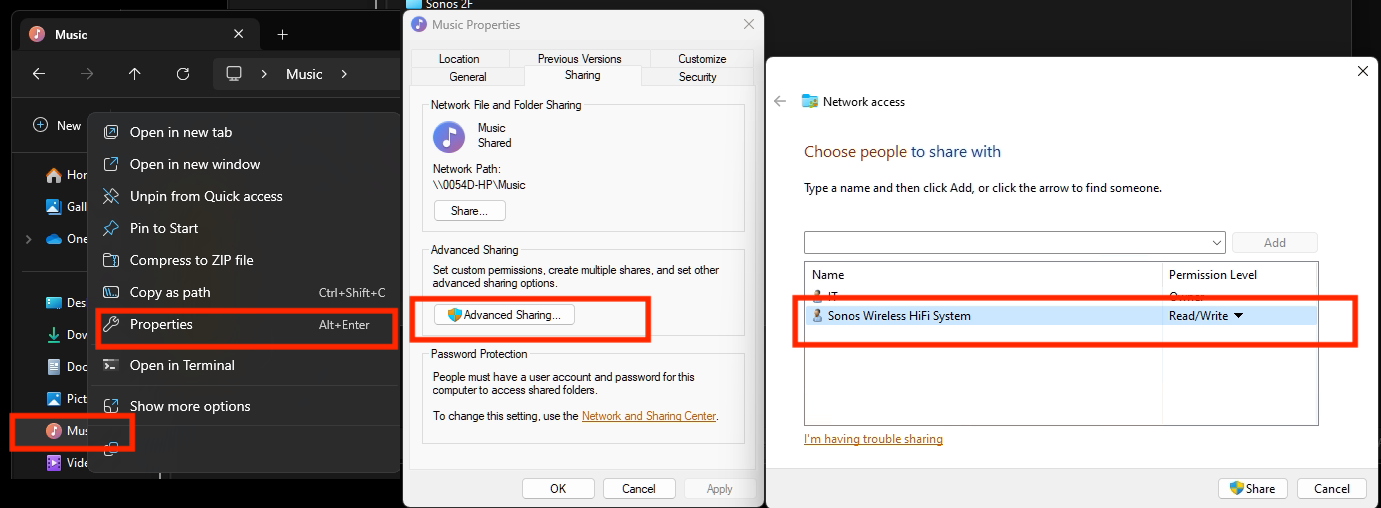
Please right-click on the Music Folder > Properties > Advanced Sharing > Add Sonos Wireless HiFi System to Read/Write:
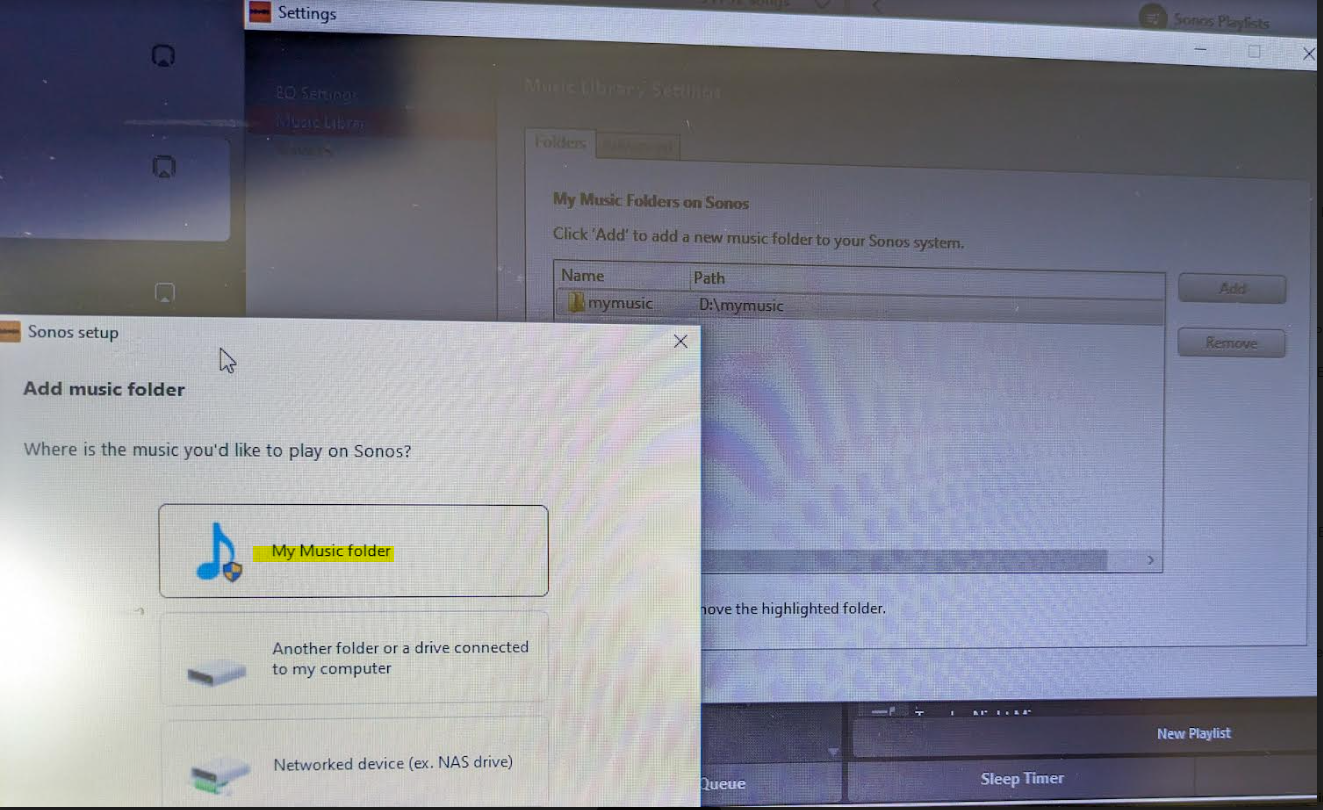
Then go to Sonos settings on your laptop and add “My Music folder” and it will sync.


Because the android app is terrible, I rolled back to the version 78 and found the .apk for that and then the app works like it’s used to and marries to the W10 controller app nicely….which has also caused the update issues along with the apps for android/apple to be very annoying!


Good luck and lets hope the next update from Sonos makes things nice n easy for everyone..

Hope this helps everyone and thanks to everyone elses ideas across this forum!


This topic has been closed for further comments. You can use the search bar to find a similar topic, or create a new one by clicking Create Topic at the top of the page.

91 replies

press250
Prodigy III
May 25, 2024

@Chlorine I already have SMBv2 enabled on my PC build but my controller is still crapping out trying to connect to my ext drive whether connected to my PC or to my router. I have already enabled Samba and specifically SMBv2 on my router.

I am out of ideas. Have anyone got their ext drives working?

My local library music is on a shared (SMBv2) Windows partition and works with the new (v80.01.11) app and the old (v16.1) app. I documented my steps, fingers crossed this is helpful …


Trending Lyricist I
May 26, 2024

When the update first installed, I had my library on my NAS, no artwork, but whatever! Now with the new update I have nothing. If I remove SMB 1, Windows no longer see my NAS.  I use a NAS for the same reason, I don't want to leave my laptop on. Does this mean that when there is a "fix" it won't work anyway?

Lyricist III
May 26, 2024

@press250 thanks for the instructions. I have already set up all the PC settings, the only bit that differs is that my ext hard drive hangs off a modem router which cannot be shared from.

But I think the problem I have is likely the hard drive itself - there is some inherent incompatibility ( ancient WD my passport ) so I am about to retest using a newer drive I bought last year for system backups, and see if that works.

Lyricist III
May 26, 2024

@makinsellajr how old is your NAS? The native protocols might be clashing with the Sonos controller. My little drive works fine with PC and I can read the files off it either directly plugged into my PC or through the router. It’s only the sonos controller that is having convulsions trying to read it no matter where I plug it in.

Trending Lyricist I
May 26, 2024

@makinsellajr how old is your NAS? The native protocols might be clashing with the Sonos controller. My little drive works fine with PC and I can read the files off it either directly plugged into my PC or through the router. It’s only the sonos controller that is having convulsions trying to read it no matter where I plug it in.

It's an old Seagate. Hardwired to my FiOS router. Like I said when I removed smb1 from windows it disappears even from the network. I'm waiting for the dust to settle before calling support.

press250
Prodigy III
May 26, 2024

@press250 thanks for the instructions. I have already set up all the PC settings, the only bit that differs is that my ext hard drive hangs off a modem router which cannot be shared from.

But I think the problem I have is likely the hard drive itself - there is some inherent incompatibility ( ancient WD my passport ) so I am about to retest using a newer drive I bought last year for system backups, and see if that works.

Here’s an idea for you: try setting up an experimental share (just a couple of albums) on your Windows machine and see if you can get that working. That would confirm Sonos is living and breathing okay, and then you can try different things with your external hard drive.

Lyricist III
May 26, 2024

@press250 thanks for the instructions. I have already set up all the PC settings, the only bit that differs is that my ext hard drive hangs off a modem router which cannot be shared from.

But I think the problem I have is likely the hard drive itself - there is some inherent incompatibility ( ancient WD my passport ) so I am about to retest using a newer drive I bought last year for system backups, and see if that works.

Here’s an idea for you: try setting up an experimental share (just a couple of albums) on your Windows machine and see if you can get that working. That would confirm Sonos is living and breathing okay, and then you can try different things with your external hard drive.

Already did that - yes local file folders work and currently playing music off my internal SSD.

Sonos just not reading off my WD mypassport, permissioned to death, whether shared locally or hanging off my SMBv2 enabled router. Just tried sharing locally using my new Seagate and the shared album got read in, about to try it off the router.

Wish me luck. and dammit - I don’t want to buy *ANOTHER* ext drive!!!

Lyricist III
May 26, 2024

Ok found the friggin issues - there are two.

EDIT: Seems the SMBv2 gate issue disappeared - I can now see under it. Either my router is also getting snarky or Sonos is being a dick.

To enable SMBv2 on my Arcadyan “Smart” router I have to create a SMB2 account which acts as a gate but the problem is it masks the ext drive directories and Sonos cannot see under it, so you need to add the ENTIRE drive name to the share address.So if your SMB2 account is Joeblack, and your drive is seagate\my music, you will need to put in \\<my computer name>\Joeblack\seagate\my music.

Second issue - for whatever reason Sonos really really doesn’t want to read the WD MyPassport off the router or off the PC. So looks like any ext drives older than 5 years might not work with the update.

Looks like I AM buying a new drive since the old wd is not big enough to be my backup drive.


Lyricist III
May 26, 2024

OK Issue 2 - seems like Sonos does not like to read an entire library of 200+ artists with multiple albums. Choosing the subdir of 1 band, not a problem, choose my library dir, no can do. Anyone else find this?

Lyricist III
May 26, 2024

For those buying a new drive, please take care. All the WD drives but the super expensive ones don’t have NAS capability. You can only access your own data in your own house through a WD-mediated web interface.

I got a Buffalo NAS drive, which is far less expensive and is made for grownups to use.